
屏幕浏览器技巧和 MCP 服务器配置: 从您编码代理服务器内部对您的网络应用程序进行描述的教程视频 .
概览
从指南或编码代理中解析您的网络应用程序的演示和辅导视频 。 询问熟悉您的代码库的代理服务器为特性的教程视频 。 它用您的按钮和字段使用的字词来写行走, 屏幕浏览器会记录一个真实的浏览器, 它会针对您的部署的应用程序, 描述它, 添加屏幕上的效果, 代理将 MP4 与 GIF, 字幕和章节一起交给您 。 当应用程序更改时,编辑一行并再次询问. 这是66秒视频的第一章, 整个会话,从句子,到完成的视频 与准确的即时 和每一个屏幕沿途, 在克劳德代码指南.
概述(AI 翻译)
从指南或编码代理中解析您的网络应用程序的演示和辅导视频 。
询问熟悉您的代码库的代理服务器为特性的教程视频 。 它写着行走 在您使用的按钮和字段中,屏幕浏览器记录到一个真实的 浏览器针对您所部署的应用程序跟踪它,描述它,并添加屏幕效果,以及 代理将带有GIF,字幕和章节的MP4交给您. 当应用程序更改时,编辑行并 又问.
这是66秒的视频的第一章, 创建运动"*. 整个会话 从句子到完成的视频 快速和每一个屏幕 沿途,在 克劳德代码指南.
这个寄存器会给你的经纪人两件事:
- ** [[T0] 技能**——如何读取您的代码库并写出两个指南屏幕浏览器 需要(登录流量和行走),效果适合哪个时刻,如何检查向导 在录制前免费, 和如何审查视频 在移交之前。
- ** MCP 服务器配置** — 代理调用的工具:创建项目,上传指南,
本页由 AI 翻译,技术细节请以原文为准。
README
以下为原文 README 节选,完整内容请查看原文。
Screen Browser skill
Narrated demo and tutorial videos of your web app, from a guide or your coding agent.
Ask the agent that knows your codebase for a tutorial video of a feature. It writes the walkthrough in the words your buttons and fields use, Screen Browser records a real browser following it against your deployed app, narrates it, adds the on-screen effects, and the agent hands you the MP4 with a GIF, subtitles and chapters. When the app changes, edit a line and ask again.
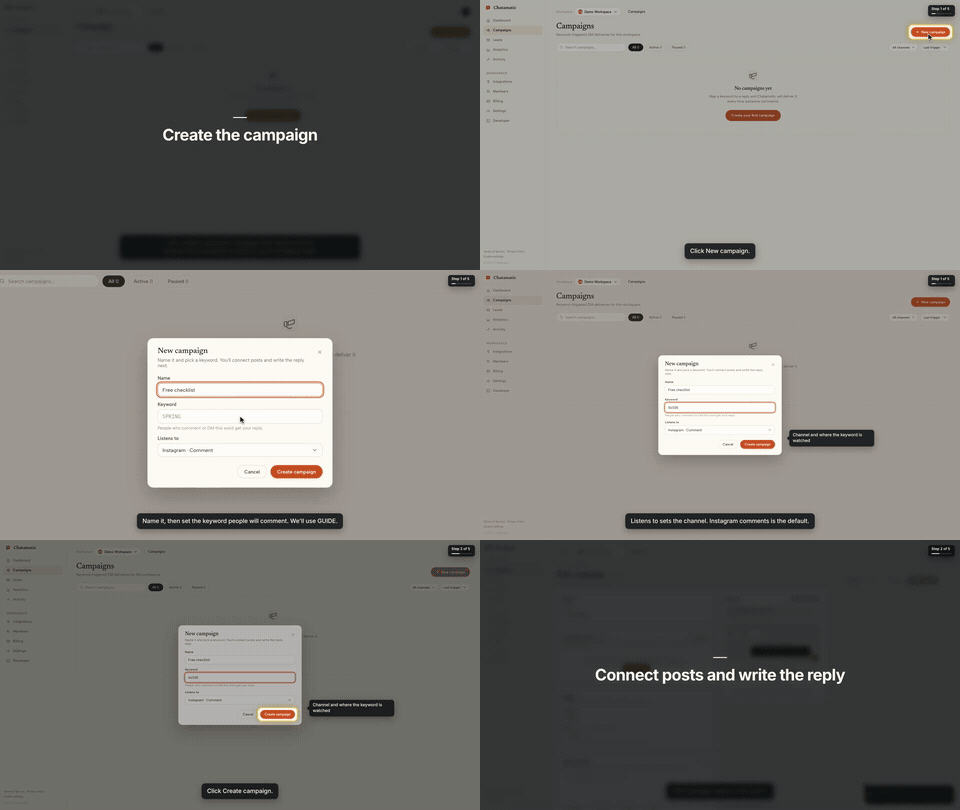
That is the first chapter of a 66-second video made from the request “make a tutorial video of creating a campaign”. The whole session, from that sentence to the finished video with the exact prompt and every screen along the way, is in the Claude Code guide.
This repository gives your agent two things:
- The
screenbrowserskill — how to read your codebase and write the two guides Screen Browser needs (the login flow and the walkthrough), which effect fits which moment, how to check a guide for free before recording, and how to review the video before handing it over. - The MCP server configuration — the tools the agent calls: create the project, upload guides,
check them, start the run, poll it, fetch the video. The server itself is part of your Screen
Browser account at
https://mcp.screenbrowser.com.
Claude Code, Codex, Cursor or any MCP client can use it. Sign-in happens in the browser; there is no key to paste.
Install (Claude Code)
Add this repository as a plugin marketplace and install the plugin:
claude plugin marketplace add screenbrowser/skill
claude plugin install screenbrowser@screenbrowser
The first time the agent reaches for a Screen Browser tool, Claude Code opens your browser: sign in
to Screen Browser, approve the connection, and you are done. Nothing to copy. (If it does not
prompt, run /mcp and pick screenbrowser → Authenticate.)
Without the plugin system, register the server yourself and copy the skill:
claude mcp add --transport http screenbrowser https://mcp.screenbrowser.com
cp -r skills/screenbrowser ~/.claude/skills/
With an API key instead
If your agent cannot open a browser to sign in, create a key under Settings → API keys in Screen Browser and pass it as a bearer token:
claude mcp add --transport http screenbrowser https://mcp.screenbrowser.com \
  --header "Authorization: Bearer "
Any MCP client works the same way: Streamable HTTP at https://mcp.screenbrowser.com, OAuth 2.1 with
推荐工具
换一个关键词,或者移除筛选条件。
安装
npx skillfish add screenbrowser/skill