
副驾驶工作室的 VS 代码扩展
概览
Visual Studio代码的副驾驶工作室扩展旨在增强微软副驾驶工作室代理的开发经验. 它提供语言支持,IntelliSense代码补全和建议,以及Copilot Studio代理组件的编写能力. 安装后,扩展会促使您登录到 Copilot Studio. 然后可以向您展示一份与您环境相关的特工名单. 克隆一个代理以查看其可编辑的组件,包括知识源,动作,话题,以及触发. 1. 在Visual Studio代码的主侧栏中选择副驾驶工作室图标. 延期请求您的许可 1. 选择并附适当的证书,供您的副驾驶工作室环境使用。 1. (可选)在 Copilot Studio 中打开想要的代理,并从您的浏览器地址栏复制其URL. 1. 在Visual Studio代码的面板中,选择 1. 联合国.
概述(AI 翻译)
Visual Studio代码的副驾驶工作室扩展旨在增强微软副驾驶工作室代理的开发经验. 它提供语言支持,IntelliSense代码补全和建议,以及Copilot Studio代理组件的编写能力.
安装后,扩展会促使您登录到 Copilot Studio. 然后可以向您展示一份与您环境相关的特工名单. 克隆一个代理以查看其可编辑的组件,包括知识源,动作,话题,以及触发.
□ 第一次连接到副驾驶工作室
-
在Visual Studio代码的主侧栏中选择副驾驶工作室图标. 延期请求您的许可
-
选择Allow,并附适当全权证书,供您驾驶室环境使用。
□ 克隆一个代理
-
(可选)在 Copilot Studio 中打开想要的代理,并从您的浏览器地址栏复制其URL.
-
在副驾驶工作室视觉工作室代码面板中,选择克隆代理.
-
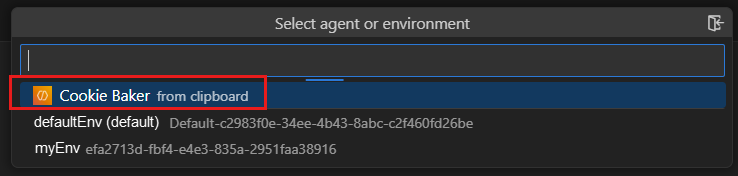
选择您的代理( 如果您已经复制了 URL , 请用“ 从剪贴板” 标记); 否则, 选择想要的环境, 然后选择想要的代理 .
本页由 AI 翻译,技术细节请以原文为准。
README
以下为原文 README 节选,完整内容请查看原文。
Copilot Studio Extension for Visual Studio Code
The Copilot Studio extension for Visual Studio Code is designed to enhance the development experience of Microsoft Copilot Studio agents. It provides language support, IntelliSense code completion and suggestions, and authoring capabilities for Copilot Studio agent components.
After installation, the extension prompts you to sign in to Copilot Studio. It can then show you a list of the agents associated with your environment. Clone an agent to see its editable components, including knowledge sources, actions, topics, and triggers.
Connect to Copilot Studio for the first time
-
Select the Copilot Studio icon in the primary side bar of Visual Studio Code. The extension asks for your permission to sign in.
-
Select Allow, and sign in with the appropriate credentials for your Copilot Studio environment.
Clone an agent
-
(Optional) Open the desired agent in Copilot Studio and copy its URL from your browser’s address bar.
-
In the Copilot Studio panel of Visual Studio Code, select Clone agent.
-
Select your agent (marked with “from clipboard” if you already copied the URL); otherwise, select the desired environment and then select the desired agent. The extension prompts you to select a folder to hold your agent’s files (similar to a local repository).
-
Select the desired folder.
Edit your agent
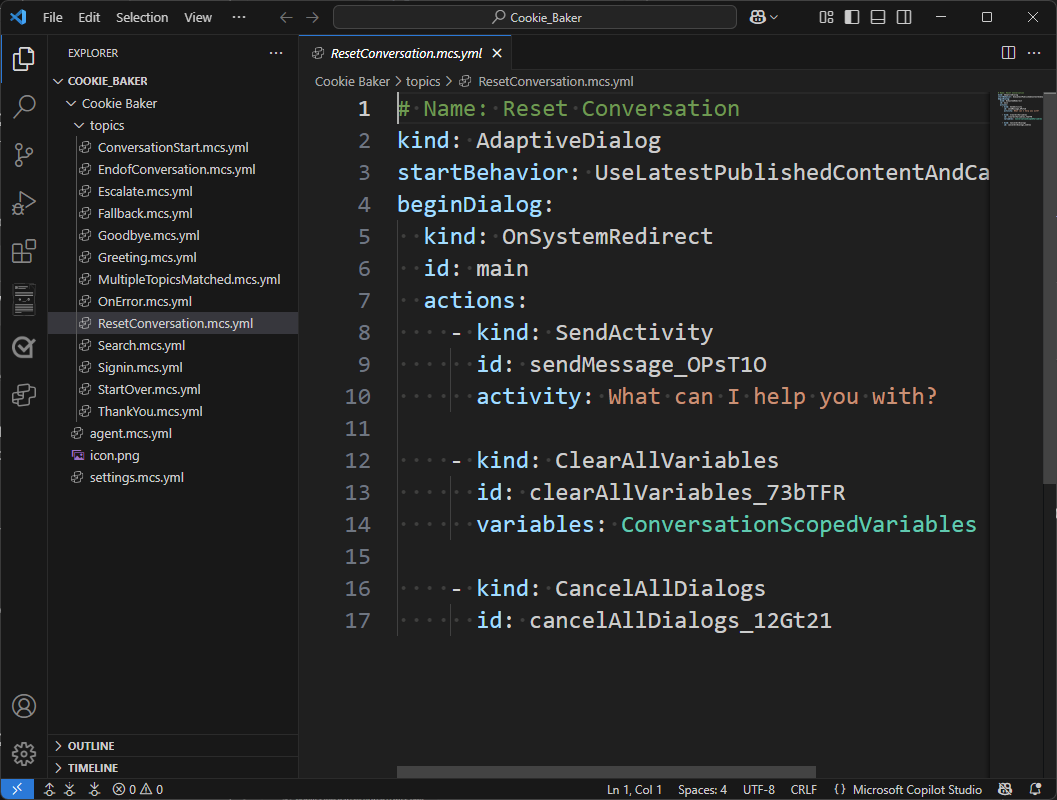
To edit any component, open the corresponding file and make the desired changes. Since Visual Studio Code natively supports YAML files, the Copilot Studio extension supports IntelliSense code completion and can provide guided tips.
Sync your changes
The Copilot Studio extension keeps your local workspace in sync with your agent. Use the sync commands in the Agent Changes view to manage changes between your local files and your Copilot Studio agent.
- Preview changes — See what’s different between your local workspace and the agent in Copilot Studio, without modifying any files.
- Get changes — Download the latest changes from your Copilot Studio agent into your local workspace.
- Apply changes — Upload your local edits to your Copilot Studio agent.
When you apply changes, they are saved directly to your agent’s environment. This is a live editing experience—your agent is updated immediately.
Repository Structure
src/
  LanguageServers/                        # .NET language server (C#)
CLaSP/ # Common Language Server Protocol framework推荐工具
换一个关键词,或者移除筛选条件。
安装
npx skillfish add microsoft/vscode-copilotstudio