
这是一个基于 DeepAgent CLI 构建的原生 Python 代理 CLI,具有独立的内存代理,能在每个任务后捕获学习内容,并通过分层结构提供高效的 AI 编码辅助......
概览
Invincat 是一款终端原生的本地代码编码助手。它可以检查和编辑文件,获得批准运行 shell 命令,使用网页/MCP 工具,保持长期记忆,执行前计划,执行定时任务,并将远程 WeCom 消息桥接到项目会话中。 - 直接在终端界面中的项目目录中工作。- 读取、编辑并创建带有批准门槛工具执行的文件。- 在可配置的安全控制下运行shell命令。- 在实施前使用/plan审查并批准执行计划。- 在会话间保存用户和项目内存。- 创建自然语言的重复或一次性定时任务。- 通过MCP工具、技能和WeCom机器人守护进程集成扩展功能。 首次启动时,运行 /model 配置提供者和模型。 从你的项目目录运行Invincat: 第一次启动后,运行 /model 打开模型管理器。 - 按 Ctrl+N 注册模型。
概述(AI 翻译)
Invincat 是一款终端原生的本地代码编码助手。它可以检查和编辑文件,获得批准运行 shell 命令,使用网页/MCP 工具,保持长期记忆,执行前计划,执行定时任务,并将远程 WeCom 消息桥接到项目会话中。
特色
- 直接在终端界面中的项目目录中工作。
- 通过批准门槛工具执行,读取、编辑和创建文件。
- 在可配置的安全控制下运行shell命令。
- 在实施前使用
/plan审查并批准执行计划。 - 在会话间保持用户和项目内存。
- 用自然语言创建重复或一次性定时任务。
- 通过MCP工具、技能和WeCom机器人守护进程集成扩展能力。
快速启动
首次发布时,运行/model配置供应商和型号。
安装
需要 Python 3.11+。
从源头安装:
开始
从你的项目目录运行Invincat:
模型配置
第一次启动后,运行/model以打开模型管理器。
- 按
Ctrl+N注册模型。 - 填写提供者、型号名称、API 密钥和可选的基础 URL。
本页由 AI 翻译,技术细节请以原文为准。
README
以下为原文 README 节选,完整内容请查看原文。
Invincat


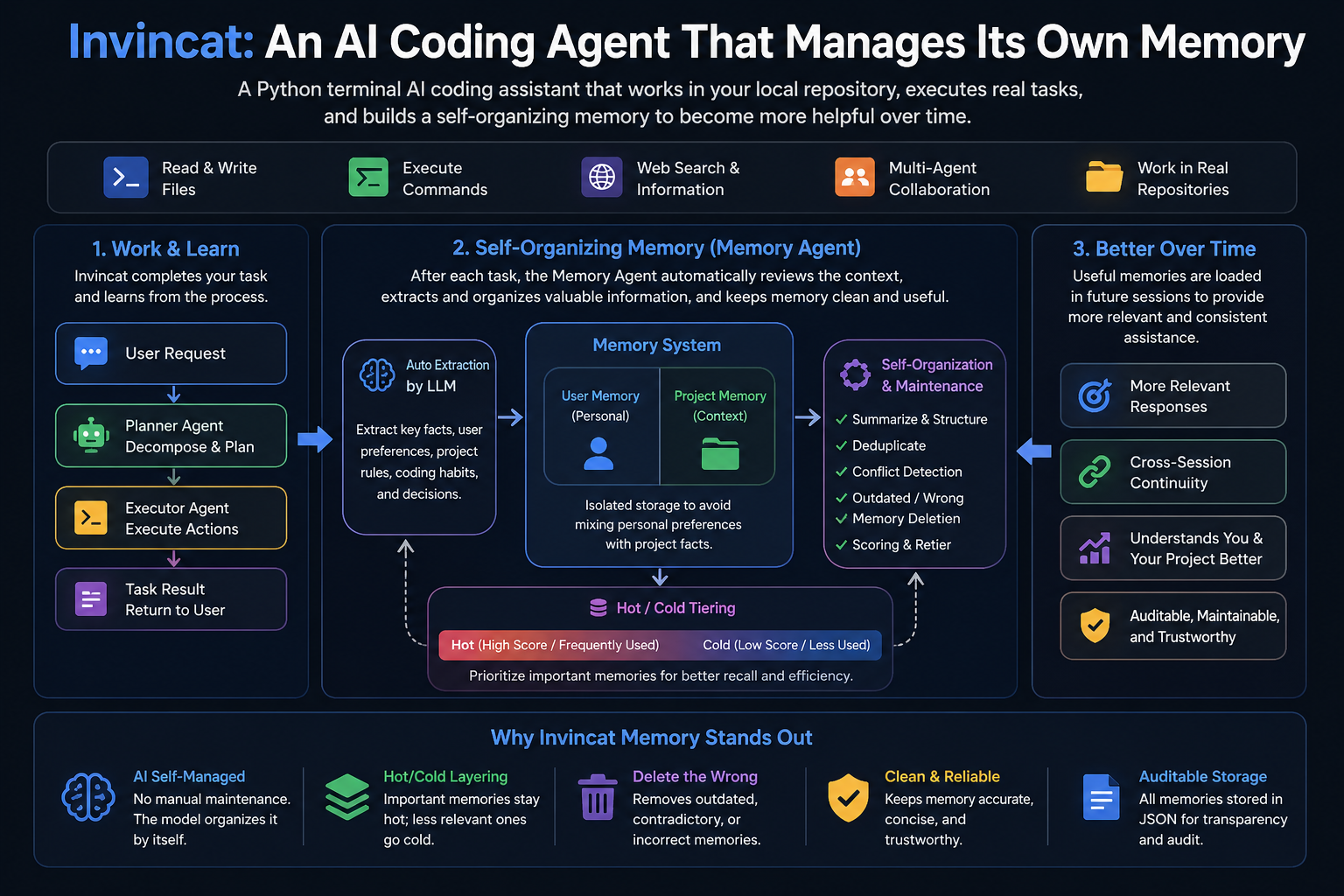
Invincat is a terminal-native AI coding assistant for local repositories. It can inspect and edit files, run shell commands with approval, use web/MCP tools, keep long-term memory, plan before execution, run scheduled tasks, and bridge remote WeCom messages into a project session.
Features
- Work directly from your project directory in a terminal UI.
- Read, edit, and create files with approval-gated tool execution.
- Run shell commands under configurable safety controls.
- Use
/planto review and approve an execution plan before implementation. - Keep user and project memory across sessions.
- Create recurring or one-shot scheduled tasks in natural language.
- Extend capabilities through MCP tools, skills, and WeCom bot daemon integration.
Quick Start
pip install invincat-cli
cd /path/to/your/project
invincat-cli
On first launch, run /model to configure a provider and model.
Installation
Requires Python 3.11+.
pip install invincat-cli
Install from source:
git clone https://github.com/dog-qiuqiu/invincat.git
cd invincat
pip install -e .
Start
Run Invincat from your project directory:
cd /path/to/your/project
invincat-cli
Model Configuration
After the first launch, run /model to open the model manager.
- Press
Ctrl+Nto register a model. - Fill in the provider, model name, API key, and optional base URL.
- Select a model and press
Enterto activate it.
You can also provide credentials through environment variables such as:
export OPENAI_API_KEY="..."
export ANTHROPIC_API_KEY="..."
export GOOGLE_API_KEY="..."
export DEEPSEEK_API_KEY="..."
export OPENROUTER_API_KEY="..."
Example for DeepSeek:
export DEEPSEEK_API_KEY="sk-..."
Then register a model in /model with:
| Field | Value |
|---|---|
| Provider | openai |
| Model | deepseek-v4-flash |
| API Key | DEEPSEEK_API_KEY |
| BASE URL | https://api.deepseek.com |
Invincat supports a primary model for normal work and an optional memory model for post-turn memory extraction. If no memory model is configured, memory extraction uses the current primary model.
Basic Commands
| Command | Description |
|---|---|
/model |
Configure and switch models. |
推荐工具
换一个关键词,或者移除筛选条件。
安装
npx skillfish add dog-qiuqiu/invincat