
Ableton Live OSC 控制的 MCP 服务器实现
概览
这是一个实现模型上下文协议(MCP)的服务器,用于促进LLM与之间的通信。它用于与Ableton Live之间发送和接收消息。它基于AbletonOSC实现,详尽地将可用的OSC地址映射到MCP客户端可访问的地址。 该项目由两个主要组成部分组成: - mcp_ableton_server.py:负责客户端与OSC守护进程之间通信的MCP服务器。- osc_daemon.py:负责向Ableton Live传递命令并处理响应的OSC守护进程。 - 提供兼容MCP的API,用于从MCP客户端控制Ableton Live。- 用于发送和接收OSC消息。- 基于AbletonOSC的OSC实现。- 实现Ableton Live命令的请求-响应处理。 - Python 3.8+ - python-osc(用于 OSC 通信)- fastmcp(支持主控制器)- uv(推荐的 Python 软件包安装器)- AbletonOSC 作为控制表面 1. 安装UV(https://docs.astral.
概述(AI 翻译)
📌 概述
Ableton Live MCP 服务器是一个实现 模型上下文协议(MCP)以促进 大型语言模型与Ableton Live之间的通信。它使用OSC(开放声音) Control) 用于发送和接收 Ableton Live 的消息。其基础是 AbletonOSC 实现和 可将可用OSC地址详尽映射为 工具可访问 MCP客户端。
该项目由两个主要组成部分组成:
mcp_ableton_server.py:负责 客户和OSC守护灵。osc_daemon.py:负责向 Ableton 传递命令的 OSC 守护进程 实时处理和处理回应。
✨ 特色
- 提供一个兼容MCP的API,用于从MCP客户端控制Ableton Live。
- 使用 python-osc 进行 OSC 消息的发送和接收。
- 基于 OSC 实现 AbletonOSC。
- 实现Ableton Live命令的请求-响应处理。
⚡ 安装
要求
- Python 3.8+
python-osc(用于OSC通信)fastmcp(支持MCP)uv(推荐的Python软件包安装程序)- AbletonOSC 作为控制面
安装步骤
- 安装
uv(https://docs.astral.
本页由 AI 翻译,技术细节请以原文为准。
README
以下为原文 README 节选,完整内容请查看原文。
Ableton Live MCP Server
📌 Overview
The Ableton Live MCP Server is a server implementing the Model Context Protocol (MCP) to facilitate communication between LLMs and Ableton Live. It uses OSC (Open Sound Control) to send and receive messages to/from Ableton Live. It is based on AbletonOSC implementation and exhaustively maps available OSC adresses to tools accessible to MCP clients.
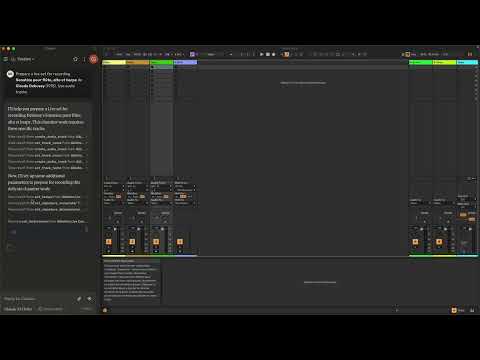
This project consists of two main components:
mcp_ableton_server.py: The MCP server handling the communication between clients and the OSC daemon.osc_daemon.py: The OSC daemon responsible for relaying commands to Ableton Live and processing responses.
✨ Features
- Provides an MCP-compatible API for controlling Ableton Live from MCP clients.
- Uses python-osc for sending and receiving OSC messages.
- Based on the OSC implementation from AbletonOSC.
- Implements request-response handling for Ableton Live commands.
⚡ Installation
Requirements
- Python 3.8+
python-osc(for OSC communication)fastmcp(for MCP support)uv(recommended Python package installer)- AbletonOSC as a control surface
Installation Steps
-
Install
uv(https://docs.astral.sh/uv/getting-started/installation):curl -LsSf https://astral.sh/uv/install.sh | sh -
Clone the repository:
git clone https://github.com/your-username/mcp_ableton_server.git cd mcp_ableton_server -
Install the project and its dependencies:
uv sync -
Install AbletonOSC Follow the instructions at AbletonOSC
🚀 Usage
Running the OSC Daemon
The OSC daemon will handle OSC communication between the MCP server and Ableton Live:
uv run osc_daemon.py
This will:
- Listen for MCP client connections on port 65432.
- Forward messages to Ableton Live via OSC on port 11000.
- Receive OSC responses from Ableton on port 11001.
Example Usage
In Claude desktop, ask Claude:
- Prepare a set to record a rock band
- Set the input routing channel of all tracks that have “voice” in their name to Ext. In 2
⚙️ Configuration
By default, the server and daemon run on localhost (127.0.0.1) with the following ports:
- MCP Server Socket: 65432
- Ableton Live OSC Port (Send): 11000
- Ableton Live OSC Port (Receive): 11001
To modify these, edit the AbletonOSCDaemon class in osc_daemon.py:
self.socket_host = '127.0.0.1'
self.socket_port = 65432
self.ableton_host = '127.0.0.1'
self.ableton_port = 11000
self.receive_port = 11001
安装
This server does not publish a one-line install command.
Open the repository installation guide 新手?先看 mcpskill.org 教程 →配置
{
  "mcpServers": {
    "Ableton Live Controller": {
      "command": "/path/to/your/project/.venv/bin/python",
      "args": ["/path/to/your/project/mcp_ableton_server.py"]
    }
  }