
本地、Docker 和 CI/CD 中诊断并修复 CUDA / GPU 环境兼容性问题。CLI + MCP 服务器可用。
概览
GPU和Python AI库之间的缺失环节 因为你的驱动支持CUDA 11.8,但pip install torch给你CUDA 12.4方向盘。 你的NVIDIA驱动、系统工具包、cuDNN和Python库之间的CUDA版本不匹配。 你需要弄清楚你的环境是否出了问题——以及具体如何修复它。 核心CLI没有重度依赖——安装只需几秒钟。 如果你想管理一个由多个GPU节点组成的分布式系统,这个仪表盘可以从可观测性角度帮助你。它增加了一个用于监控多台GPU机器的网页界面,并且对核心CLI没有影响。你很快就可以通过每个虚拟机上的分布式env-doctor CLI实例,直接从仪表盘操作! 这增加了:fastAPI、uvicorn、sqlalchemy、aiosqlite Env-Doctor内置模型上下文协议(MCP)服务器,向Claude Code和Claude Desktop等AI助手开放11个诊断工具。
概述(AI 翻译)
环境医生
GPU和Python AI库之间的缺失环节
“为什么我刚安装PyTorch却会崩溃并出现CUDA错误?”
因为你的驱动支持CUDA 11.8,但
pip install torch给了你CUDA 12.4轮毂。
环境医生诊断并修复了GPU计算中的#1挫败感: NVIDIA驱动、系统工具包、cuDNN和Python库之间的CUDA版本不匹配。
只需5秒就能判断你的环境是否坏了——以及具体如何修复。
医生“检查”(诊断)
特色
| 特色 | 功能 |
|---|---|
| 一命令诊断 | 检查兼容性:GPU驱动→CUDA工具包→cuDNN和PyTorch/TensorFlow/JAX的PyTorch/TensorFlow/JAX→ |
| 计算能力检查 | 检测GPU架构不匹配——找出为何torch.cuda.is_available()在新GPU(如Blackwell)上返回False,即使驱动和CUDA正常 |
| Python 版本兼容性 | 检测 Python 版本与 AI 库及依赖级联影响的冲突 |
本页由 AI 翻译,技术细节请以原文为准。
README
以下为原文 README 节选,完整内容请查看原文。
Env-Doctor
The missing link between your GPU and Python AI libraries
“Why does my PyTorch crash with CUDA errors when I just installed it?”
Because your driver supports CUDA 11.8, but
pip install torchgave you CUDA 12.4 wheels.
Env-Doctor diagnoses and fixes the #1 frustration in GPU computing: mismatched CUDA versions between your NVIDIA driver, system toolkit, cuDNN, and Python libraries.
It takes 5 seconds to find out if your environment is broken - and exactly how to fix it.
Doctor “Check” (Diagnosis)
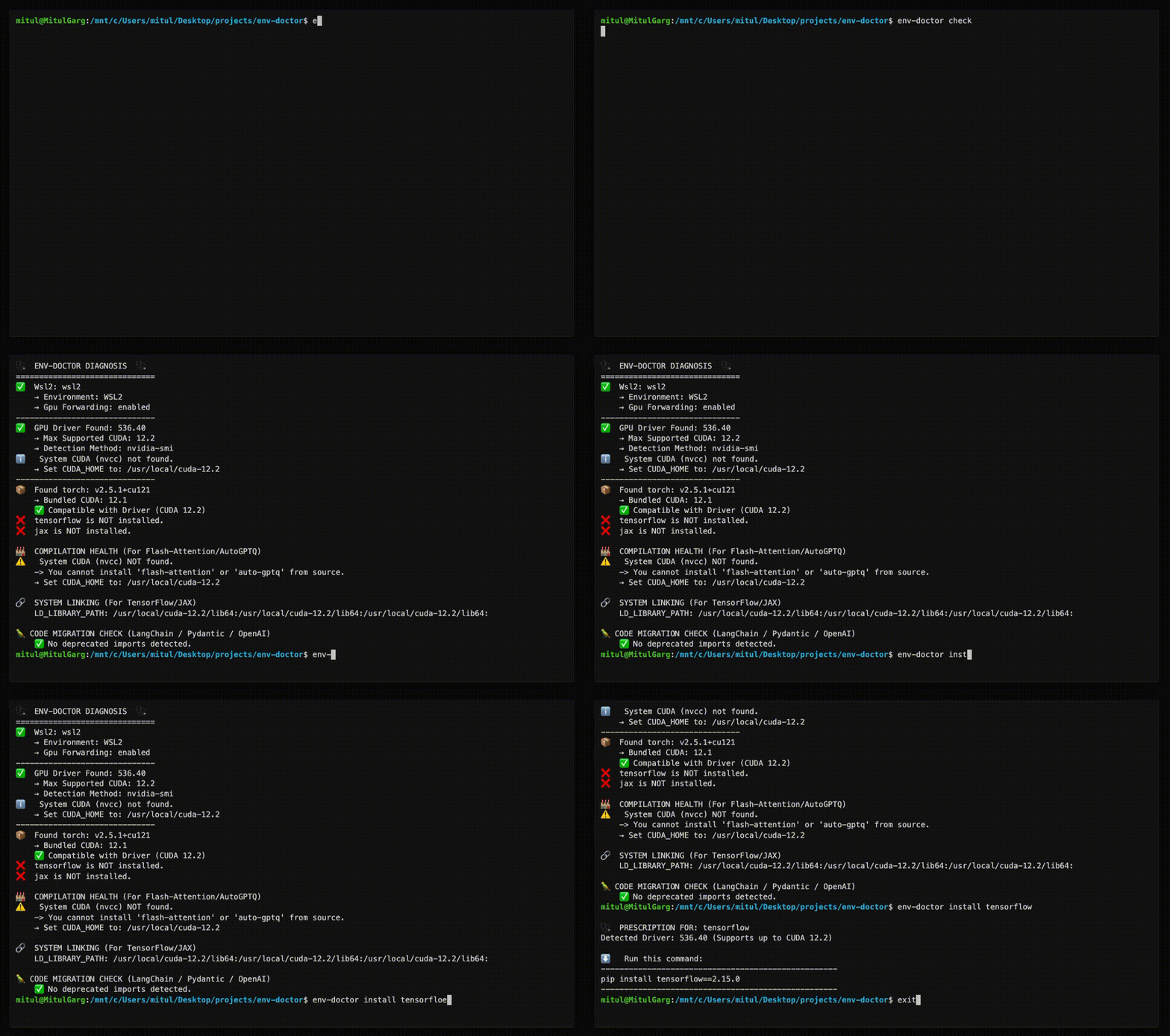
Features
| Feature | What It Does |
|---|---|
| One-Command Diagnosis | Check compatibility: GPU Driver → CUDA Toolkit → cuDNN → PyTorch/TensorFlow/JAX |
| Compute Capability Check | Detect GPU architecture mismatches — catches why torch.cuda.is_available() returns False on new GPUs (e.g. Blackwell) even when driver and CUDA are healthy |
| Python Version Compatibility | Detect Python version conflicts with AI libraries and dependency cascade impacts |
| Jupyter / Notebook Output | from env_doctor import check; check() renders a rich HTML diagnosis inline in Jupyter, Colab, or VS Code notebooks — falls back to text in the terminal |
| CUDA Auto-Installer | Execute CUDA Toolkit installation directly with --run; CI-friendly with --yes; preview with --dry-run |
安装
uvx env-doctor check配置
// Claude Desktop config (~/.config/Claude/claude_desktop_config.json)
{
  "mcpServers": {
    "env-doctor": {
      "command": "env-doctor-mcp"
    }
  }
}