通过MCP和ACP为您的React、Vue、Svelte、SolidJS、Preact和Next.js应用提供AI驱动的可视化调试
概览
AI 可以读取你的代码,但无法看到运行时发生的事情。DevInspector 提供了缺失的上下文:源代码位置、DOM 状态、样式、网络、控制台、终端输出和截图。 :通过MCP与IDE的AI(Cursor、VSCode)一起使用,或者直接通过ACP(, , , , more)在浏览器中运行AI代理。 安装DevInspector技能,让你的代理知道如何设置和排查检查器: https://www.youtube.com/shorts/TCt2oOtPS_k https://x.com/yaoandyan/status/1995082020431753600 点击任意元素即可查看,或 。AI 获得完整上下文:源代码位置、计算样式、组件层级、ID、类、文本内容,以及像素级的视觉理解。 get_page_info为AI提供了页面的语义理解:URL、视口,以及显示地标、标题、表单和链接。AI可以在不使用截图的情况下导航页面结构。
概述(AI 翻译)
AI 编码代理缺失的运行时上下文。
AI 可以读取你的代码,但无法看到运行时发生的事情。DevInspector 提供了缺失的上下文:源代码位置、DOM 状态、样式、网络、控制台、终端输出和截图。
两种模式:通过MCP与IDE的AI(Cursor、VSCode)一起使用,或者直接通过ACP在浏览器中运行AI代理(Claude Code、Codex CLI、Gemini CLI、OpenCode等)。
使用 Claude 代码或其他 AI 代理? 安装 DevInspector 技能,让你的代理知道如何设置和排查检查器:
目录
- 演示视频
- 社交媒体
- 主要特征
- 快速入门
- 安装
- 自动化设置
- 框架搭建
- 特工技能
- 配置
- 自动更新MCP配置
- 代理安装
- 海关代理
- MCP 服务器配置
- 它的作用
- 两种工作流程模式
- MCP 工具
- 定制检查工具
- MCP 提示词
- 建筑学
演示视频
观看演示: https://www.youtube.com/shorts/TCt2oOtPS_k
社交媒体
Twittter/X Post: https://x.com/yaoandyan/status/1995082020431753600
主要特色
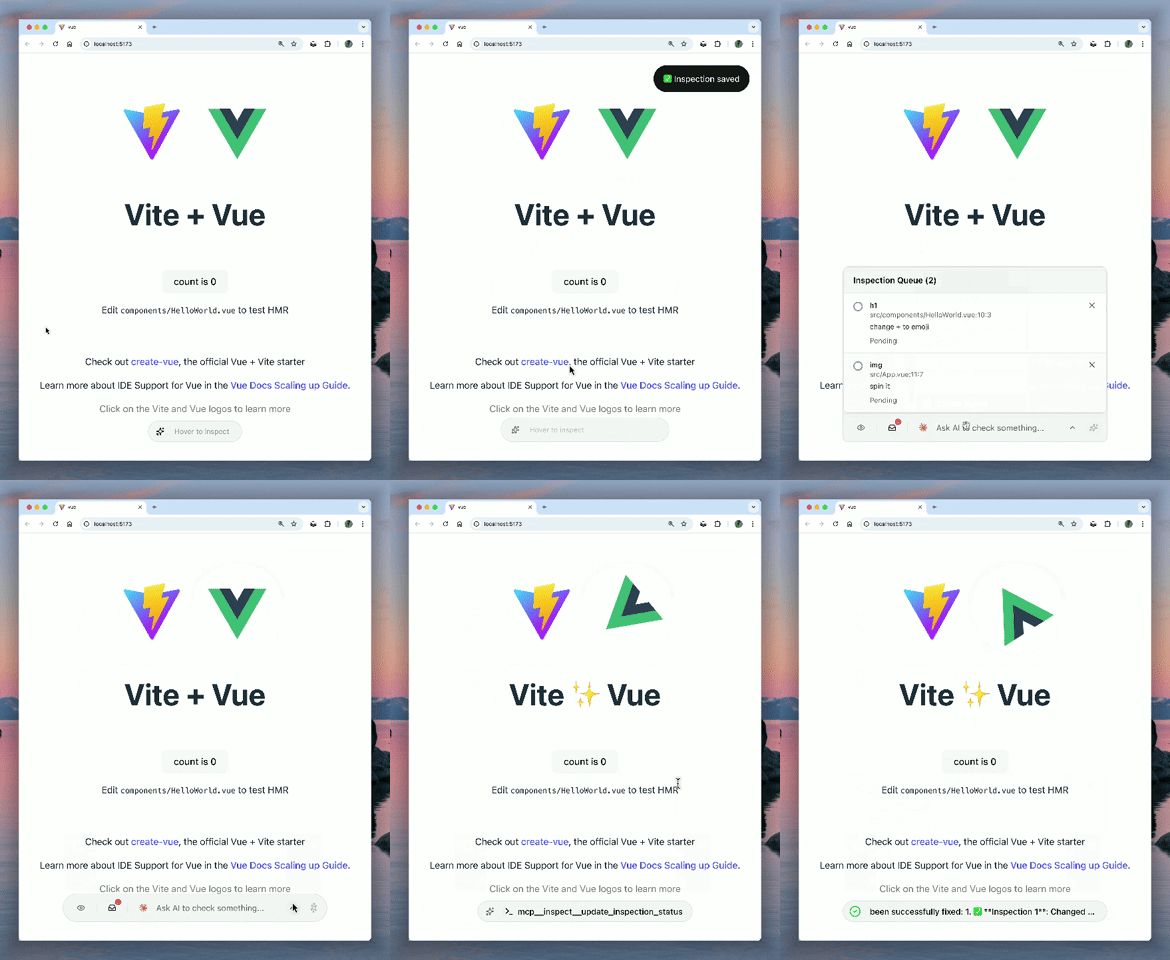
视觉语境与区域选择
本页由 AI 翻译,技术细节请以原文为准。
README
以下为原文 README 节选,完整内容请查看原文。
dev-inspector-mcp


The missing runtime context for AI coding agents.
AI can read your code, but can’t see what’s happening at runtime. DevInspector provides the missing context: source code location, DOM state, styles, network, console, terminal output, and screenshots.
Two modes: Use with your IDE’s AI (Cursor, VSCode) via MCP, or run AI agents directly in the browser via ACP (Claude Code, Codex CLI, Gemini CLI, OpenCode, more).
Using Claude Code or another AI agent? Install the DevInspector skill so your agent knows how to set up and troubleshoot the inspector:
npx skills add mcpc-tech/dev-inspector-mcp
Table of Contents
- Demo Video
- Social Media
- Key Features
- Quick Start
- Agent Skills
- Configuration
- What It Does
- Two Workflow Modes
- MCP Tools
- Custom Inspector Tools
- MCP Prompts
- Architecture
Demo Video
Watch the demo: https://www.youtube.com/shorts/TCt2oOtPS_k
Social Media
Twittter/X Post: https://x.com/yaoandyan/status/1995082020431753600
Key Features
Visual Context & Region Selection
Click any element to inspect it, or drag to select a region. AI gets the full context: source code location, computed styles, component hierarchy, IDs, classes, text content, and automatically captures screenshots for pixel-perfect visual understanding.
Page Overview & Accessibility Tree
get_page_info provides AI with a semantic understanding of the page: URL, viewport, and an accessibility tree showing landmarks, headings, forms, and links. AI can navigate the page structure without screenshots.
Universal DevTools Access
AI can access Network and Console logs from any browser (via client-side interception) or full Chrome DevTools (via chrome devtools mcp). It sees what you see, regardless of your environment.
安装
npx @mcpc-tech/unplugin-dev-inspector-mcp setup