
如果你正在使用Burp Suite Community Edition,并且想借助强大的AI辅助来提升你的工作流程——而不需要Burp Pro——那么这份指南一定会让你大开眼界。
概览
如果你正在使用并想借助强大的AI辅助来增强工作流程——而不需要Burp Pro——那么这份指南一定会让你大开眼界。 我们将向您展示如何将Burp Suite与模型上下文协议(MCP)集成。这使您的AI助手能够处理实时HTTP历史、分析请求、识别漏洞,甚至引导您完成漏洞利用——所有这些都在渗透测试流程中完成。 模型上下文协议(MCP)是一个开放框架,支持。它被设计成桥梁,使像Claude这样的工具能够直接与你的技术环境(如Burp Suite)协作。 MCP让AI助手能够:- 分析结构化工具输出 - 动态响应新数据 - 在渗透测试工作流程中进行交互式协作 该开放标准发布于,现已成为红队操作中尖端AI工具的骨干。
概述(AI 翻译)
** 🚀 为Hack Tools黑暗社区创建的帖子**
如果你正在使用Burp Suite Community Edition,并且想用强大的AI辅助来提升你的工作流程——无需Burp Pro——那么这份指南一定会让你大开眼界。
我们将向您展示如何利用_Model上下文协议(MCP)_将Burp Suite与**Claude(Anthropic)**集成。这使你的AI助手能够处理实时HTTP历史、分析请求、识别漏洞,甚至引导你完成漏洞利用——所有这些都在你的渗透测试流程中完成。
什么是MCP?
模型上下文协议(MCP)是一个开放框架,实现了 AI 模型与实时工具之间的同步交互。它被设计成桥梁,使像 Claude 这样的工具能够直接与你的技术环境如 Burp Suite 协作。
MCP允许AI助手:
- 分析结构化工具输出
- 动态响应新数据
- 在渗透测试工作流程中进行交互式协作
该开放标准于2024年11月25日**发布,现已成为红队行动中尖端AI工具的支柱。
- → MCP官方公告
- → 技术文档
- → 协议概述
建筑概述
本页由 AI 翻译,技术细节请以原文为准。
README
以下为原文 README 节选,完整内容请查看原文。
🧬 Next-Level Pentesting: Using Claude AI with Burp Suite Community via MCP
🚀 Post created for Hack Tools Dark Community
If you’re using Burp Suite Community Edition and want to supercharge your workflow with some powerful AI assistance – without needing Burp Pro – then this guide is going to blow your mind.
We’ll show you how to integrate Burp Suite with Claude (by Anthropic) using the Model Context Protocol (MCP). This allows your AI assistant to process live HTTP history, analyze requests, identify vulnerabilities, and even guide you through exploitation – all inside your pentest flow.
What is MCP?
Model Context Protocol (MCP) is an open framework that enables synchronous interaction between AI models and real-time tools. It’s designed to be a bridge, allowing tools like Claude to work directly with your technical environments like Burp Suite.
MCP lets AI assistants:
- Analyze structured tool output
- Respond dynamically to new data
- Collaborate interactively in pentest workflows
Released on November 25, 2024, this open standard is now the backbone of cutting-edge AI tooling in red team ops.
Architecture Overview
- MCP Server (in Burp Suite) – This extension exposes Burp’s internal data to external tools like Claude.
- Claude Desktop Integration – This links your local Claude AI with the MCP server, enabling 2-way sync.
Step-by-Step Setup (Win/macOS)
- Install Burp Suite Community Edition – Get it from PortSwigger and set it up. Or download it from here
- Load MCP Extension – Go to Extender > BApp Store, search for “MCP Server”, and click install.
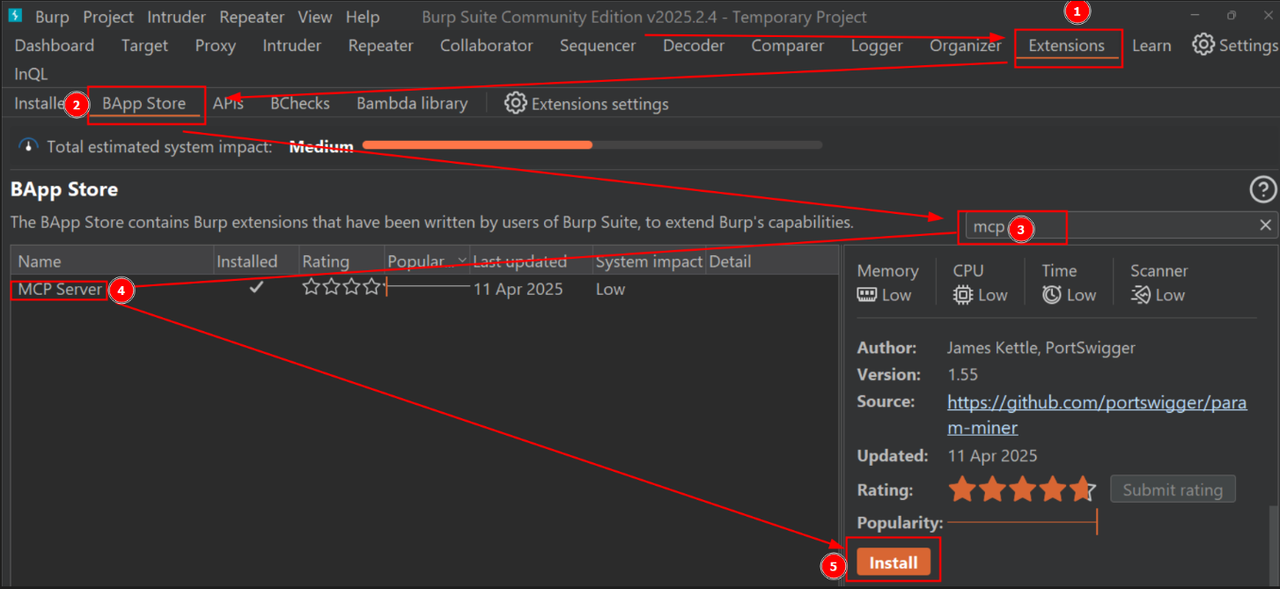
- Install Claude Desktop – Download from: https://claude.ai/download
→ Works only on Windows/macOS for now. - Enable MCP in Burp – Make sure the “MCP” tab is visible in Burp. If not, check if the extension is properly loaded under Installed Extensions.
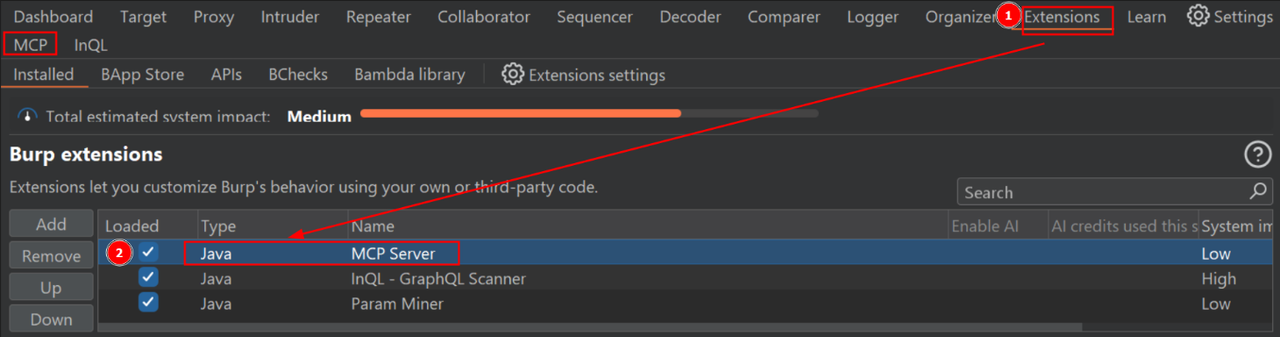
- Connect to Claude – Go to MCP tab, click Install to Claude Desktop. This generates a JSON config that links both tools.
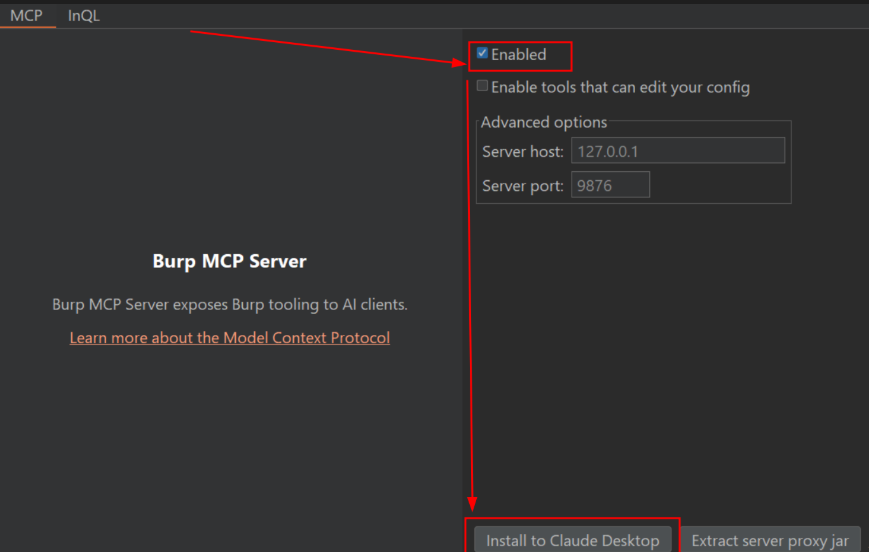
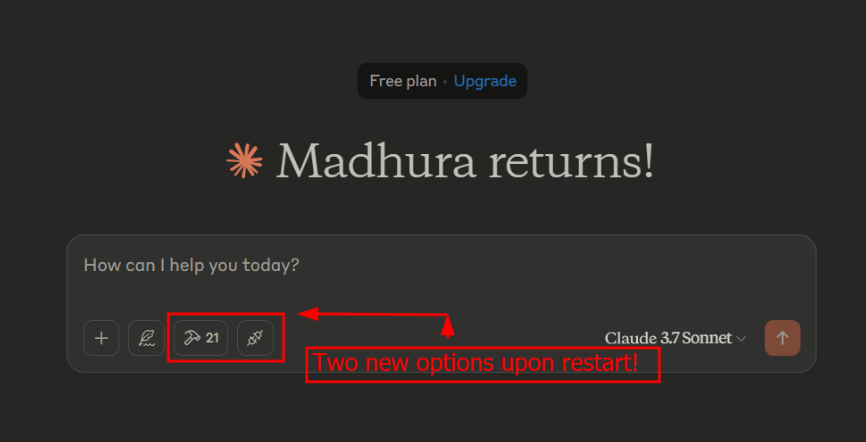
- Restart Claude Desktop – Essential to apply the configuration. After restarting, you should see an option in Claude like “Share context with Burp”.
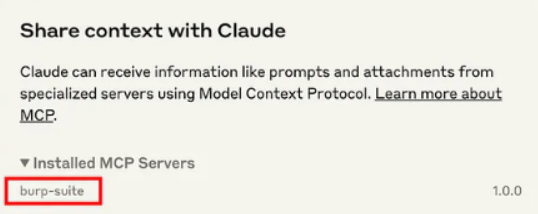
- Start Prompting – Launch your tests and fire up prompts in Claude Desktop.
Example Prompt
安装
This server does not publish a one-line install command.
Open the repository installation guide 新手?先看 mcpskill.org 教程 →