
llnl/paraview_mcp 是从 https://github.com/llnl/paraview_mcp. 导入的 MCP 服务器候选
概览
llnl/paraview_mcp 是从 https://github.com/llnl/paraview_mcp. 导入的 MCP 服务器候选
概述(AI 翻译)
ParaView-MCP 是一个自主智能体,通过模型上下文协议将多模态大型语言模型与 ParaView 集成,使用户能够使用自然语言和视觉输入创建和操作科学可视化,而非复杂的命令或图形界面操作。该系统具备视觉反馈功能,使其能够观察视口并迭代优化可视化,使高级可视化面向非专家也能访问,同时通过智能自动化增强专家工作流程。
免责声明
当前MCP服务器与ParaView连接的实现,无论是主分支还是开发分支,都依赖于pvserver与ParaView客户端之间的同步。由于该功能在大多数最新ParaView版本中已被弃用,ParaView应用视图可能无法正确显示pvserver实例的内容,整体稳定性可能会存在问题。
视频演示
点击下方图片观看视频:
安装
大型语言模型的设置
要设置与 Claude Desktop 的集成,请添加以下内容claude_desktop_config.json
跑步
1.启动paraview server
2.
本页由 AI 翻译,技术细节请以原文为准。
README
Paraview_MCP
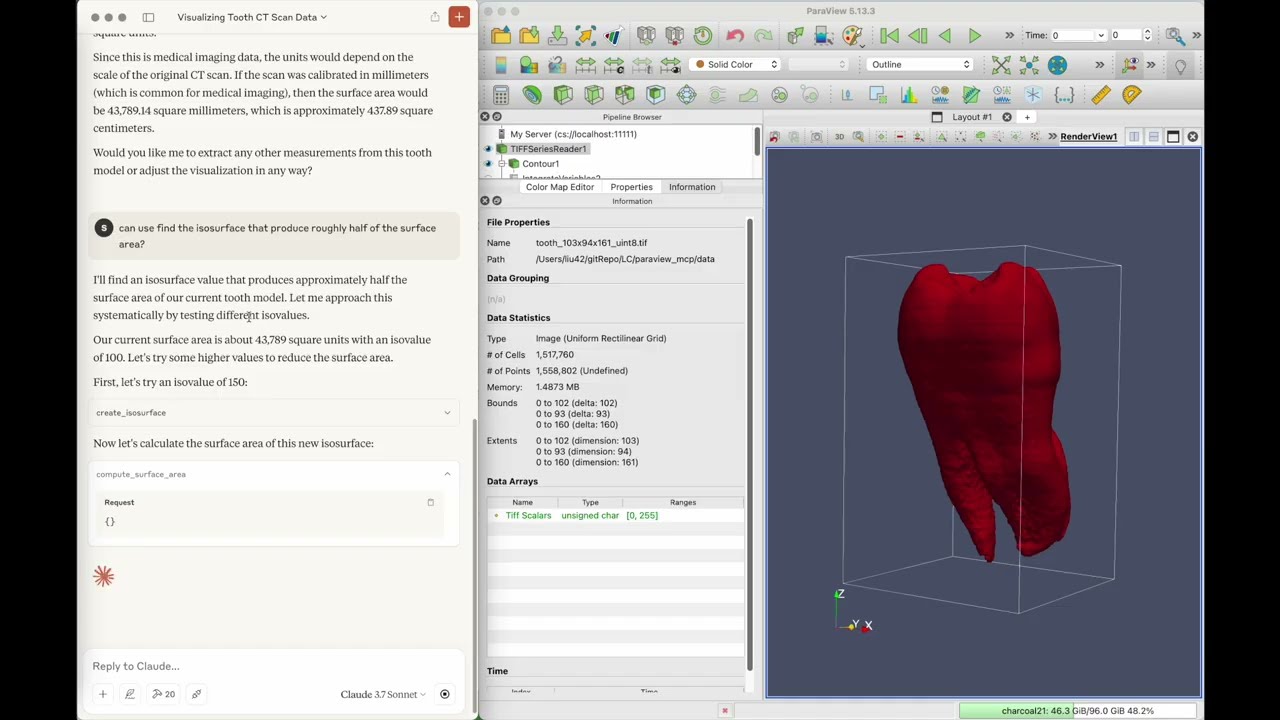
ParaView-MCP is an autonomous agent that integrates multimodal large language models with ParaView through the Model Context Protocol, enabling users to create and manipulate scientific visualizations using natural language and visual inputs instead of complex commands or GUI operations. The system features visual feedback capabilities that allow it to observe the viewport and iteratively refine visualizations, making advanced visualization accessible to non-experts while augmenting expert workflows with intelligent automation.
Disclaimer
The current implementation of the connection between the MCP server and ParaView, in both the main and dev branches, relies on synchronization between pvserver and the ParaView client. Because this feature has been deprecated in most recent ParaView versions, the ParaView application view may not display content from the pvserver instance correctly, and overall stability issues may occur.
Video Demo
Click the image below to watch the video:
Installation
git clone https://github.com/LLNL/paraview_mcp.git
cd paraview_mcp

conda create -n paraview_mcp python=3.10
conda install conda-forge::paraview
conda install mcp[cli] httpx
Setup for LLM
To set up integration with claude desktop, add the following to claude_desktop_config.json
    "mcpServers": {
      "ParaView": {
        "command": "/path/to/python",
        "args": [
        "/path/to/paraview_mcp/paraview_mcp_server.py"
        ]
      }
    }
running
1. Start paraview server
python pvserver --multi-clients
2. Connect to paraview server from paraview GUI (file -> connect)
3. Start claude desktop app
Citing Paraview_MCP
S. Liu, H. Miao, and P.-T. Bremer, “Paraview-MCP: Autonomous Visualization Agents with Direct Tool Use,” in Proc. IEEE VIS 2025 Short Papers, 2025, pp. 00
@inproceedings{liu2025paraview,
  title={Paraview-MCP: Autonomous Visualization Agents with Direct Tool Use},
  author={Liu, S. and Miao, H. and Bremer, P.-T.},
  booktitle={Proc. IEEE VIS 2025 Short Papers},
  pages={00},
  year={2025},
  organization={IEEE}
}
Authors
Paraview_MCP was created by Shusen Liu ([email protected]) and Haichao Miao ([email protected])
License
Paraview_MCP is distributed under the terms of the BSD-3 license.
LLNL-CODE-2007260
安装
This server does not publish a one-line install command.
Open the repository installation guide 新手?先看 mcpskill.org 教程 →配置
"mcpServers": {
      "ParaView": {
        "command": "/path/to/python",
        "args": [
        "/path/to/paraview_mcp/paraview_mcp_server.py"
        ]
      }
    }