
jparkerweb/mcp-sqlite 是从 https://github.com/jparkerweb/mcp-sqlite. 导入的 MCP 服务器候选。
概览
jparkerweb/mcp-sqlite 是从 https://github.com/jparkerweb/mcp-sqlite. 导入的 MCP 服务器候选。
概述(AI 翻译)
这是一个模型上下文协议(MCP)服务器,提供全面的SQLite数据库交互功能。
维护者
特色
- 完成CRUD操作(创建、读取、更新、删除)
- 数据库探索与内省
- 执行自定义SQL查询
布置
请在你的IDE的MCP服务器设置中定义该命令:
例如Cursor:
例如VSCode:
你的数据库路径必须作为参数提供。
可用工具
数据库信息
####db_info
获取有关连接数据库的详细信息。
示例:
####list_tables
列出数据库中的所有表格。
示例:
get_table_schema
获取关于表格结构的详细信息。
参数:
tableName(字符串):表的名称
示例:
CRUD作业
####create_record
将新记录插入表格。
参数:
table(字符串):表的名称data(对象):将数据记录为键值对
示例:
read_records
从表查询记录,并可选择过滤。
参数:
table(字符串):表的名称conditions(对象,可选):以键值对形式过滤条件
本页由 AI 翻译,技术细节请以原文为准。
README
以下为原文 README 节选,完整内容请查看原文。
🐇 MCP SQLite Server
This is a Model Context Protocol (MCP) server that provides comprehensive SQLite database interaction capabilities.

Maintained by
Features
- Complete CRUD operations (Create, Read, Update, Delete)
- Database exploration and introspection
- Execute custom SQL queries
Setup
Define the command in your IDE’s MCP Server settings:
e.g. Cursor:
{
    "mcpServers": {
        "MCP SQLite Server": {
            "command": "npx",
            "args": [
                "-y",
                "mcp-sqlite",
                ""
            ]
        }
    }
}
e.g. VSCode:
{
    "servers": {
        "MCP SQLite Server": {
            "type": "stdio",
            "command": "npx",
            "args": [
                "-y",
                "mcp-sqlite",
                ""
            ]
        }
    }
}
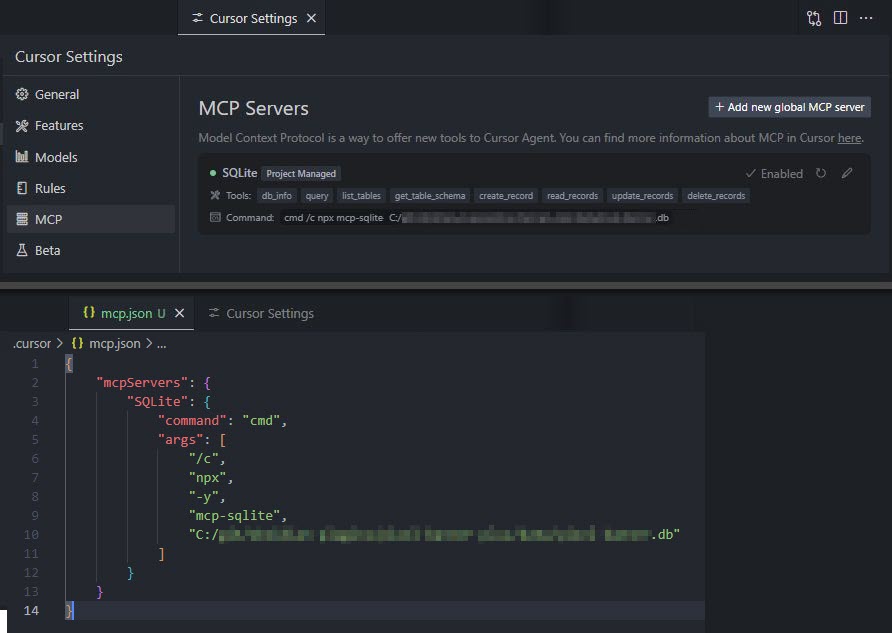
Your database path must be provided as an argument.
Available Tools
Database Information
db_info
Get detailed information about the connected database.
Example:
{
  "method": "tools/call",
  "params": {
    "name": "db_info",
    "arguments": {}
  }
}
list_tables
List all tables in the database.
Example:
{
  "method": "tools/call",
  "params": {
    "name": "list_tables",
    "arguments": {}
  }
}
get_table_schema
Get detailed information about a table’s schema.
Parameters:
tableName(string): Name of the table
Example:
{
  "method": "tools/call",
  "params": {
    "name": "get_table_schema",
    "arguments": {
      "tableName": "users"
    }
  }
}
CRUD Operations
create_record
Insert a new record into a table.
Parameters:
table(string): Name of the tabledata(object): Record data as key-value pairs
Example:
{
  "method": "tools/call",
  "params": {
    "name": "create_record",
    "arguments": {
      "table": "users",
      "data": {
        "name": "John Doe",
        "email": "[email protected]",
        "age": 30
      }
    }
  }
}
read_records
Query records from a table with optional filtering.
Parameters:
table(string): Name of the tableconditions(object, optional): Filter conditions as key-value pairslimit(number, optional): Maximum number of records to returnoffset(number, optional): Number of records to skip
安装
npx -y mcp-sqlite <path-to-your-sqlite-database.db>配置
{
    "mcpServers": {
        "MCP SQLite Server": {
            "command": "npx",
            "args": [
                "-y",
                "mcp-sqlite",
                "<path-to-your-sqlite-database.db>"
            ]
        }
    }
}