
MCP server for Asterisk and FreeSWITCH. Lets AI assistants inspect channels, SIP registrations, trunk status and dialplan on a live PBX.
概览
An MCP server that lets an AI assistant inspect and control and . Ask "which extensions are offline right now?" or "why is my SIP trunk not registering?" and get a real answer from the live switch, not a guess. Developed by at ICT Innovations, the team behind ICTCore, ICTContact, ICTDialer, ICTFax and ICTPBX. The AMI and ESL clients in this repo are the same protocol groundwork those products run on. Debugging a PBX means memorising two very different command sets. Asterisk speaks AMI and a CLI with hundreds of verbs. FreeSWITCH speaks ESL with its own vocabulary. If you run both, you're context switching all day. pbx-mcp puts a single, well described tool surface in front of both, so your assistant can go from "calls are failing" to sofia status gateway without you spelling out each step. The user guide walks through PBX setup, client config, worked examples and troubleshooting. This README is the quick reference.
README
以下为原文 README 节选,完整内容请查看原文。
pbx-mcp

An MCP server that lets an AI assistant inspect and control Asterisk and FreeSWITCH.
Ask “which extensions are offline right now?” or “why is my SIP trunk not registering?” and get a real answer from the live switch, not a guess.
Developed by Tahir Almas at ICT Innovations, the team behind ICTCore, ICTContact, ICTDialer, ICTFax and ICTPBX. The AMI and ESL clients in this repo are the same protocol groundwork those products run on.
Why
Debugging a PBX means memorising two very different command sets. Asterisk speaks AMI and a CLI with hundreds of verbs. FreeSWITCH speaks ESL with its own vocabulary. If you run both, you’re context switching all day.
pbx-mcp puts a single, well described tool surface in front of both, so your assistant can go from “calls are failing” to sofia status gateway without you spelling out each step.
New here? The user guide walks through PBX setup, client config, worked examples and troubleshooting. This README is the quick reference.
What your assistant sees
Twelve read-only tools, six per engine, each one described well enough that the model picks the right one without being told. This is the server running under the MCP Inspector:
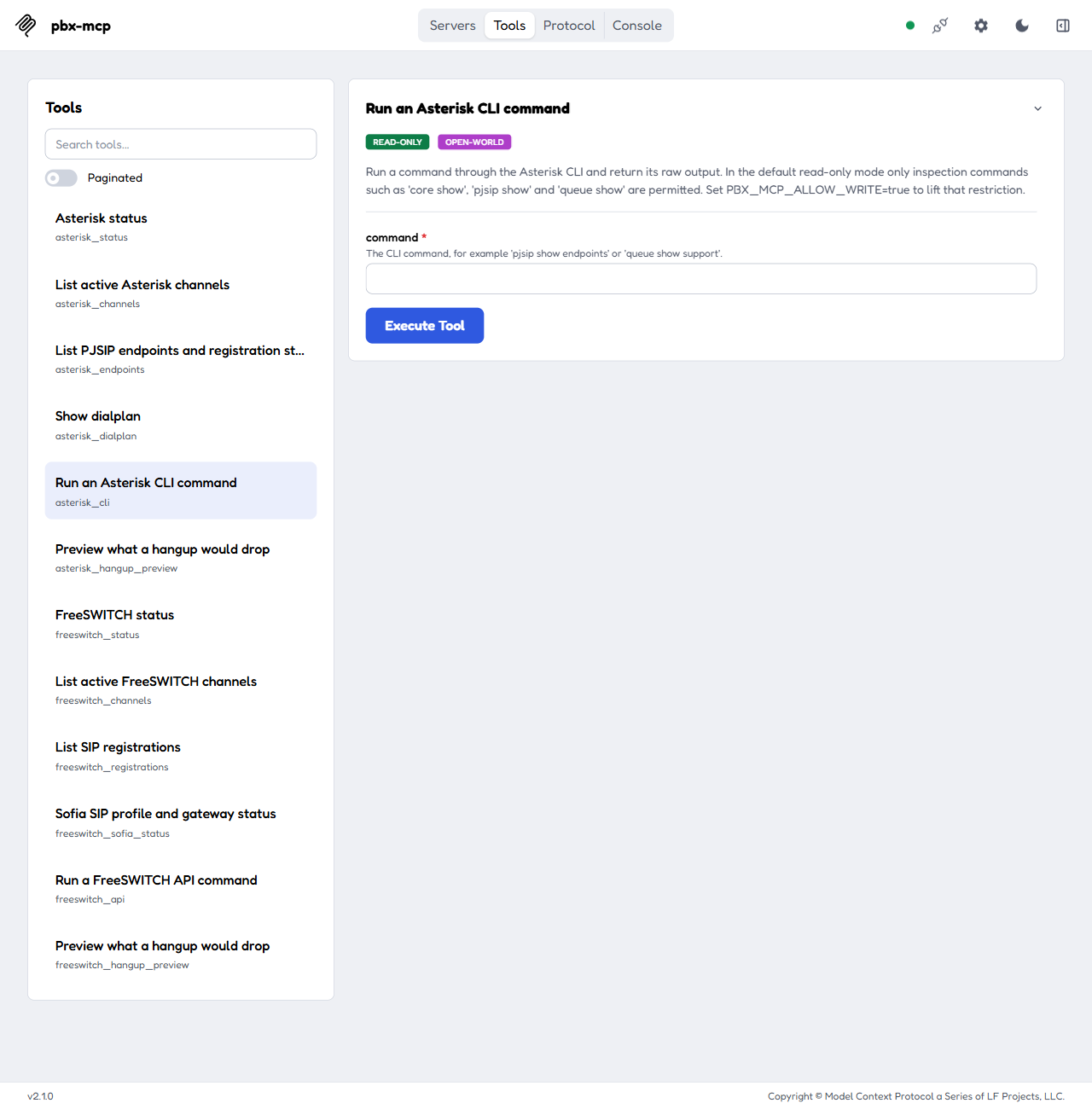
The four write tools, asterisk_originate, asterisk_hangup, freeswitch_originate and freeswitch_hangup, stay hidden until you set PBX_MCP_ALLOW_WRITE=true.
Install
npm install -g pbx-mcp
Or run it straight from npx, which is what most MCP client configs do:
npx -y pbx-mcp
You need Node 18 or newer.
Docker
There’s a prebuilt image if you’d rather not put Node on the machine that talks to your PBX.
docker run -i --rm \
  -e ASTERISK_AMI_HOST=10.0.0.10 \
  -e ASTERISK_AMI_USERNAME=mcp \
  -e ASTERISK_AMI_PASSWORD=change-me \
  ghcr.io/ictinnovations/pbx-mcp
The same image is on Docker Hub as ictinnovations/pbx-mcp if that registry is an easier pull for you.
Three things to know:
-iis not optional. The server speaks MCP over stdio, so without stdin attached the container starts and then sits there saying nothing, which looks exactly like a broken server.- There is no port to publish. Nothing listens.
安装
npx -y pbx-mcp配置
{
  "mcpServers": {
    "pbx": {
      "command": "npx",
      "args": ["-y", "pbx-mcp"],
      "env": {
        "ASTERISK_AMI_HOST": "10.0.0.10",
        "ASTERISK_AMI_USERNAME": "mcp",
        "ASTERISK_AMI_PASSWORD": "change-me",
        "FREESWITCH_ESL_HOST": "10.0.0.11",
        "FREESWITCH_ESL_PASSWORD": "ClueCon"
      }
    }
  }
}