
KiCad MCP integrated with the KiCad IPC API.
概览
KiCad MCP integrated with the KiCad IPC API. You can run the MCP server directly without installing it using uvx: This will download and execute the latest version from PyPI in an isolated environment. Add the following configuration to your MCP client: Modify the code and restart your MCP client to see changes. - Requires uv: https://github.com/astral-sh/uv - Python 3.11+ - Ensure KiCad is running with IPC enabled
README
kicad-mcp
KiCad MCP integrated with the KiCad IPC API.


Usage
Run the latest release
You can run the MCP server directly without installing it using uvx:
uvx kicad-mcp --editor-type schematic
This will download and execute the latest version from PyPI in an isolated environment.
MCP client configuration
- Claude Code
{
	"mcpServers": {
		"Kicad-Schematic-MCP": {
			"type": "stdio",
			"command": "uvx",
			"args": [
				"kicad-mcp",
				"--editor-type",
				"schematic"
			]
		},
		"Kicad-PCB-MCP": {
			"type": "stdio",
			"command": "uvx",
			"args": [
				"kicad-mcp",
				"--editor-type",
				"pcb"
			]
		}
	},
	"inputs": []
}
- VSCode
Add the following configuration to your MCP client:
{
	"servers": {
		"Kicad-Schematic-MCP": {
			"type": "stdio",
			"command": "uvx",
			"args": [
				"kicad-mcp",
				"--editor-type",
				"schematic"
			]
		},
		"Kicad-PCB-MCP": {
			"type": "stdio",
			"command": "uvx",
			"args": [
				"kicad-mcp",
				"--editor-type",
				"pcb"
			]
		}
	},
	"inputs": []
}
- Cherry Studio
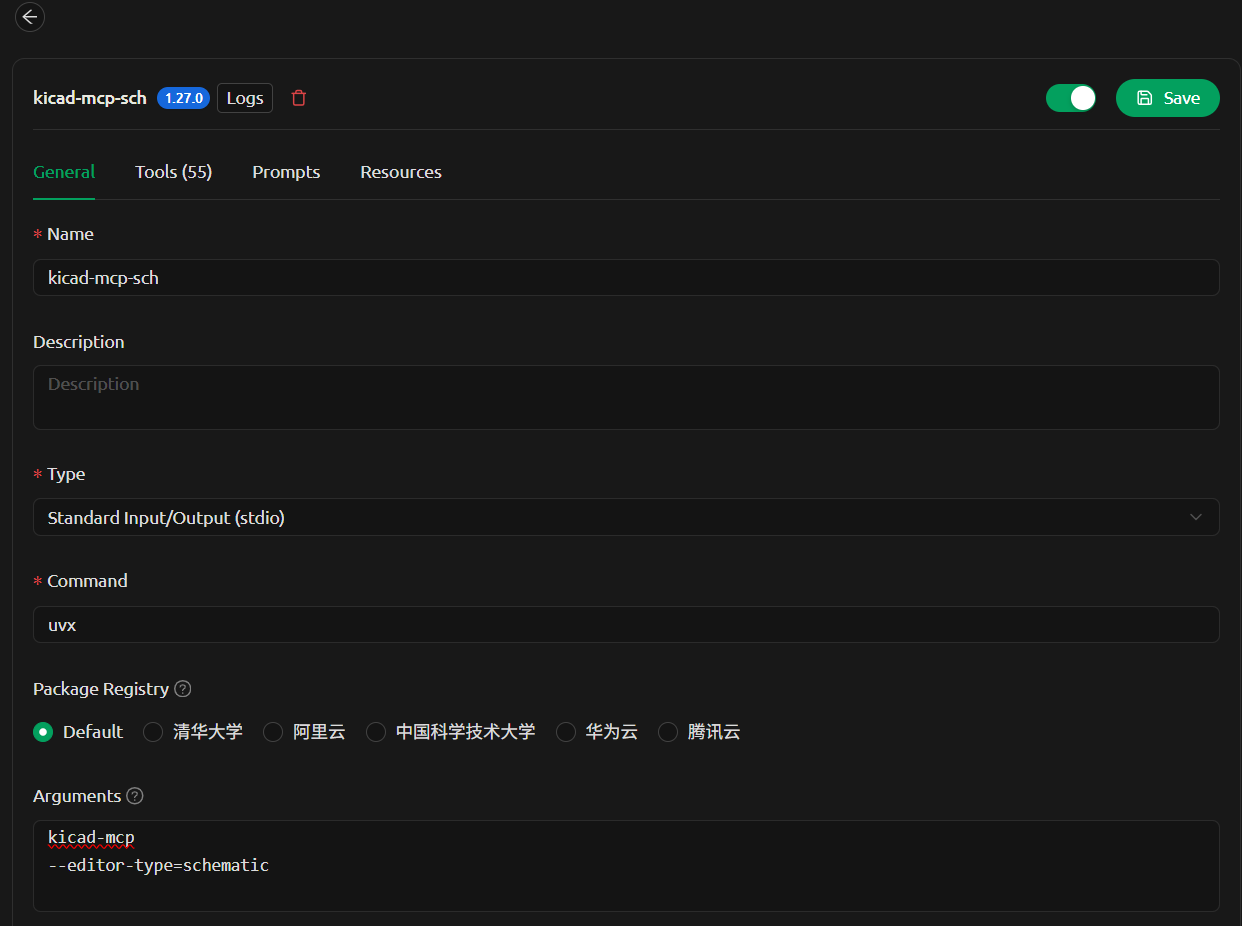
Options
--editor-type supports:
schematicpcbsymbolfootprint
Development
1. Clone the repository
git clone
cd kicad-mcp
2. Configure MCP client (local development)
Example configuration in VSCode:
{
  "servers": {
    "kicad-pcb-mcp": {
      "type": "stdio",
      "command": "uv",
      "args": [
        "--directory",
        "C:/code/kicad-mcp",
        "run",
        "kicad-mcp",
        "--editor-type",
        "pcb"
      ]
    },
    "kicad-schematic-mcp": {
      "type": "stdio",
      "command": "uv",
      "args": [
        "--directory",
        "C:/code/kicad-mcp",
        "run",
        "kicad-mcp",
        "--editor-type",
        "schematic"
      ]
    }
  }
}
3. Run locally
Install dependencies and run:
uv sync
uv run kicad-mcp --editor-type schematic
4. Iterate
Modify the code and restart your MCP client to see changes.
Notes
- Requires
uv: https://github.com/astral-sh/uv - Python 3.11+
- Ensure KiCad is running with IPC enabled
安装
uvx kicad-mcp --editor-type schematic配置
{
	"mcpServers": {
		"Kicad-Schematic-MCP": {
			"type": "stdio",
			"command": "uvx",
			"args": [
				"kicad-mcp",
				"--editor-type",
				"schematic"
			]
		},
		"Kicad-PCB-MCP": {
			"type": "stdio",
			"command": "uvx",
			"args": [
				"kicad-mcp",
				"--editor-type",
				"pcb"
			]
		}
	},
	"inputs": []
}