
Roblox Studio MCP 服务器及 Claude Code、Cursor、Codex 和 Gemini 插件。AI 驱动的脚本、地形、资源、光照和双向项目同步。
概览
是Roblox Studio的AI开发产品。它包含用于AI应用连接和用于实时Studio控制的功能。Claude Code、Codex和Antigravity也可以安装可选的客户端原生设置和工作流程指导。 像Claude、Codex和Gemini这样的AI编码代理很强大,但它们无法在Roblox Studio中看到或修改任何内容。DataModel、脚本、地形和光照对外部工具来说是看不见的。没有桥接,AI只能生成代码片段,你必须手动粘贴。 它将 AI 代理连接到 。AI 直接在 Studio 内部创建和修改实例、脚本、属性、地形等,这些更改会立即反映在 Studio 和仪表盘中,让你清楚看到具体变化。 WEPPY也专为分散在多个地点的Roblox体验设计。打开最多五个Studio窗口,分别用于大厅、游戏、商店、教程或其他场景,然后告诉客服使用哪个Studio ID。
概述(AI 翻译)
WEPPY Roblox AI 工具包是 Roblox Studio 的 AI 开发产品。它包含 WEPPY MCP 服务器用于 AI 应用连接,以及 WEPPY Roblox Studio 插件用于实时 Studio 控制。Claude Code、Codex 和 Antigravity 还可以安装可选的 WEPPY AI 代理插件,用于客户端原生设置和工作流程指导。
多地点工作室工作 ·生成资源到Roblox ·双向同步 ·自动游戏测试 ·UI Studio
英语 |한국어 |日本語 |西班牙语 |葡萄牙语 |印尼语 |德语
为什么是WEPPY Roblox AI工具包?
像Claude、Codex和Gemini这样的AI编码代理很强大,但它们无法在Roblox Studio中看到或修改任何内容。DataModel、脚本、地形和光照对外部工具来说是看不见的。没有桥接,AI只能生成代码片段,你必须手动粘贴。
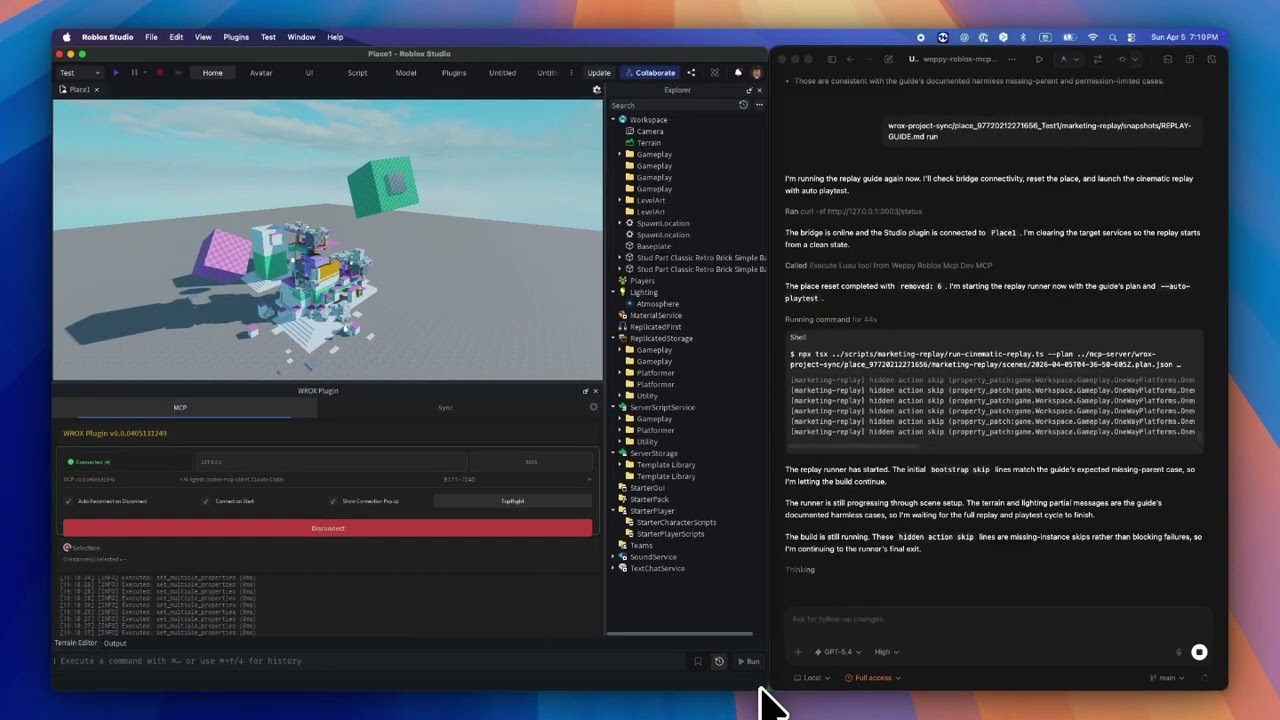
WEPPY MCP 服务器将 AI 代理连接到 WEPPY Roblox Studio 插件。AI 直接在 Studio 内部创建和修改实例、脚本、属性、地形等,这些更改会立即反映在 Studio 和仪表盘中,让你能准确看到具体变化。
本页由 AI 翻译,技术细节请以原文为准。
README
以下为原文 README 节选,完整内容请查看原文。
WEPPY Roblox AI Toolkit — AI Game Development for Roblox Studio
WEPPY Roblox AI Toolkit is a Roblox Studio AI development product. It includes the WEPPY MCP Server for AI app connections and the WEPPY Roblox Studio Plugin for live Studio control. Claude Code, Codex, and Antigravity can also install the optional WEPPY AI Agent Plugin for client-native setup and workflow guidance.
Multi-Place Studio work · Generated assets to Roblox · Bidirectional sync · Automated playtest · UI Studio
English | 한국어 | 日本語 | Español | Português | Bahasa Indonesia | Deutsch
Why WEPPY Roblox AI Toolkit?
AI coding agents like Claude, Codex, and Gemini are powerful, but they cannot see or modify anything inside Roblox Studio. The DataModel, scripts, terrain, and lighting are invisible to external tools. Without a bridge, AI can only generate code snippets that you must paste manually.
The WEPPY MCP Server connects AI agents to the WEPPY Roblox Studio Plugin. AI directly creates and modifies instances, scripts, properties, terrain, and more inside Studio, and the changes are reflected immediately in Studio and the dashboard so you can see exactly what changed.
WEPPY is also built for Roblox experiences that are split across several Places. Open up to five Studio windows for Lobby, Game, Shop, Tutorial, or other Places, then tell the agent which Studio ID to use. One request can update several Places without re-explaining context or copying changes by hand.
For assets, an agent can create or prepare an image, save it to the Asset Library, upload it through Roblox Open Cloud, and apply the returned asset URI to a Place. The result is a shorter path from “make this icon/decal” to “it is visible in Studio.”
No copy-pasting code or asset IDs. AI does the work, you review the results.
Quick Install
Start from the web install page. It shows the recommended one-line script for your platform first.
Recommended One-Line Install
On the install page, copy the one-line script and run it in Terminal or PowerShell.
macOS / Linux
curl -fsSL https://raw.githubusercontent.com/hope1026/weppy-roblox-mcp/main/install.sh | bash
Windows (PowerShell)
irm https://raw.githubusercontent.com/hope1026/weppy-roblox-mcp/main/install.ps1 | iex
Then reopen your AI app and restart Roblox Studio.
Automatic WEPPY MCP Server registration supports Claude Code, Claude Desktop, Cursor, Codex CLI/App, Gemini CLI, and Antigravity / Antigravity IDE / Antigravity CLI.
安装
npx -y @weppy/roblox-mcp@latest