
halilural/electron-mcp-server 是从 https://github.com/halilural/electron-mcp-server. 导入的 MCP 服务器候选
概览
halilural/electron-mcp-server 是从 https://github.com/halilural/electron-mcp-server. 导入的 MCP 服务器候选
概述(AI 翻译)
用自然语言控制任何Electron应用。 一个MCP服务器,允许AI助手(Claude、光标、VS Code等)驱动你的Electron应用:点击按钮、填写表单、截图、阅读控制台日志,并在其中运行JavaScript——全部基于Chrome DevTools协议,且不修改你的应用。
然后问你的 AI:“点击我的 Electron 应用中的设置按钮,截图结果。”*
你为什么会想要它
- 🤖 AI驱动的UI自动化 — 描述交互(“点击提交”,“填写邮件字段”);无需选择器纠缠
- 🐛 无开发工具调试 — 控制台日志和页面结构直接拉入聊天
- 📸 按需截图 — 以AI可实际查看的图像数据返回
- ⚡ 零应用更改 — 通过CDP附加到任何以[[T0]开头的Electron应用]
- 🔒 安全级别——严格的→开发,因此你可以选择AI能做多少事情
- 🧪 自动化端对端流程——将手动测试步骤转化为可重复的AI运行场景
它暴露的4个工具: get_electron_window_info、take_screenshot、send_command_to_electron(UI交互 + eval)、read_electron_logs。
演示
本页由 AI 翻译,技术细节请以原文为准。
README
以下为原文 README 节选,完整内容请查看原文。
Electron MCP Server






Control any Electron app with natural language. An MCP server that lets AI assistants (Claude, Cursor, VS Code, …) drive your Electron app: click buttons, fill forms, take screenshots, read console logs, and run JavaScript inside it — all over the Chrome DevTools Protocol, with no changes to your app.
npx -y electron-mcp-server
Then ask your AI: “Click the Settings button in my Electron app and screenshot the result.”
Why you might want it
- 🤖 AI-driven UI automation — describe the interaction (“click Submit”, “fill the email field”); no selector wrangling
- 🐛 Debugging without DevTools — console logs and page structure pulled straight into the chat
- 📸 Screenshots on demand — returned as image data the AI can actually look at
- ⚡ Zero app changes — attaches over CDP to any Electron app started with
--remote-debugging-port=9222 - 🔒 Security levels — strict → development, so you choose how much the AI may do
- 🧪 Automated E2E flows — turn manual test steps into repeatable AI-run scenarios
The 4 tools it exposes: get_electron_window_info, take_screenshot, send_command_to_electron (UI interaction + eval), read_electron_logs.
Demo
See the Electron MCP Server in action:
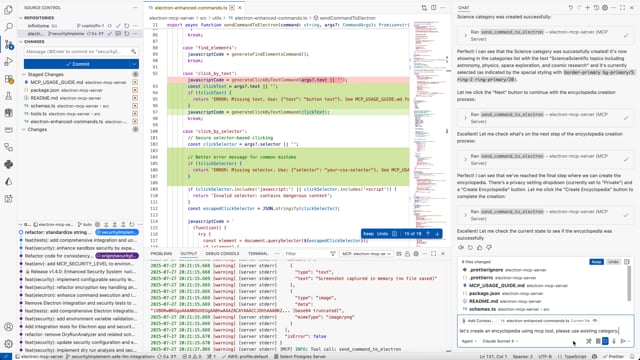
Watch how easy it is to automate Electron applications with AI-powered MCP commands.
🔒 Security & Configuration
Configurable security levels to balance safety with functionality:
Security Levels
- 🔒 STRICT: Maximum security for production environments
- ⚖️ BALANCED: Default security with safe UI interactions (recommended)
- 🔓 PERMISSIVE: More functionality for trusted environments
- 🛠️ DEVELOPMENT: Minimal restrictions for development/testing
Environment Configuration
安装
npx -y electron-mcp-server配置
{
  "mcpServers": {
    "electron": {
      "command": "npx",
      "args": ["-y", "electron-mcp-server"],
      "env": {
        "SECURITY_LEVEL": "balanced",
        "SCREENSHOT_ENCRYPTION_KEY":"your-32-byte-hex-string"
      }
    }
  }
}