
gethopp/figma-mcp-bridge 是从 https://github.com/gethopp/figma-mcp-bridge. 导入的 MCP 服务器候选
概览
gethopp/figma-mcp-bridge 是从 https://github.com/gethopp/figma-mcp-bridge. 导入的 MCP 服务器候选
概述(AI 翻译)
- 演示
- 快速入门
- 可用工具
- 地方发展
- 结构
- 工作原理
[!注] 需要Figma桌面应用(macOS/Windows)。Figma的浏览器版本不支持导入开发插件。
虽然还有其他很棒的Figma MCP服务器,比如Figma-Context-MCP,但一个问题是API对免费用户的限制。
免费账户的申请上限是每月6次,是的,每月。
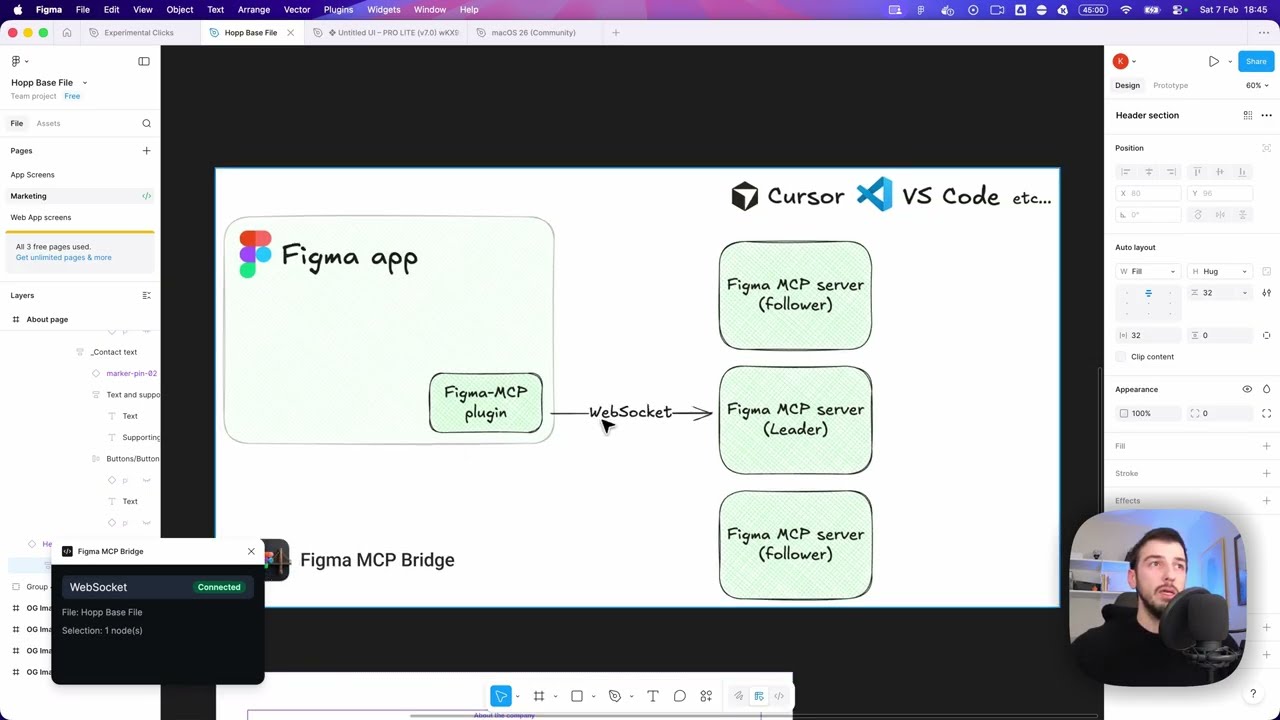
Figma MCP Bridge 是解决这个问题的方案。它是一个插件 + MCP 服务器,可以将实时 Figma 文档数据流向 AI 工具,且不会达到 Figma API 的速率限制,所以对我们✊其他人来说就是 Figma MCP
它支持多个Figma文件同时连接;在每个文件中打开插件,你的AI代理可以通过fileKey查询其中任何一个。单文件设置完全正常,无需更改。
它还包含一小批自愿加入的编写工具,用于安全的代理驱动编辑——详见下方编辑说明。
演示
观看用Figma MCP Bridge在光标中构建UI的演示
快速启动
1.将MCP服务器添加到你最喜欢的AI工具中
在你的AI工具的MCP配置中添加以下内容(例如:Cursor、Windsurf、Claude Desktop):
本页由 AI 翻译,技术细节请以原文为准。
README
以下为原文 README 节选,完整内容请查看原文。
Figma MCP Bridge

[!NOTE]
Requires the Figma desktop app (macOS/Windows). The browser version of Figma does not support importing development plugins.
While other amazing Figma MCP servers like Figma-Context-MCP exist, one issues is the API limiting for free users.
The limit for free accounts is 6 requests per month, yes per month.
Figma MCP Bridge is a solution to this problem. It is a plugin + MCP server that streams live Figma document data to AI tools without hitting Figma API rate limits, so its Figma MCP for the rest of us ✊
It supports multiple Figma files connected simultaneously; open the plugin in each file and your AI agent can query any of them by fileKey. Single-file setups work exactly as before with no changes required.
It also includes a small, opt-in set of write tools for safe agent-driven edits — see Editing Notes below.
Demo
Watch a demo of building a UI in Cursor with Figma MCP Bridge
Quick Start
1. Add the MCP server to your favourite AI tool
Add the following to your AI tool’s MCP configuration (e.g. Cursor, Windsurf, Claude Desktop):
{
  "figma-bridge": {
    "command": "npx",
    "args": ["-y", "@gethopp/figma-mcp-bridge"]
  }
}
That’s it — no binaries to download or install.
2. Add the Figma plugin
Download the plugin from the latest release page, then in Figma go to Plugins > Development > Import plugin from manifest and select the manifest.json file from the plugin/ folder. The same plugin runs in Figma design files, Dev Mode (read-only), and FigJam boards.
3. Start using it 🎉
Open a Figma file, run the plugin, and start prompting your AI tool. The MCP server will automatically connect to the plugin.
To work across multiple files, just open the plugin in each Figma file. The bridge keeps all connections active and your AI agent can target any of them by fileKey.
If you want to know more about how it works, read the How it works section.
Available Tools
| Tool | Description |
安装
npx -y @gethopp/figma-mcp-bridge