
elliotttate/splicekit 是一个从 https://github.com/elliotttate/splicekit. 导入的 MCP 服务器候选。
概览
elliotttate/splicekit 是一个从 https://github.com/elliotttate/splicekit. 导入的 MCP 服务器候选。
概述(AI 翻译)
Final Cut Pro,解锁版。一个命令调色板、MCP服务器和一个几乎可以做任何事情的开放插件框架。
| 🎹 命令调色板 | 🤖 MCP 服务器 | 🧩插件框架 |
|---|---|---|
点击Cmd+Shift+P,输入你想要的。苹果智能负责运行。 |
任何大型语言模型都能读取并编辑你的时间线——并在过程中构建新工具。 | 每个内置功能都只是示例插件。你(或AI)可以发布更多。 |
编辑?从这里开始。 官方 SpliceKit 网站和常见问题是最友好的访问方式。有问题、帮助或功能请求?加入 FCP Cafe Discord 的 SpliceKit 频道。错误报告:在 GitHub 上发布问题。
迫不及待想看看你怎么用它。🥳
三柱石
🎹 1。指令调色板
只需一次按键就能完成任何操作。
在补丁FCP内按Cmd+Shift+P。用模糊搜索100+内置编辑操作——刀片、修剪、颜色、速度、标记、效果、过渡、导出——或者直接输入普通英语,让Apple Intelligence(设备内,私密)帮你弄明白意思。
试着说…
- “每5秒添加标记”
- “将此片段减速至半速”
- *“每场换景都用刀刃”
- “消除所有沉默”
本页由 AI 翻译,技术细节请以原文为准。
README
以下为原文 README 节选,完整内容请查看原文。
SpliceKit




Final Cut Pro, unlocked. A Command Palette, MCP server, and an open plugin framework to do almost anything.
SpliceKit v4
This is the official and original repository for SpliceKit.
It is still maintained - however progress is slow, as we’re busy with other jobs (hence all the open pull requests).
However, SpliceKit v4 is a fork, that’s now available on FCP Cafe that is more actively maintained and updated.
| 🎹 Command Palette | 🤖 MCP Server | 🧩 Plugin Framework |
|---|---|---|
Hit Cmd+Shift+P and type what you want. Apple Intelligence runs it. |
Any LLM can read and edit your timeline — and build new tools as it goes. | Every built-in feature is just an example plugin. You (or an AI) can ship more. |
Editor? Start here. The official SpliceKit site and the FAQ are the friendliest way in. Questions, help, or feature requests? Join the SpliceKit channels on the FCP Cafe Discord. Bug reports: open a GitHub issue.
Can’t wait to see what you do with it. 🥳
The Three Pillars
🎹 1. The Command Palette
One keystroke to anything.
Hit Cmd+Shift+P inside the patched FCP. Fuzzy-search 100+ built-in editing actions — blade, trim, color, speed, markers, effects, transitions, export — or type plain English and let Apple Intelligence (on-device, private) figure out what you meant.
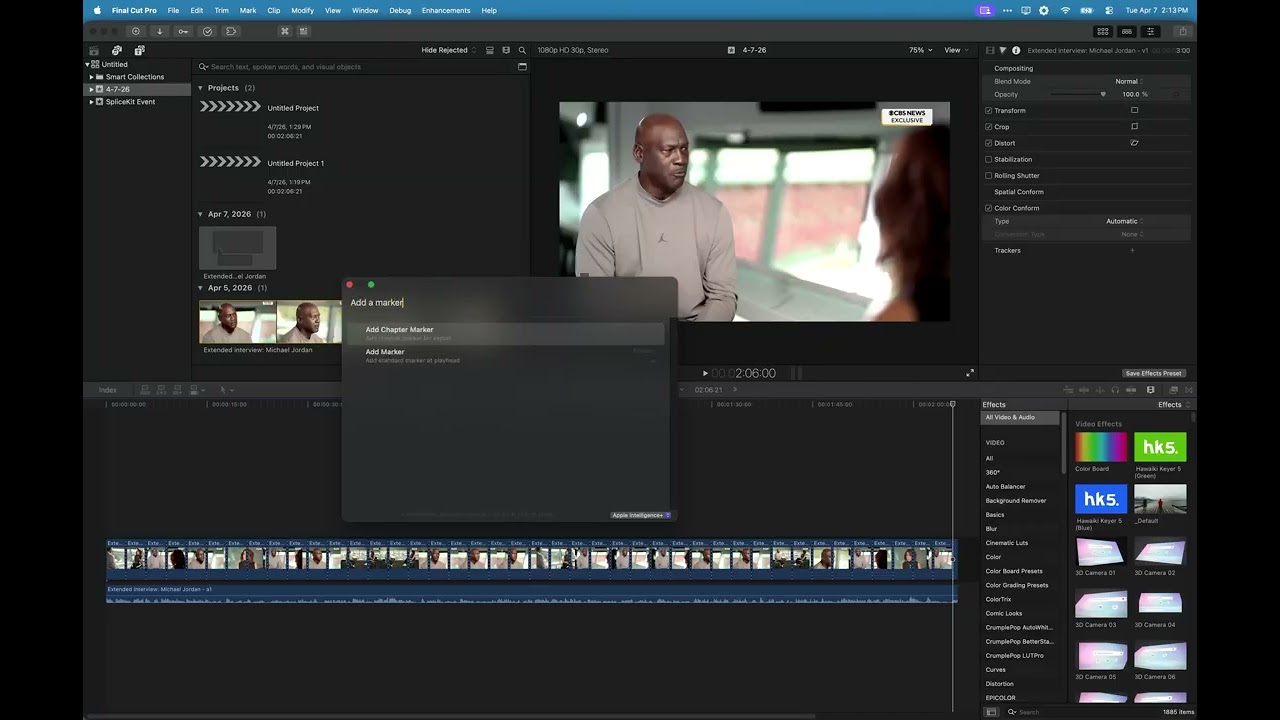
Try saying…
- “add markers every 5 seconds”
- “slow this clip to half speed”
- “blade at every scene change”
- “remove all the silences”
- “add a cross dissolve”
No more menu hunting. No more memorizing shortcuts. No cloud.
🤖 2. The MCP Server
Claude (or any other LLM) can drive your editor — and teach it new tricks.
SpliceKit ships with an MCP server that exposes ~200 tools covering every major FCP subsystem. Point Claude Code, Claude Desktop, or any MCP-compatible AI client at it and you can say things like:
- “cut this 40-minute interview down to its best moments”
- “remove the silences from this podcast, add captions, and export”
- “assemble a rough cut from these clips, synced to the beat of this song”
安装
This server does not publish a one-line install command.
Open the repository installation guide 新手?先看 mcpskill.org 教程 →配置
{
  "mcpServers": {
    "splicekit": {
      "command": "/Users/yourname/.venvs/splicekit-mcp/bin/python",
      "args": ["/absolute/path/to/SpliceKit/mcp/server.py"]
    }
  }
}