
该项目为使用模型上下文协议(MCP)为GitHub仓库提供语义搜索功能。
概览
该项目使用模型上下文协议(MCP)为GitHub仓库提供语义搜索功能。它支持针对索引的GitHub仓库进行检索增强生成(RAG)查询,支持公共和私有仓库。 - : VSCode 扩展,用于与 Copilot 聊天窗口集成为 MCP。- : 后端 MCP 服务器,利用 Cloudflare 基础设施处理索引和搜索查询。- : 用于部署的配置和打包工具。 1. 在你的IDE中配置MCP服务器(请参见工作流程README中的设置说明)。2. 使用语义搜索工具,提供@owner和仓库参数。3. 如果仓库尚未被索引,请稍后再查看,因为初始索引需要时间。
概述(AI 翻译)
该项目使用模型上下文协议(MCP)为GitHub仓库提供语义搜索功能。它支持针对索引的GitHub仓库进行检索增强生成(RAG)查询,支持公共和私有仓库。
组成部分
- vscode-extension:VSCode 扩展,用于与 Copilot 聊天窗口集成为 MCP。
- 工作流程:后端MCP服务器,使用Cloudflare基础设施处理索引和搜索查询。
- 配置包:用于部署的配置和打包工具。
快速启动
MCP 配置
- 在你的IDE中配置MCP服务器(详见工作流程README中的设置说明)。
- 通过提供
@owner和repository参数,使用语义搜索工具。 - 如果仓库尚未被索引,请稍后再回来查看,因为初始索引需要时间。
特色
- 跨 GitHub 仓库的语义代码搜索
- 支持私有仓库
- 与VSCode及其他MCP兼容工具的集成
- 基于Cloudflare的后端支持扩展性
有关详细的安装、部署和使用说明,请参阅每个组件目录中的 README 文件。
本页由 AI 翻译,技术细节请以原文为准。
README
GitHub Semantic Search
This project provides semantic search capabilities for GitHub repositories using the Model Context Protocol (MCP). It enables retrieval-augmented generation (RAG) queries against indexed GitHub repositories, supporting both public and private repos.
Components
- vscode-extension: VSCode extension for integration with Copilot Chat Window as MCP.
- workflow: Backend MCP server that handles indexing and search queries using Cloudflare infrastructure.
- config-packs: Configuration and packaging utilities for deployment.
Quick Start

MCP Configuration
{
  "mcpServers": {
    "github-semantic-search-server": {
      "type": "streamable-http",
      "url": "https://github-search.lokeel.com/mcp",
      "headers": {
        "GITHUB_TOKEN": ""
      }
    }
  }
}
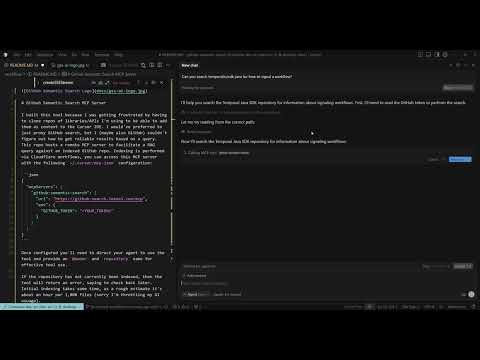
- Configure the MCP server in your IDE (see workflow README for setup instructions).
- Use the semantic search tool by providing
@ownerandrepositoryparameters. - If a repository hasn’t been indexed yet, check back later as initial indexing takes time.
Features
- Semantic code search across GitHub repositories
- Support for private repositories
- Integration with VSCode and other MCP-compatible tools
- Cloudflare-powered backend for scalability
For detailed installation, deployment, and usage instructions, refer to the README files in each component directory.
安装
This server does not publish a one-line install command.
Open the repository installation guide 新手?先看 mcpskill.org 教程 →配置
{
  "mcpServers": {
    "github-semantic-search-server": {
      "type": "streamable-http",
      "url": "https://github-search.lokeel.com/mcp",
      "headers": {
        "GITHUB_TOKEN": "<YOUR_TOKEN>"
      }
    }
  }
}