
将错误截图打包成 MCP 服务器的 AI 修复说明
概览
30秒内将错误截图打包成AI准备修复说明 快速入门 ·MCP配置 ·OpenClaw ·功能 ·集成 BugPack 是一款将错误截图打包成结构化、AI兼容修复说明的工具。 QA会在聊天中发布截图→你用Ctrl+V粘贴到BugPack→注释问题→生成结构化指令→反馈给你的AI编码代理。 或者完全跳过复制粘贴:BugPack 内置的 AI 编码工具支持任何兼容 MCP 的 AI 编程工具(Claude Code、Cursor、Windsurf、Cline 等)。 人工智能编码代理改变了我们写代码的方式,但没有改变我们写代码的方式。 每个漏洞修复仍然要求:保存截图→创建文件→写路径→描述问题→粘贴到AI。每天10个bug=。 - >= 18 - — Windows / macOS / Linux - — Chrome / Edge / Firefox(推荐使用 Chrome)
概述(AI 翻译)
漏洞包
30秒内将错误截图打包成AI准备修复说明
快速入门 ·MCP配置 ·OpenClaw ·功能 ·集成
英文 |中文
什么是虫包?
BugPack 是一款本地优先工具,将错误截图打包成结构化、AI准备好的修复说明。
QA会在聊天中发布截图→你Ctrl+V粘贴到BugPack→注释问题→生成结构化指令→输入给你的AI编码代理。
或者完全跳过复制粘贴:BugPack 内置的 MCP 服务器允许任何兼容 MCP 的 AI 编码工具(Claude Code、Cursor、Windsurf、Cline 等)自动读取 bug 上下文并修复代码。
为什么是虫群?
AI编码代理改变了我们写代码的方式,但并没有改变我们传达错误上下文的方式。
每个修复错误仍然需要:保存截图→创建文件→写路径→描述问题→粘贴到AI。 每天10个虫子 = 1-2小时的纯重复。
BugPack将此压缩为30秒。
要求
- Node.js >= 18
- OS — Windows / macOS / Linux
- 浏览器 — Chrome / Edge / Firefox(推荐使用 Chrome)
快速启动
本页由 AI 翻译,技术细节请以原文为准。
README
以下为原文 README 节选,完整内容请查看原文。
BugPack
Package bug screenshots into AI-ready fix instructions in 30 seconds
Quick Start · MCP Config · OpenClaw · Features · Integrations
English | 中文
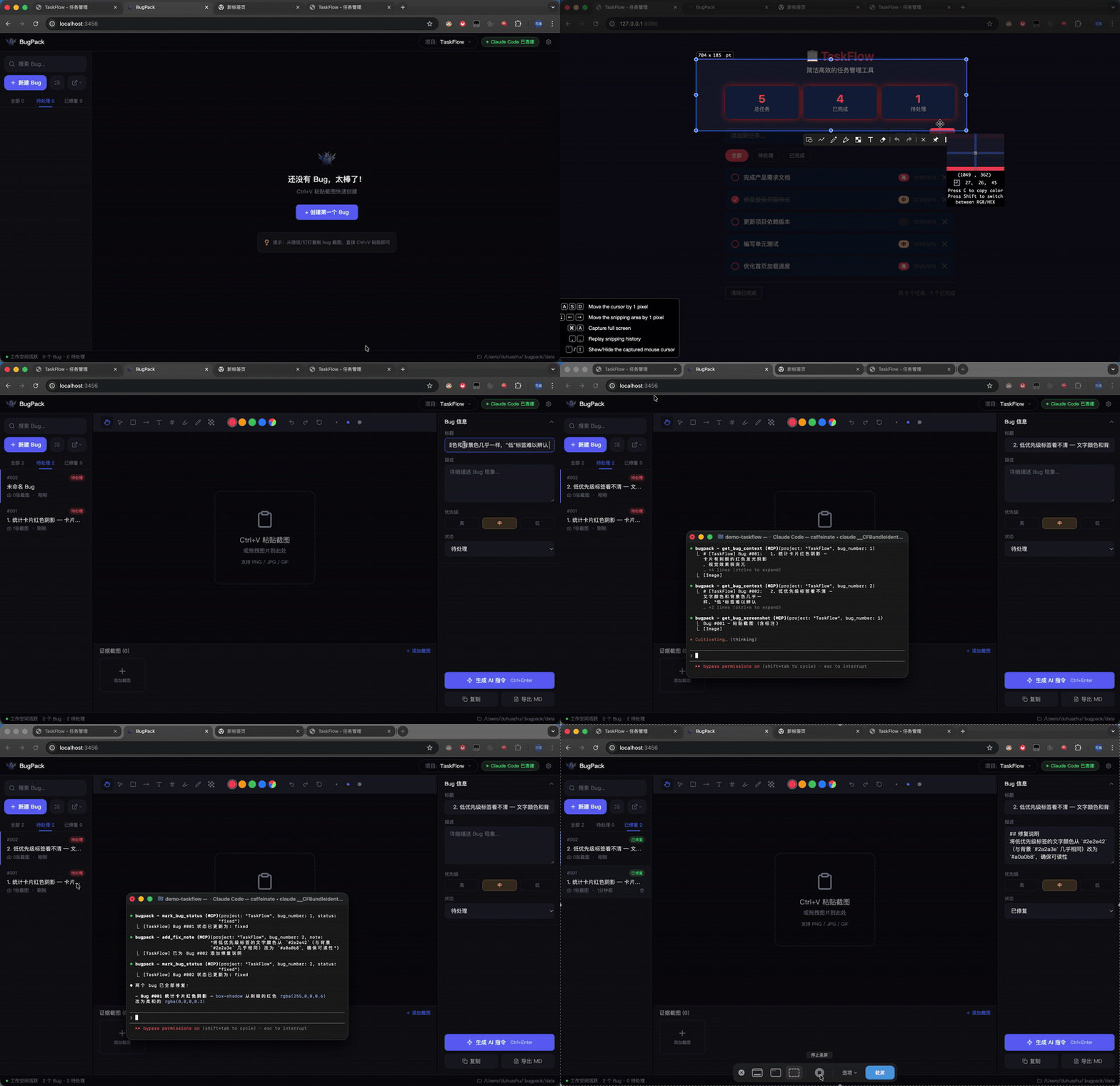
What is BugPack?
BugPack is a local-first tool that packages bug screenshots into structured, AI-ready fix instructions.
QA drops a screenshot in the chat → you Ctrl+V paste it into BugPack → annotate the issue → generate structured instructions → feed them to your AI coding agent.
Or skip the copy-paste entirely: BugPack’s built-in MCP Server lets any MCP-compatible AI coding tool (Claude Code, Cursor, Windsurf, Cline, etc.) read bug context and fix code automatically.
Why BugPack?
AI coding agents changed how we write code, but not how we communicate bug context.
Every bug fix still requires: save screenshot → create file → write paths → describe the issue → paste to AI. 10 bugs a day = 1-2 hours of pure repetition.
BugPack compresses this to 30 seconds.
Requirements
- Node.js >= 18
- OS — Windows / macOS / Linux
- Browser — Chrome / Edge / Firefox (Chrome recommended)
Quick Start
npx bugpack-mcp
Open http://localhost:3456 and Ctrl+V your first bug screenshot to get started.
MCP Configuration
BugPack works with any MCP-compatible AI coding tool. Here are common examples — configure other tools the same way.
Claude Code — add to ~/.claude.json:
{
  "mcpServers": {
    "bugpack": {
      "type": "stdio",
      "command": "npx",
      "args": ["bugpack-mcp", "--mcp"]
    }
  }
}
Cursor (.cursor/mcp.json):
{
  "mcpServers": {
    "bugpack": {
      "command": "npx",
      "args": ["bugpack-mcp", "--mcp"]
    }
  }
}
安装
npx bugpack-mcp --mcp配置
{
  "mcpServers": {
    "bugpack": {
      "type": "stdio",
      "command": "npx",
      "args": ["bugpack-mcp", "--mcp"]
    }
  }
}