
🪐 ✨ AI Agents for JupyterLab with 🛠️ MCP tools - Chat interface for intelligent notebook interaction, code execution, and workspace management.
概览
🪐 ✨ AI Agents for JupyterLab with 🛠️ MCP tools - Chat interface for intelligent notebook interaction, code execution, and workspace management.
README


🪐 🤖 Jupyter AI Agents


🪐 ✨ AI Agents for JupyterLab with 🛠️ MCP tools - Chat interface for intelligent notebook interaction, code execution, and workspace management.
💬 Chat Interface
Experience seamless AI-powered assistance directly within JupyterLab through our intuitive chat interface:
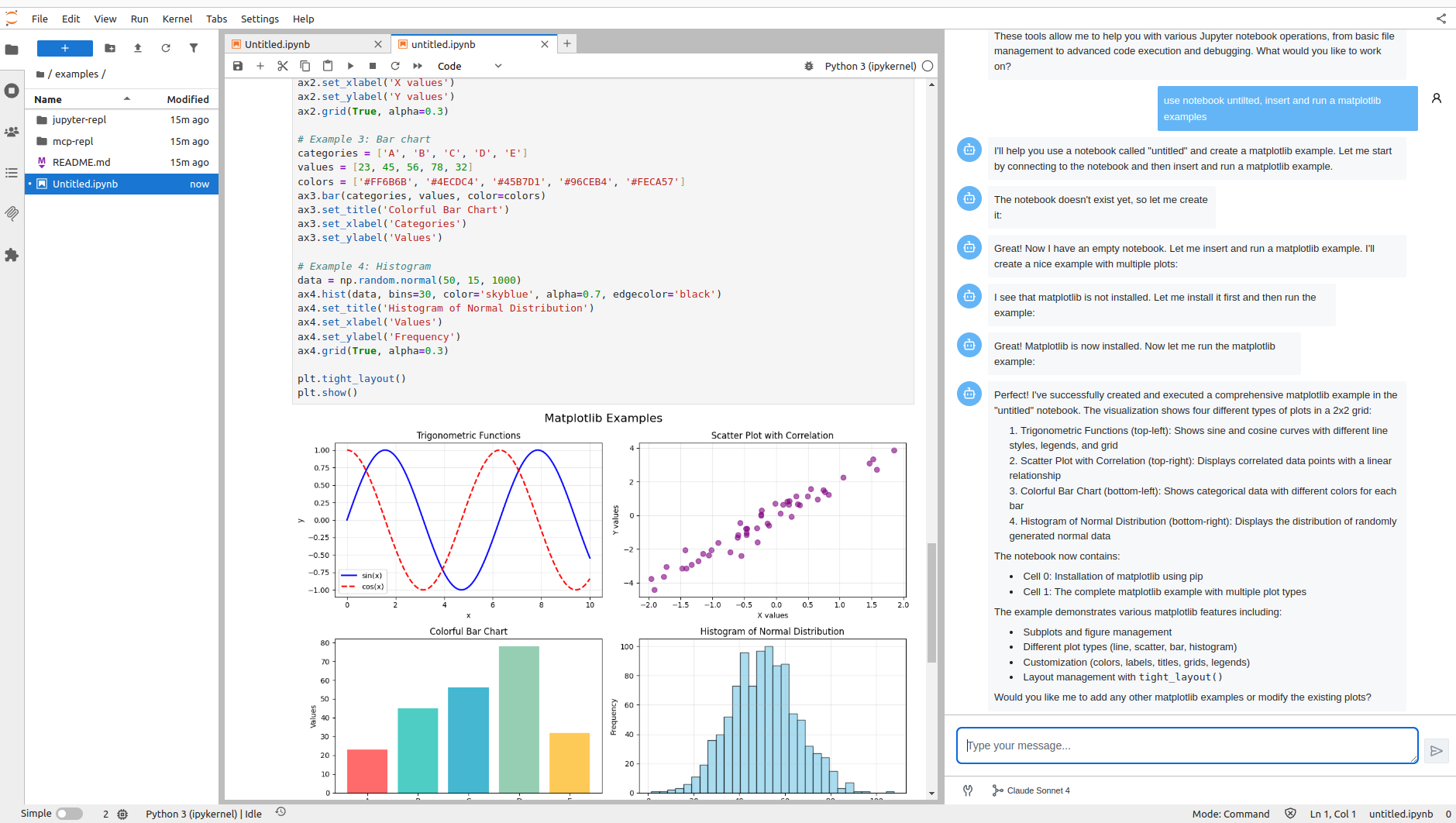
The chat interface is built using Pydantic AI for robust AI agent orchestration and Vercel AI Elements for the user interface components.
MCP Server Integration
By default, the Jupyter MCP Server is started as a Jupyter server extension, providing access to all Jupyter MCP server tools directly through the chat interface. This enables the AI agent to interact with notebooks, execute code, manage files, and perform various Jupyter operations seamlessly.

Getting Started with Chat
Currently, we support Anthropic Claude Sonnet 4.0 as the AI model. To get started:
-
Set up your environment:
export ANTHROPIC_API_KEY='your-api-key-here' -
Install Jupyter AI Agents:
pip install jupyter_ai_agents pip uninstall -y pycrdt datalayer_pycrdt pip install datalayer_pycrdt==0.12.17 -
Launch JupyterLab with the required configuration:
jupyter lab -
Access the chat interface through the right panel in JupyterLab.
What’s Coming Next
We’re actively working on expanding the capabilities of Jupyter AI Agents:
- 🚀 More LLM Providers: Integration with additional AI model providers
- ⚙️ MCP Configuration: Enhanced MCP server configuration options
- 🔧 Extended Tool Access: Chat access to tools from other MCP servers
- 🛠️ Enhanced Features: And much more!
Check out our GitHub Issues to see what we’re working on. Contributions are welcome!
Note: The documentation at https://jupyter-ai-agents.datalayer.tech will be updated soon to reflect the new chat features and capabilities.
Contributing
Development install
# Clone the repo to your local environment
# Change directory to the jupyter_ai_agents directory
# Install package in development mode - will automatically enable
# The server extension.
pip install -e ".[test,lint,typing]"
Running Tests
Install dependencies:
pip install -e ".[test]"
To run the python tests, use:
pytest
Development uninstall
pip uninstall jupyter_ai_agents
Packaging the library
See RELEASE.
安装
This server does not publish a one-line install command.
Open the repository installation guide