
本地优先安全扫描器、MCP协议检查器、动态模糊器、Docker沙箱以及用于模型上下文协议服务器的报告生成器。
概览
本地优先的安全扫描器、MCP协议检查器、动态模糊器、Docker沙盒以及服务器报告生成器。 MCP-Fence 是一个开发者工具。把它指向你的mcp.json(或你编写的任何运行中的 MCP 服务器),它会: 1. 工具中毒、危险启动命令、明文秘密、模式漏洞和未认证的HTTP传输的配置和源代码。2. 服务器运行于Stdio之上——运行初始化、工具/列表,收集模式/注释。3. 所有具备模式感知载荷的工具(路径遍历、命令注入、SSRF、提示注入、超大输入、类型混淆)。默认安全;通过--toy-mode或--allow-unsafe选择使用运行时负载。4. 任何带有合理配置文件(严格、文件系统唯读、网络拒绝、开发)的Docker中Stdio服务器。5. 发现结果以明文表、JSON、SARIF 2.1.0(用于GitHub代码扫描)或完全离线HTML页面的形式。 它是 , ,使用 。可选的本地 LLM 法官可以与本地 Ollama 或兼容 OpenAI 的端点通信。
概述(AI 翻译)
本地优先安全扫描器、MCP协议检测器、动态震动器, Docker 沙箱,以及 模型上下文协议的报表生成器 服务器。
mcp-fence 是一个显影工具。把它指向你的 mcp.json(或任何一个)
运行你编写的MCP服务器),它会:
- 静态扫描配置和工具中毒源, 危险的启动命令、明文秘密、模式间隙,以及 未认证的HTTP传输。
- 检查服务器在stdio上实时运行——运行
initialize,tools/list,收集模式/注释。 - 模糊所有具有模式感知有效载荷的工具(路径遍历,
命令注入,SSRF,提示注入,超大输入,类型
混淆)。默认安全;通过以下方式选择使用运行时有效载荷
--toy-mode或--allow-unsafe。 - 沙盒任何带有合理配置文件的Docker标准服务器
(
strict, [[T7],network-deny,dev)。 - 报告结果为明文表,JSON,SARIF 2.1.0(用于 GitHub代码扫描),或者完全离线的HTML页面。
它是非破坏性的,本地优先,并且没有使用云LLM’ 默认。可选的本地LLM法官可以与本地Ollama对话,或者 兼容OpenAI的终端。
安装
本页由 AI 翻译,技术细节请以原文为准。
README
以下为原文 README 节选,完整内容请查看原文。
Local-first security scanner, MCP protocol inspector, dynamic fuzzer, Docker sandbox, and report generator for Model Context Protocol servers.
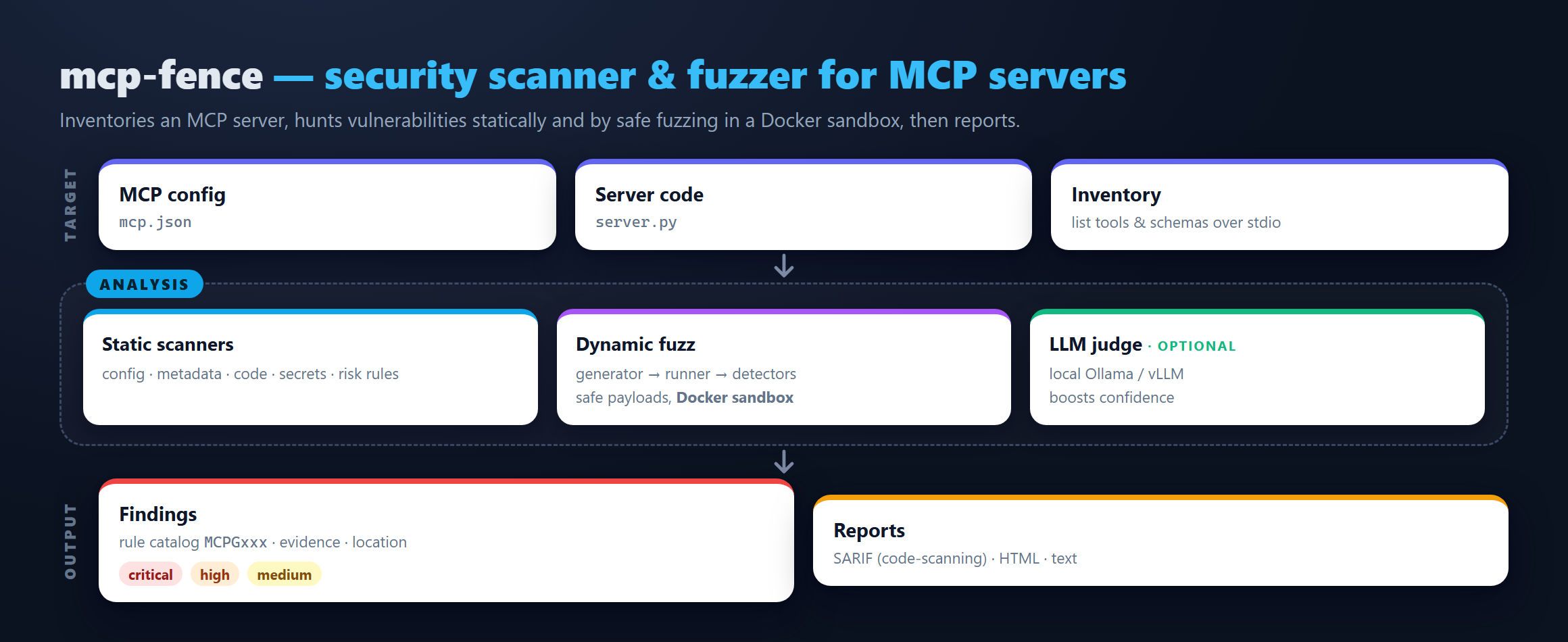
mcp-fence is a developer tool. Point it at your mcp.json (or any
running MCP server you wrote) and it will:
- Statically scan the config and source for tool poisoning, dangerous startup commands, plaintext secrets, schema gaps, and unauthenticated HTTP transports.
- Inspect the server live over stdio — runs
initialize,tools/list, gathers schemas/annotations. - Fuzz every tool with schema-aware payloads (path traversal,
command injection, SSRF, prompt injection, oversize input, type
confusion). Safe by default; opt in to runtime payloads via
--toy-modeor--allow-unsafe. - Sandbox any stdio server in Docker with sensible profiles
(
strict,filesystem-readonly,network-deny,dev). - Report findings as a plain-text table, JSON, SARIF 2.1.0 (for GitHub code scanning), or a fully offline HTML page.
It is non-destructive, local-first, and uses no cloud LLM by default. An optional local-LLM judge can talk to a local Ollama or OpenAI-compatible endpoint.
Install
From PyPI:
pip install mcp-fence
From source (for contributors):
git clone https://github.com/DaoyuanLi2816/mcp-fence
cd mcp-fence
python -m venv .venv
source .venv/bin/activate          # Windows: .venv\Scripts\activate
python -m pip install -e ".[dev]"
Requires Python 3.11+.
30-second quickstart
# 1. Bring up the bundled examples in your working directory.
mcp-fence init-example ./mcp-fence-examples

# 2. Static scan the intentionally poisoned metadata server.
mcp-fence scan mcp-fence-examples/vulnerable_metadata_server/mcp.json

# 3. Live-inspect the safe baseline.
mcp-fence inspect mcp-fence-examples/safe_server/mcp.json

# 4. Fuzz the arbitrary-file-read server.
mcp-fence fuzz mcp-fence-examples/vulnerable_filesystem_server/mcp.json

# 5. Generate a `docker run` command that sandboxes any of the above.安装
This server does not publish a one-line install command.
Open the repository installation guide 新手?先看 mcpskill.org 教程 →