
用于Keycloak用户管理的MCP服务器实现。通过模型上下文协议(MCP),实现由AI驱动的Keycloak用户和领域管理。
概览
一个用于Keycloak管理的模型上下文协议服务器,提供管理用户和领域的工具。 - 在特定领域创建新用户 - 删除领域内用户 - 列出可用领域 - 在特定领域中列出用户 要通过Smithery自动安装Claude Desktop的Keycloak: 该服务器以NPM包形式提供: 如果你想开发或修改服务器: 在你的Claude Desktop配置文件中配置服务器: 在指定领域创建新用户。 : - 领域:领域名称 - 用户名:新用户的用户名 - 邮箱:用户邮箱地址 - 名字:用户名字 - 姓氏:用户姓氏
概述(AI 翻译)
一个用于Keycloak管理的模型上下文协议服务器,提供管理用户和领域的工具。
特色
- 在特定领域创建新用户
- 从领域删除用户
- 列表可用领域
- 列出特定领域的用户
安装
通过Smithery安装
要通过Smithery自动安装Claude Desktop的Keycloak:
通过NPM(推荐)
该服务器以NPM包形式提供:
本地开发设置
如果你想开发或修改服务器:
配置
使用 NPM 软件包(推荐)
在你的Claude Desktop配置文件中配置服务器:
为地方发展
可用工具
创建用户
在指定领域创建新用户。
输入:
realm:域名username:新用户名email:用户邮箱地址firstName:用户名字lastName:用户姓氏
删除用户
删除指定领域的用户。
输入:
realm:王国名称userId:需删除用户的ID。
列表领域
列出所有可用的领域。
列表用户
列出指定领域内的所有用户。
输入:
realm:王国名称
发展
本页由 AI 翻译,技术细节请以原文为准。
README
以下为原文 README 节选,完整内容请查看原文。
Keycloak MCP Server


A Model Context Protocol (MCP) server for Keycloak administration. It lets an AI assistant such as Claude manage users, groups, roles and sessions, and inspect clients, events and the security posture of your realms, through the Keycloak Admin REST API, with least-privilege authentication and guardrails around every write.
[!WARNING] This server acts with the permissions of the Keycloak account you give it. Use a dedicated service-account client with only the roles you need, never the bootstrap admin. Every tool that changes data asks for confirmation by default, and a read-only mode is available. See Security.
Highlights
- 24 tools in 7 toolsets, enabled per toolset. The default set (
core,groups,roles) is small; everything else is opt-in. - Least-privilege auth.
client_credentialswith a service account is the recommended grant; the password grant stays available. No credential defaults, so a missing setting fails fast. - Guardrails. Read-only mode, realm allowlist, write protection for the
masterrealm, and a preview-then-confirm: trueflow for every change. Grants of administrative rights are detected through composite roles and parent groups. - 4 guided prompts (onboarding, offboarding, security audit, failed-login investigation) and MCP resources for realms and users, with realm-name completion.
- Structured, paginated output with output schemas; secrets and credentials are never returned or logged.
- Works with Claude Desktop, Claude Code, VS Code, Cursor and any stdio MCP client. Requires Node.js 22 or newer.
How it works
Your MCP client starts the server as a local child process and talks to it over stdio. Every tool call passes the guards, then goes through a single gateway that owns the Keycloak login and caches the access token.
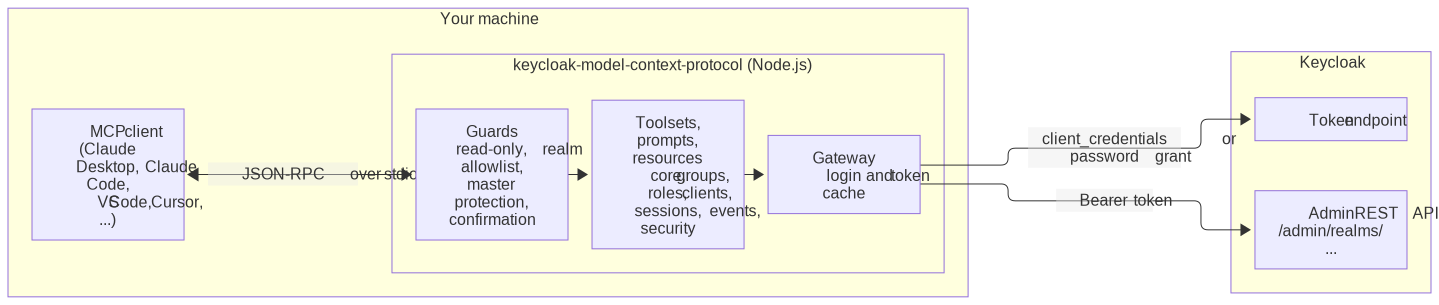
What a confirmed call looks like
安装
npx -y keycloak-model-context-protocol@1配置
{
  "mcpServers": {
    "keycloak": {
      "command": "npx",
      "args": ["-y", "keycloak-model-context-protocol@1"],
      "env": {
        "KEYCLOAK_URL": "https://keycloak.example.com",
        "KEYCLOAK_AUTH_REALM": "demo",
        "KEYCLOAK_CLIENT_ID": "mcp-admin",
        "KEYCLOAK_CLIENT_SECRET": "<client-secret>"
      }
    }
  }
}