
biegehydra/bifrostmcp 是从 https://github.com/biegehydra/bifrostmcp. 导入的 MCP 服务器候选人。
概览
biegehydra/bifrostmcp 是从 https://github.com/biegehydra/bifrostmcp. 导入的 MCP 服务器候选人。
概述(AI 翻译)
该 VS Code 扩展提供了一个模型上下文协议(MCP)服务器,向 AI 工具展示 VSCode 强大的开发工具和语言特性。当使用 AI 编码助手支持 MCP 协议时,它实现了高级代码导航、分析和操作能力。
目录
- 特色
- 安装/使用
- 多项目支持
- 可用工具
- 可用命令
- 故障排除
- 贡献
- 调试
- 许可证
特色
- 语言服务器集成:访问VSCode支持的任何语言服务器功能
- 代码导航:查找参考文献、定义、实现等
- 符号搜索:在工作区内搜索符号
- 代码分析:获取语义标记、文档符号和类型信息
- 智能选择:使用语义选择范围进行智能代码选择
- 代码操作:访问重构建议和快速修复
- HTTP/SSE 服务器:通过兼容 MCP 的 HTTP 服务器暴露语言特性
- AI 助手集成:准备与支持 MCP 协议的 AI 助手协作
用途
安装
本页由 AI 翻译,技术细节请以原文为准。
README
以下为原文 README 节选,完整内容请查看原文。
Bifrost - VSCode Dev Tools MCP Server
This VS Code extension provides a Model Context Protocol (MCP) server that exposes VSCode’s powerful development tools and language features to AI tools. It enables advanced code navigation, analysis, and manipulation capabilities when using AI coding assistants that support the MCP protocol.
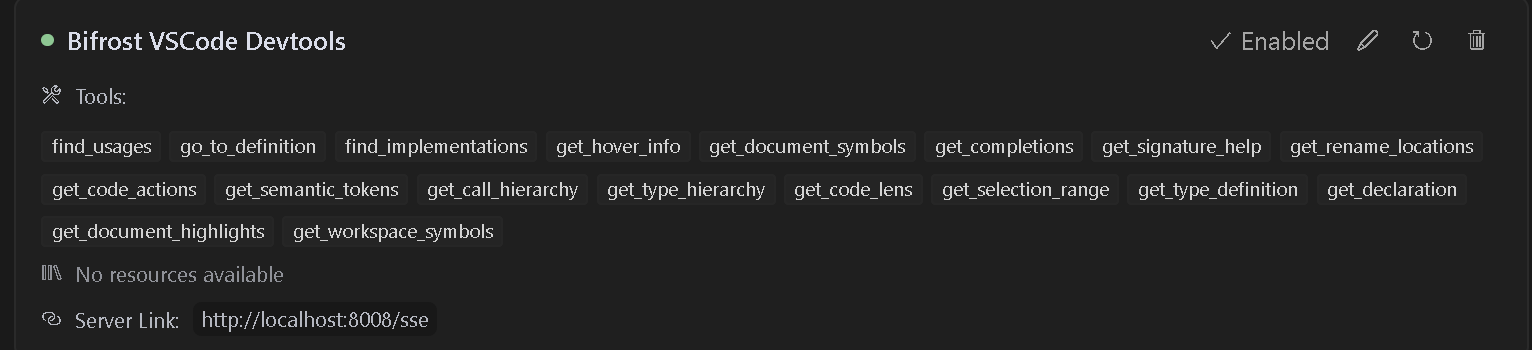
Table of Contents
- Features
- Installation/Usage
- Multi-Project Support
- Available Tools
- Available Commands
- Troubleshooting
- Contributing
- Debugging
- License
Features
- Language Server Integration: Access VSCode’s language server capabilities for any supported language
- Code Navigation: Find references, definitions, implementations, and more
- Symbol Search: Search for symbols across your workspace
- Code Analysis: Get semantic tokens, document symbols, and type information
- Smart Selection: Use semantic selection ranges for intelligent code selection
- Code Actions: Access refactoring suggestions and quick fixes
- HTTP/SSE Server: Exposes language features over an MCP-compatible HTTP server
- AI Assistant Integration: Ready to work with AI assistants that support the MCP protocol
Usage
Installation
- Install the extension from the VS Code marketplace
- Install any language-specific extensions you need for your development
- Open your project in VS Code
Configuration
The extension will automatically start an MCP server when activated. To configure an AI assistant to use this server:
- The server runs on port 8008 by default (configurable with
bifrost.config.json) - Configure your MCP-compatible AI assistant to connect to:
- SSE endpoint:
http://localhost:8008/sse - Message endpoint:
http://localhost:8008/message
- SSE endpoint:
LLM Rules
I have also provided sample rules that can be used in .cursorrules files for better results.
Cline Installation
- Step 1. Install Supergateway
- Step 2. Add config to cline
- Step 3. It will show up red but seems to work fine
Windows Config
{
  "mcpServers": {
    "Bifrost": {
      "command": "cmd",
"args": [安装
npx -y supergateway --sse http://localhost:8008/sse配置
{
  "mcpServers": {
    "Bifrost": {
      "command": "cmd",
      "args": [
        "/c",
        "npx",
        "-y",
        "supergateway",
        "--sse",
        "http://localhost:8008/sse"
      ],
      "disabled": false,
      "autoApprove": [],
      "timeout": 600
    }
  }
}