
:该软件处于开发早期阶段,可能存在缺陷。请在 github.com/aws-samples/sample-drawio-mcp/issues 开启问题——我们欢迎报告错误并接受PR。
概览
:该软件处于开发早期阶段,可能存在缺陷。请在 github.com/aws-samples/sample-drawio-mcp/issues 开启问题——我们欢迎报告错误并接受PR。 利用AI助手程序化地创建、阅读并更新 draw.io 图表。 draw.io MCP 服务器使 AI 助手能够通过自然语言在你的本地计算机上构建技术图。请求 AWS 架构图、流程图或网络拓扑——并观看它们以 draw.io 格式呈现。 该项目由两个主要组成部分组成: - - 一个操作 mxGraph XML 结构的 JavaScript/TypeScript 库- - 一个向 AI 助手开放图表操作的模型上下文协议服务器 JSAPI 独立于 draw.io 或 mxGraph 运行时依赖,既能在Node.js环境下工作,也可在浏览器环境中运行。 所有操作完全在你的本地机器上运行。不会通过网络传输图表数据、遥测数据或信息。
概述(AI 翻译)
[!警告] Pre Alpha Software:该软件处于开发早期阶段,可能存在缺陷。 请在 github.com/aws-samples/sample-drawio-mcp/issues 上发布问题——我们欢迎报告错误并接受永久居民。
利用AI助手程序化地创建、阅读并更新 draw.io 图表。
🚀 这是什么?
draw.io MCP 服务器使 AI 助手能够通过自然语言在你的本地计算机上构建技术图。请求 AWS 架构图、流程图或网络拓扑——并观看它们以 draw.io 格式呈现。
🏗️ 建筑
该项目由两个主要组成部分组成:
- DrawIO JSAPI——一个操作 mxGraph XML 结构的 JavaScript/TypeScript 库
- MCP 服务器 - 一个模型上下文协议服务器,向 AI 助手展示图表操作
JSAPI 独立于 draw.io 或 mxGraph 运行时依赖,既能在Node.js环境下工作,也可在浏览器环境中运行。
🔒 隐私第一
所有操作完全在你的本地机器上运行。不会通过网络传输图表数据、遥测数据或信息。
✨ 主要特色
本页由 AI 翻译,技术细节请以原文为准。
README
以下为原文 README 节选,完整内容请查看原文。
🎨 Draw.io MCP Server
[!WARNING] Pre-Release Alpha Software: This software is in an early stage of development and may contain defects. Please open issues at github.com/aws-samples/sample-drawio-mcp/issues — we welcome bug reports and accept PRs.
Create, read, and update draw.io diagrams programmatically using AI assistants.
🚀 What is This?
The draw.io MCP server enables AI assistants to build technical diagrams on your local computer through natural language. Ask for an AWS architecture diagram, a flowchart, or a network topology—and watch it appear in draw.io format.
🏗️ Architecture
The project consists of two main components:
- DrawIO JSAPI - A JavaScript/TypeScript library that manipulates mxGraph XML structures
- MCP Server - A Model Context Protocol server that exposes diagram operations to AI assistants
The JSAPI operates independently of draw.io or mxGraph runtime dependencies, working in both Node.js and browser environments.
🔒 Privacy First
All operations run entirely on your local machine. No diagram data, telemetry, or information is transmitted over the network.
✨ Key Features
- 📊 Create architecture diagrams with AWS, Kubernetes, and more icons!
- 🔄 Programmatically modify existing diagrams
- 🎯 Natural language diagram creation through AI assistants
- 🌐 Works in Node.js and browser environments
- 🔐 100% local operation with no network dependencies
🎯 Quick Example
You: "Create an AWS serverless architecture diagram with CloudFront, API Gateway,
container-based Lambda (pulling from ECR), connecting to Aurora PostgreSQL,
OpenSearch, S3, and Bedrock. Include Cognito for authentication, IAM roles,
and CodePipeline for deployment. Show the VPC and private subnet structure."

AI: [Generates a properly formatted draw.io diagram with official AWS icons]
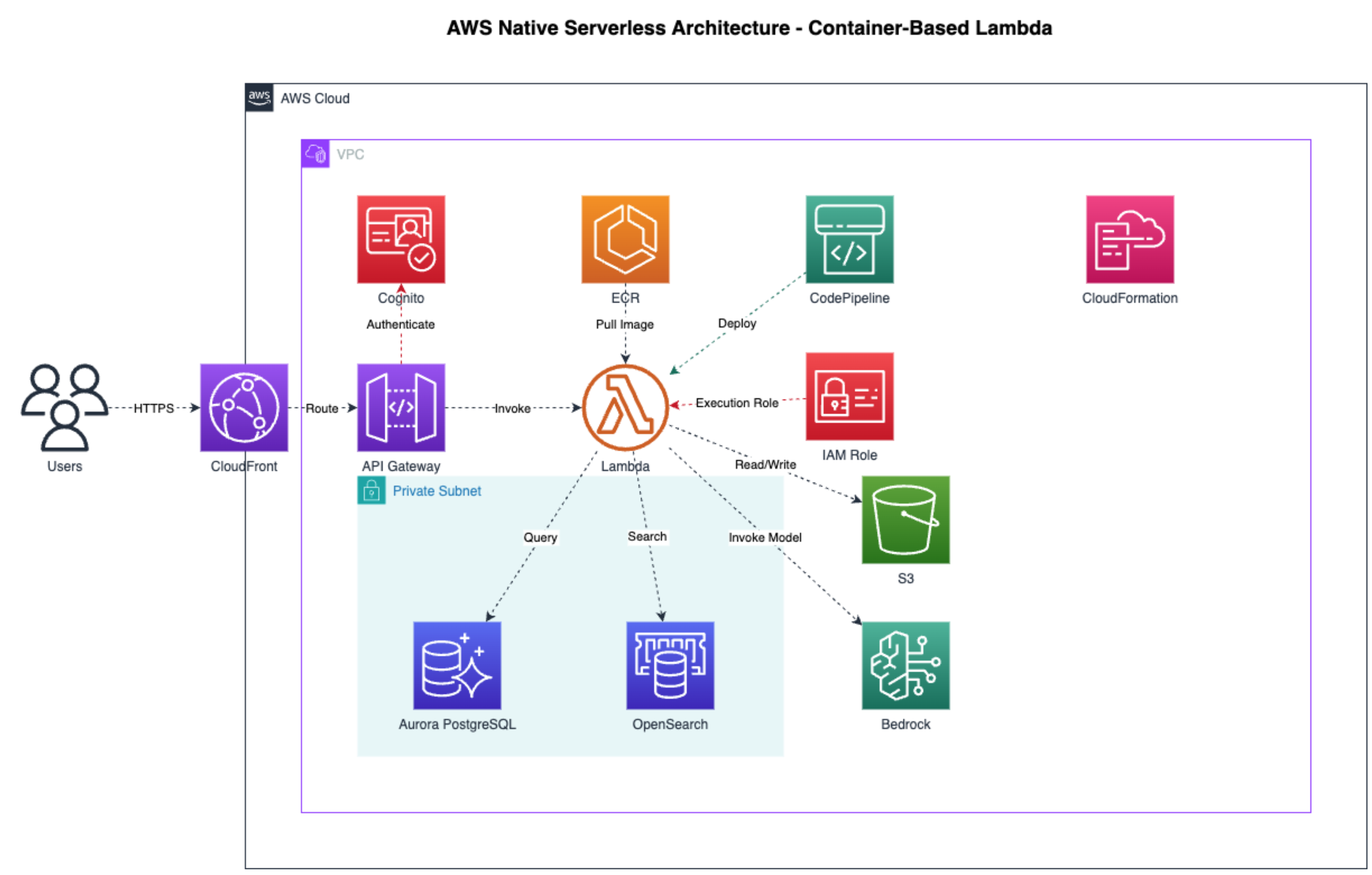
Example AWS architecture diagram generated by the MCP server. The resulting .drawio file can be edited manually in draw.io or programmatically by AI assistants like Kiro.
Getting Started
MCP Client Configuration
Add to your MCP client config (Claude Desktop, Claude Code, Kiro):
{
  "mcpServers": {
    "drawio": {
      "command": "npx",
      "args": [
        "-y",
        "https://github.com/aws-samples/sample-drawio-mcp/releases/latest/download/drawio-mcp-server-latest.tgz",
        "--no-cache"
      ],
      "type": "stdio"
    }
  }
}
See the full Installation Guide for version pinning, platform-specific config paths, and building from source.
📚 Documentation
- JSAPI - JavaScript API documentation for programmatic diagram creation
安装
npx -y https://github.com/aws-samples/sample-drawio-mcp/releases/latest/download/drawio-mcp-server-latest.tgz --no-cache配置
{
  "mcpServers": {
    "drawio": {
      "command": "npx",
      "args": [
        "-y",
        "https://github.com/aws-samples/sample-drawio-mcp/releases/latest/download/drawio-mcp-server-latest.tgz",
        "--no-cache"
      ],
      "type": "stdio"
    }
  }
}