
ami3466/tomcp 是从 https://github.com/ami3466/tomcp. 导入的 MCP 服务器候选
概览
ami3466/tomcp 是从 https://github.com/ami3466/tomcp. 导入的 MCP 服务器候选
概述(AI 翻译)
将任何网站变成MCP服务器
快速开始
在任何URL前加上tomcp.org/:
那个地址是MCP服务器。把它添加到你的客户端,或者把URL粘贴到 tomcp.org。
为什么要去MCP?
特定API常常引发AI幻觉,且网页搜索不可靠。该工具允许您作为MCP服务器提供文档,直接让AI获得所需的清晰上下文,无需手动复制粘贴。
标准的web_fetch工具会将原始HTML导入AI的上下文——导航栏、脚本、页脚和噪声。toMCP通过可读解析器处理页面,并用一小部分令牌转换为干净的markdown。
持久文档上下文
AI助手在缺乏文档时会产生错觉API细节。MCP资源被置顶为永久、只读上下文——模型不会跳过或遗忘它们。非常适合框架文档、API引用和内部团队文档。
web_fetch vs MCP 资源
| web_fetch | MCP资源 | |
|---|---|---|
| 数据 | 带噪声的原始 HTML | 干净的 markdown |
| 代币 | 高 | 低 |
| 持久性 | 按请求计算 | 始终可用 |
| 幻觉 | 更高 | 更低 |
本页由 AI 翻译,技术细节请以原文为准。
README
以下为原文 README 节选,完整内容请查看原文。
toMCP
Turn any website into an MCP server
Quick start
Put tomcp.org/ in front of any URL:
https://tomcp.org/docs.stripe.com
That address is an MCP server. Add it to your client, or paste the URL at tomcp.org instead.
Why toMCP?
specific APIs often cause AI hallucinations, and web searching is unreliable. This tool lets you serve your documentation as an MCP server, giving the AI direct access to the clear context it needs without manual copy-pasting.
Standard web_fetch tools dump raw HTML into your AI’s context—navbars, scripts, footers, and noise. toMCP runs pages through a readability parser and converts to clean markdown, using a fraction of the tokens.
Persistent Documentation Context
AI assistants hallucinate API details when they lack documentation. MCP Resources are pinned as permanent, read-only context—the model won’t skip or forget them. Ideal for framework docs, API references, and internal team docs.
web_fetch vs MCP Resources
| web_fetch | MCP Resource | |
|---|---|---|
| Data | Raw HTML with noise | Clean markdown |
| Tokens | High | Low |
| Persistence | Per-request | Always available |
| Hallucination | Higher | Lower |
| JS Support | Full (SPAs / Dynamic) | Static Only (SSG) |
Demo
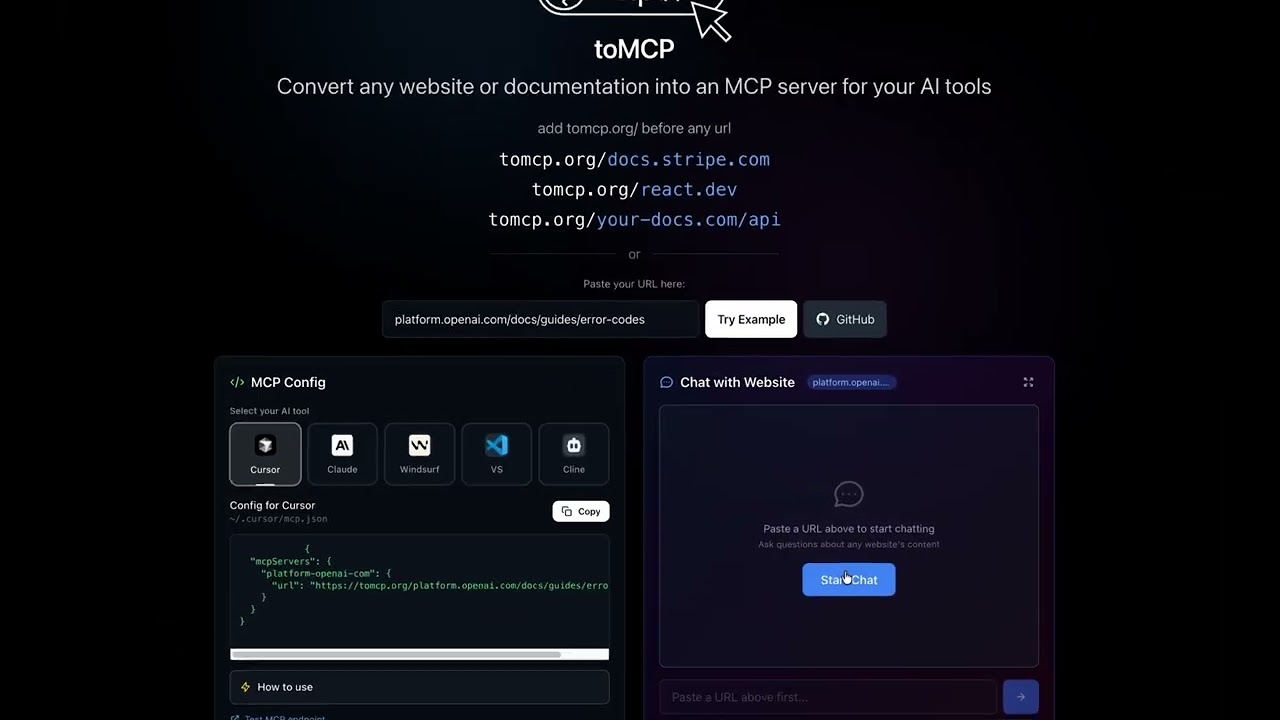
Supported AI Tools
- Cursor -
~/.cursor/mcp.json - Claude Desktop -
~/.claude/claude_desktop_config.json - Windsurf -
~/.codeium/windsurf/mcp_config.json - VS Code -
.vscode/mcp.json - Cline -
~/.cline/mcp_settings.json
How It Works
MCP Config
- Visit tomcp.org
- Enter any website URL
- Select your AI tool
- Copy the generated MCP config
- Add it to your tool’s config file
- Restart your AI tool
Chat
- Visit tomcp.org
- Paste any website URL
- Click “Start Chat”
- Ask questions about the website’s content
Example Config
{
  "mcpServers": {
    "docs-stripe-com": {
      "url": "https://tomcp.org/docs.stripe.com"
    }
  }
}
Chat API
curl -X POST https://tomcp.org/chat \
  -H "Content-Type: application/json" \
  -d '{"url": "docs.stripe.com", "message": "How do I create a payment intent?"}'
AI Models
Free Models (No API Key Required)
These models are available for everyone with no setup:
- Llama 3.1 8B (Meta) - Default model, fast and capable
- Hermes 2 Pro (NousResearch) - Great for reasoning
- Mistral 7B (Mistral) - Efficient instruction-following
- Gemma 7B LoRA (Google) - Lightweight and fast
paid Models (API Key Required)
Add your Cloudflare Workers AI API key to unlock these models:
- Llama 3.3 70B (Meta) - Most powerful Llama model
- DeepSeek R1 32B (DeepSeek) - Advanced reasoning
- Mistral Large (Mistral) - Enterprise-grade
安装
This server does not publish a one-line install command.
Open the repository installation guide 新手?先看 mcpskill.org 教程 →配置
{
  "mcpServers": {
    "docs-stripe-com": {
      "url": "https://tomcp.org/docs.stripe.com"
    }
  }
}