
一个简单的CLI来运行LLM提示符并实现MCP客户端。
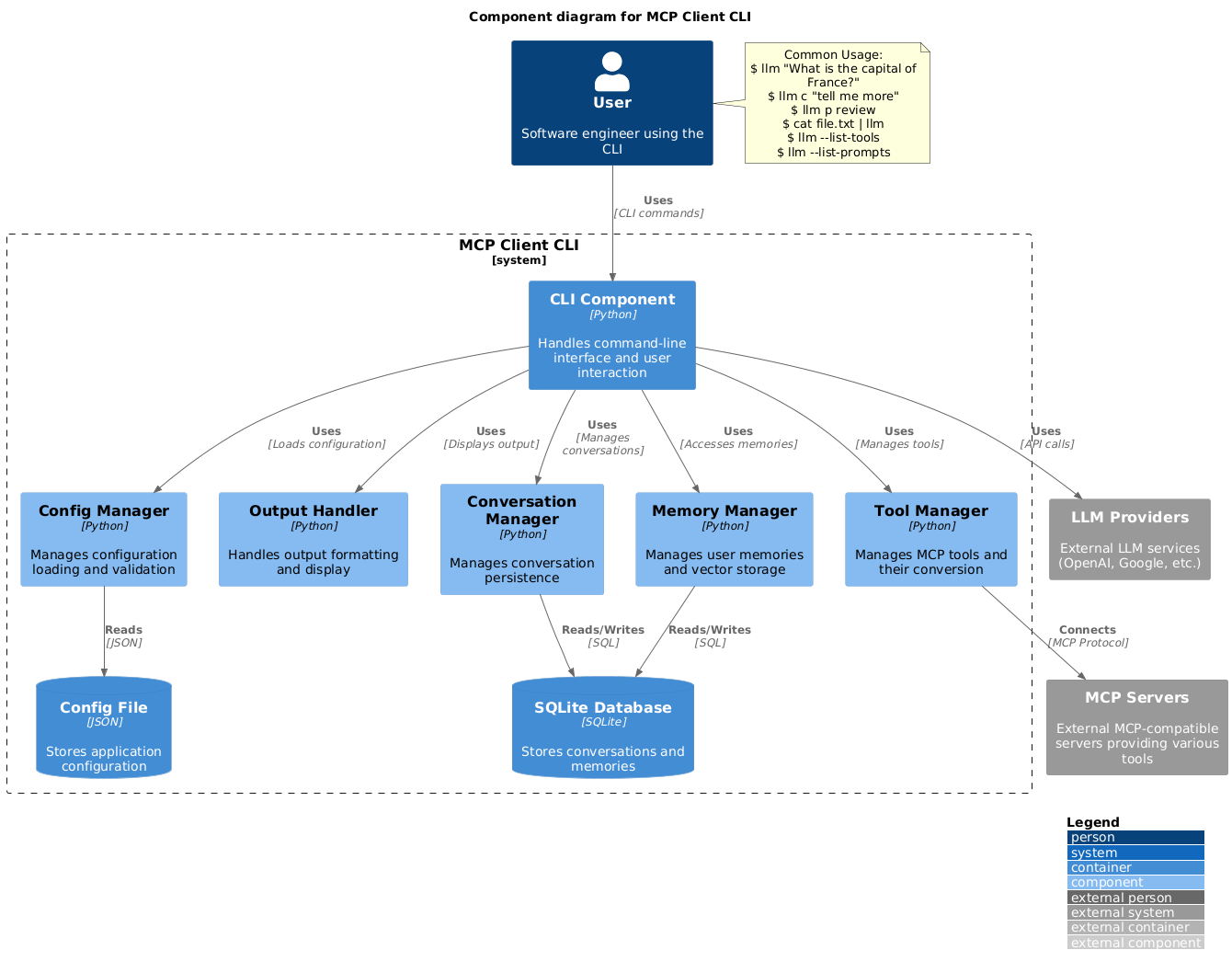
概览
一个简单的CLI程序,用于运行LLM提示符并实现模型上下文协议(MCP)客户端。 你可以在终端方便地使用任何兼容MCP的服务器。 它作为Claude Desktop之外的替代客户端。此外,你还可以使用任何LLM提供商,比如OpenAI、Groq,或者通过llama本地LLM模型。 2. 创建一个 ~/.llm/config.json 文件以配置你的 LLM 和 MCP 服务器: 注意:- 完整配置格式文档请参见 CONFIG.md - 使用requires_confirmation指定哪些工具执行前需要用户确认 - LLM API 密钥也可以通过环境变量 LLM_API_KEY 或 OPENAI_API_KEY 设置 - 配置文件可以放在 ~/.llm/config.json 或 $PWD/.llm/config.json 中 - 如果你喜欢切换配置,可以在 JSON 配置文件注释中加上 // 你可以省略引号,但要注意使用像 &、|、; 这样的 bash 特殊字符。这可能会被你的 shell 解读。
概述(AI 翻译)
一个简单的CLI程序,用于运行LLM提示符并实现模型上下文协议(MCP)客户端。
你可以在终端方便地使用任何兼容MCP的服务器。
它作为Claude Desktop之外的替代客户端。此外,你还可以使用任何LLM提供商,比如OpenAI、Groq,或者通过llama本地LLM模型。
布置
-
通过PIP安装:
-
创建一个
~/.llm/config.json文件来配置你的 LLM 和 MCP 服务器:
注:
- 完整配置格式文档请参见 CONFIG.md
- 使用
requires_confirmation指定哪些工具执行前需要用户确认 - LLM API 密钥也可以通过环境变量
LLM_API_KEY或OPENAI_API_KEY设置 - 配置文件可以放置在
~/.llm/config.json或$PWD/.llm/config.json - 如果你喜欢切换配置,可以用
//注释 JSON 配置文件
- 运行CLI:
用途
基本用法
你可以省略引号,但要注意像 &、|、; 这样的 bash 特殊字符,因为它们可能会被你的 shell 解读。
你也可以通过管道接收其他命令或文件的输入:
图像输入
你可以通过管道传输图像文件,用多模态大型语言模型进行分析:
本页由 AI 翻译,技术细节请以原文为准。
README
以下为原文 README 节选,完整内容请查看原文。
MCP CLI client
A simple CLI program to run LLM prompt and implement Model Context Protocol (MCP) client.
You can use any MCP-compatible servers from the convenience of your terminal.
This act as alternative client beside Claude Desktop. Additionally you can use any LLM provider like OpenAI, Groq, or local LLM model via llama.
Setup
-
Install via pip:
pip install mcp-client-cli -
Create a
~/.llm/config.jsonfile to configure your LLM and MCP servers:{ "systemPrompt": "You are an AI assistant helping a software engineer...", "llm": { "provider": "openai", "model": "gpt-4", "api_key": "your-openai-api-key", "temperature": 0.7, "base_url": "https://api.openai.com/v1" // Optional, for OpenRouter or other providers }, "mcpServers": { "fetch": { "command": "uvx", "args": ["mcp-server-fetch"], "requires_confirmation": ["fetch"], "enabled": true, // Optional, defaults to true "exclude_tools": [] // Optional, list of tool names to exclude }, "brave-search": { "command": "npx", "args": ["-y", "@modelcontextprotocol/server-brave-search"], "env": { "BRAVE_API_KEY": "your-brave-api-key" }, "requires_confirmation": ["brave_web_search"] }, "youtube": { "command": "uvx", "args": ["--from", "git+https://github.com/adhikasp/mcp-youtube", "mcp-youtube"] } } }Note:
- See CONFIG.md for complete documentation of the configuration format
- Use
requires_confirmationto specify which tools need user confirmation before execution - The LLM API key can also be set via environment variables
LLM_API_KEYorOPENAI_API_KEY - The config file can be placed in either
~/.llm/config.jsonor$PWD/.llm/config.json - You can comment the JSON config file with
//if you like to switch around the configuration
-
Run the CLI:
llm "What is the capital city of North Sumatra?"
Usage
Basic Usage
$ llm What is the capital city of North Sumatra?
The capital city of North Sumatra is Medan.
You can omit the quotes, but be careful with bash special characters like &, |, ; that might be interpreted by your shell.
You can also pipe input from other commands or files:
$ echo "What is the capital city of North Sumatra?" | llm
The capital city of North Sumatra is Medan.
$ echo "Given a location, tell me its capital city." > instructions.txt
$ cat instruction.txt | llm "West Java"
The capital city of West Java is Bandung.
Image Input
安装
uvx mcp-server-fetch配置
{
  "systemPrompt": "You are an AI assistant helping a software engineer...",
  "llm": {
    "provider": "openai",
    "model": "gpt-4",
    "api_key": "your-openai-api-key",
    "temperature": 0.7,
    "base_url": "https://api.openai.com/v1"  // Optional, for OpenRouter or other providers
  },
  "mcpServers": {
    "fetch": {
      "command": "uvx",
      "args": ["mcp-server-fetch"],
      "requires_confirmation": ["fetch"],
      "enabled": true,  // Optional, defaults to true
      "exclude_tools": []  // Optional, list of tool names to exclude
    },
    "brave-search": {
      "command": "npx",
      "args": ["-y", "@modelcontextprotocol/server-brave-search"],
      "env": {
        "BRAVE_API_KEY": "your-brave-api-key"
      },
      "requires_confirmation": ["brave_web_search"]
    },
    "youtube": {
      "command": "uvx",
      "args": ["--from", "git+https://github.com/adhikasp/mcp-youtube", "mcp-youtube"]
    }
  }
}