
abrinsmead/mindpilot-mcp 是从 https://github.com/abrinsmead/mindpilot-mcp. 导入的 MCP 服务器候选
概览
abrinsmead/mindpilot-mcp 是从 https://github.com/abrinsmead/mindpilot-mcp. 导入的 MCP 服务器候选
概述(AI 翻译)
通过你的代理的视角看世界。可视化遗留代码,检查复杂的流程,理解一切。
[!提示] Mindpilot 现已作为轻量级代理技能提供——无需本地 MCP 服务器。请你的代理绘制图表,它会构建一个自成一体的交互式美人鱼查看器,你可以在浏览器中打开或发布为 Claude 文物。
安装方式:
npx skills add abrinsmead/skills/mermaid-viewer
为什么是心灵驾驶?
- 可视化任何事物:使用你的编码代理生成按需的架构、代码和流程图,从不同角度查看代码。
- 氛围检查:AI生成的代码可以积累未使用的和冗余构件。利用可视化发现需要清理的区域。
- 本地处理:图解永远不会发送到云端。所有信息都只在你、你的代理和代理的大型语言模型提供者之间。
- 导出与分享:将任意图表导出为矢量图像。
先修条件
Node.js v20.0.0 或更高版本。
快速开始
克劳德·科德
claude mcp add mindpilot -- npx @mindpilot/mcp@latest
光标
本页由 AI 翻译,技术细节请以原文为准。
README
以下为原文 README 节选,完整内容请查看原文。
Mindpilot MCP


See through your agent’s eyes. Visualize legacy code, inspect complex flows, understand everything.
[!TIP] Mindpilot is now available as a lightweight agent skill—no local MCP server needed. Ask your agent to diagram something and it builds a self-contained, interactive Mermaid viewer you can open in your browser or publish as a Claude artifact.
Install with:
npx skills add abrinsmead/skills/mermaid-viewer
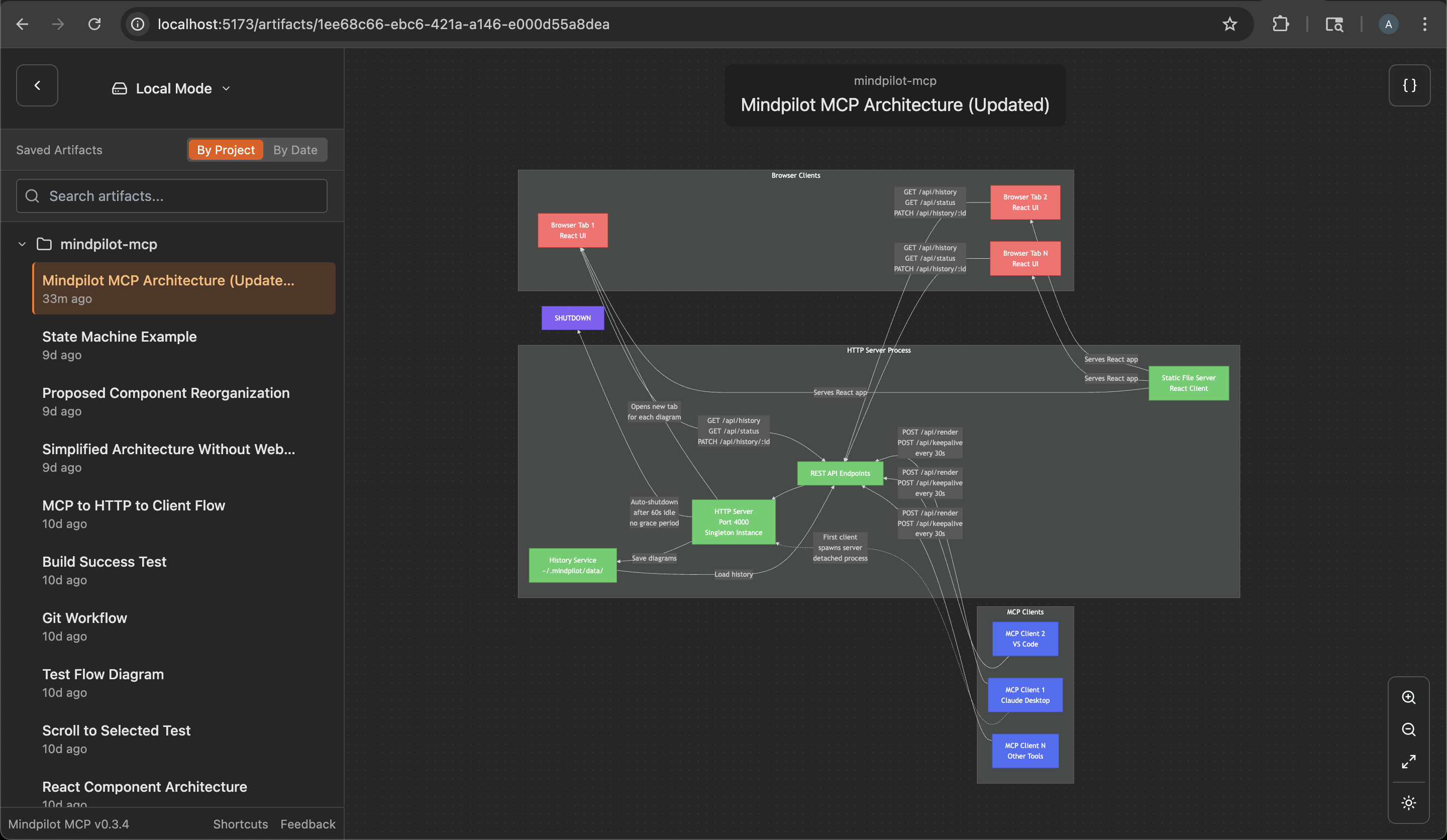
Why Mindpilot?
- Visualize Anything: Use your coding agent to generate on-demand architecture, code, and process diagrams to view your code from different perspectives.
- Vibe Checks: AI-generated code can accumulate unused and redundant constructs. Use visualizations to spot areas that need cleanup.
- Local Processing: Diagrams are never sent to the cloud. Everything stays between you, your agent, and your agent’s LLM provider(s).
- Export & Share: Export any diagram as a vector image.
Prerequisites
Node.js v20.0.0 or higher.
Quickstart
Claude Code
claude mcp add mindpilot -- npx @mindpilot/mcp@latest
Cursor
Under Settings > Cursor Settings > MCP > Click Add new global MCP server and configure mindpilot in the mcpServers object.
{
  "mcpServers": {
    "mindpilot": {
      "command": "npx",
      "args": ["@mindpilot/mcp@latest"]
    }
  }
}
VS Code
Follow the instructions here for enabling MCPs in VS Code: https://code.visualstudio.com/docs/copilot/chat/mcp-servers
Go to Settings > Features > MCP, then click Edit in settings json
Then add mindpilot to your MCP configuration:
{
  "mcp": {
    "servers": {
      "mindpilot": {
        "type": "stdio",
        "command": "npx",
        "args": ["@mindpilot/mcp@latest"]
      }
    }
  }
}
Windsurf
Under Settings > Windsurf Settings > Manage Plugins, click view raw config and configure mindpilot in the mcpServers object:
{
  "mcpServers": {
    "mindpilot": {
      "command": "npx",
      "args": ["@mindpilot/mcp@latest"]
    }
  }
}
Zed
In the AI Thread panel click on the three dots ..., then click Add Custom Server...
In the Command to run MCPserver field enter npx @mindpilot/mcp@latest and click Add Server.
Configuration Options
- Port: The server defaults to port 4000 but can be configured using the
--portcommand line switch.
安装
npx @mindpilot/mcp@latest