
maxcode917/full-stack-ai-agent-template
Developer toolsProduction-ready FastAPI + Next.js project generator with AI agents, RAG, and 20+ enterprise integrations.
Обзор
Production-ready FastAPI + Next.js project generator with AI agents, RAG, and 20+ enterprise integrations. Quick Start • Features • Demo • Documentation • Configurator • PyPI 🤖 5 AI Agent Frameworks (PydanticAI, PydanticDeep, LangChain, LangGraph, DeepAgents) 📄 RAG Pipeline (Milvus, Qdrant, pgvector, ChromaDB) ⚡ FastAPI + Next.js 15 (WebSocket streaming, real-time chat UI) 🔗 Conversation Sharing (direct sharing, public links, admin browser) 🔒 Enterprise-Ready (JWT, OAuth, admin panel, Celery, Docker, K8s) This template is part of a broader open-source ecosystem for production AI agents: pydantic-deepagents powers the deepagents framework option — install it standalone with curl -fsSL .../install.sh | bash. Use the Web Configurator to configure your project in the browser and download a ZIP — no CLI installation needed. Three steps.
README
Full-Stack AI Agent Template
Production-ready FastAPI + Next.js project generator with AI agents, RAG, and 20+ enterprise integrations.
Quick Start • Features • Demo • Documentation • Configurator • PyPI
🤖 5 AI Agent Frameworks (PydanticAI, PydanticDeep, LangChain, LangGraph, DeepAgents)
📄 RAG Pipeline (Milvus, Qdrant, pgvector, ChromaDB)
⚡ FastAPI + Next.js 15 (WebSocket streaming, real-time chat UI)
🔗 Conversation Sharing (direct sharing, public links, admin browser)
🔒 Enterprise-Ready (JWT, OAuth, admin panel, Celery, Docker, K8s)
Vstorm OSS Ecosystem
This template is part of a broader open-source ecosystem for production AI agents:
| Project | Description | |
|---|---|---|
| pydantic-deepagents | The modular agent runtime for Python. Claude Code-style CLI with Docker sandbox, browser automation, multi-agent teams, and /improve. |  |
| pydantic-ai-shields | Drop-in guardrails for Pydantic AI agents. 5 infra + 5 content shields. |  |
| pydantic-ai-subagents | Declarative multi-agent orchestration with token tracking. |  |
| summarization-pydantic-ai | Smart context compression for long-running agents. |  |
| pydantic-ai-backend | Sandboxed execution for AI agents. Docker + Daytona. |  |
Want the runtime behind this template’s AI agents? pydantic-deepagents powers the
deepagentsframework option — install it standalone withcurl -fsSL .../install.sh | bash.
Browse all projects at oss.vstorm.co
🚀 Quick Start
[!TIP] Prefer a visual configurator? Use the Web Configurator to configure your project in the browser and download a ZIP — no CLI installation needed.
Installation
# pip
pip install fastapi-fullstack

# uv (recommended)
uv tool install fastapi-fullstack

# pipx
pipx install fastapi-fullstack
From zero to a running app
Three steps. The wizard scaffolds the project, make bootstrap brings up the whole backend, and the frontend runs with a single command:
# 1. Generate your project — just answer the wizard's prompts
fastapi-fullstack

# 2. Backend + PostgreSQL up, migrations applied, default admin seeded
cd my_ai_app
make bootstrap

# 3. Frontend (in a second terminal)
cd frontend && bun install && bun dev
What
make bootstrapdoes (=make dev+make seed): builds the backend Docker image, starts the stack viadocker-compose.dev.yml, waits for PostgreSQL (pg_isready), applies Alembic migrations, and seeds[email protected]/admin123. It’s idempotent — re-run it anytime.
Then access:
| URL | ||
|---|---|---|
| Backend API | ||
| Docs | OpenAPI / Swagger | |
| Admin | [email protected] / admin123 (after make seed) |
|
| Frontend | make dev-frontend (Docker) or cd frontend && bun install && bun dev (local) |
Day-to-day commands
make dev           # bootstrap or restart (no admin re-seed)
make seed          # one-shot admin creation (no-op if admin exists)
make dev-down      # stop everything
make dev-logs      # tail container logs
make dev-rebuild   # force-rebuild backend image (after pyproject.toml changes)
make dev-frontend  # start the Next.js container
After the first make bootstrap, day-to-day you just run make dev (skips admin re-seed). Run make help inside the project for the full list.
Environments
make target |
Compose file | When to use |
|---|---|---|
make dev |
docker-compose.dev.yml |
Local development with hot-reload + bind-mounted source. |
make stage |
docker-compose.yml |
Production-like build (no bind mounts) running on localhost. Sanity-check before deploy. |
make prod |
docker-compose.prod.yml |
Production. Requires backend/.env (copy from backend/.env.example, fill real secrets) + external Nginx using nginx/nginx.conf. |
Each env has matching -down, -logs, -rebuild siblings.
[!NOTE] Windows users:
makerequires GNU Make. Install via Chocolatey (choco install make) or use WSL2 / Git Bash. The Docker workflow is identical across macOS, Linux, and WSL2.
Using the Project CLI
Each generated project has a CLI named after your project_slug. For example, if you created my_ai_app:
cd backend

# The CLI command is: uv run
uv run my_ai_app server run --reload     # Start dev server
uv run my_ai_app db migrate -m "message" # Create migration
uv run my_ai_app db upgrade              # Apply migrations
uv run my_ai_app user create-admin       # Create admin user
Use make help to see all available Makefile shortcuts.
🎬 Demo
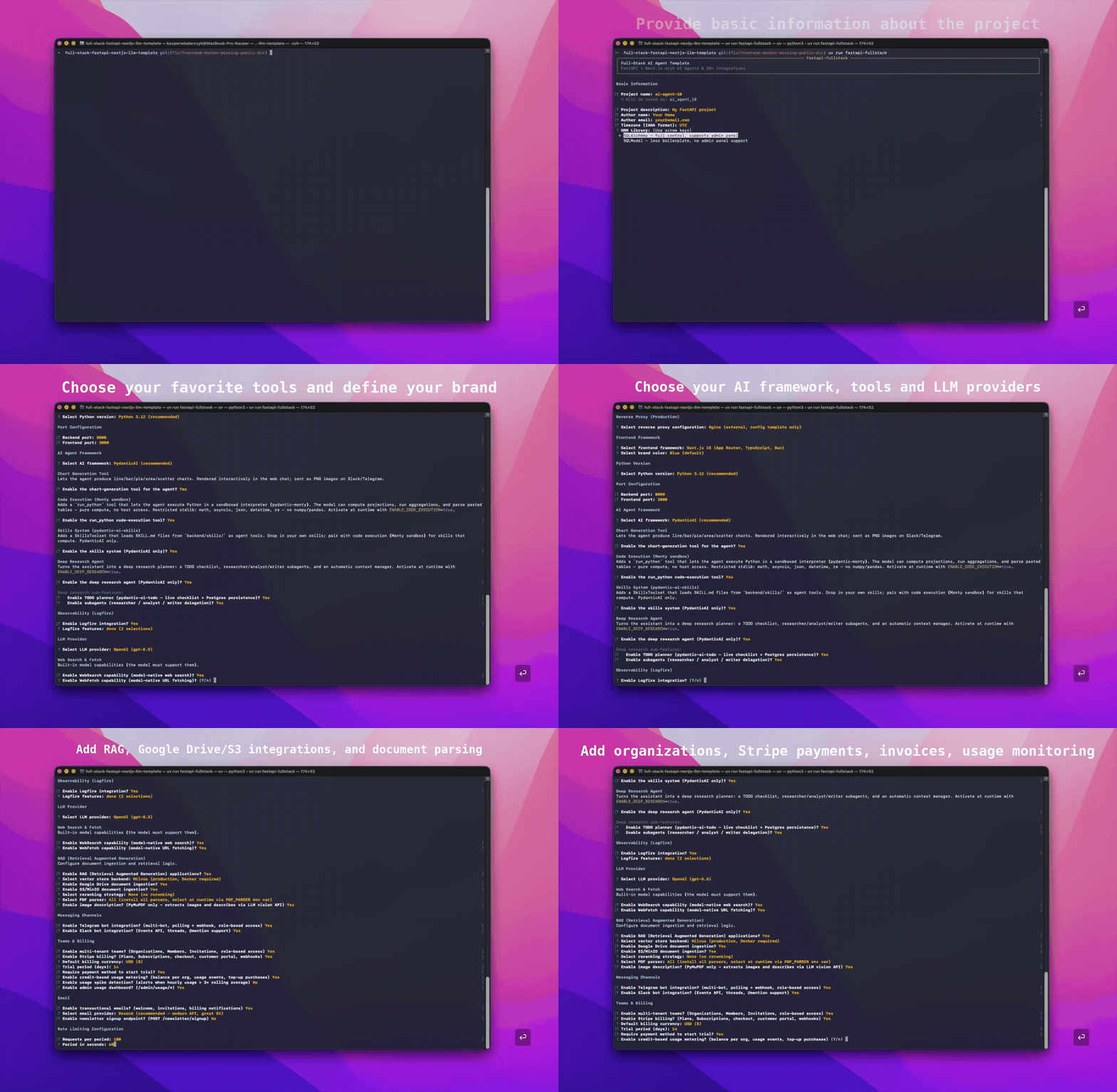
CLI generator — configure and scaffold a full-stack AI project in under 60 seconds:
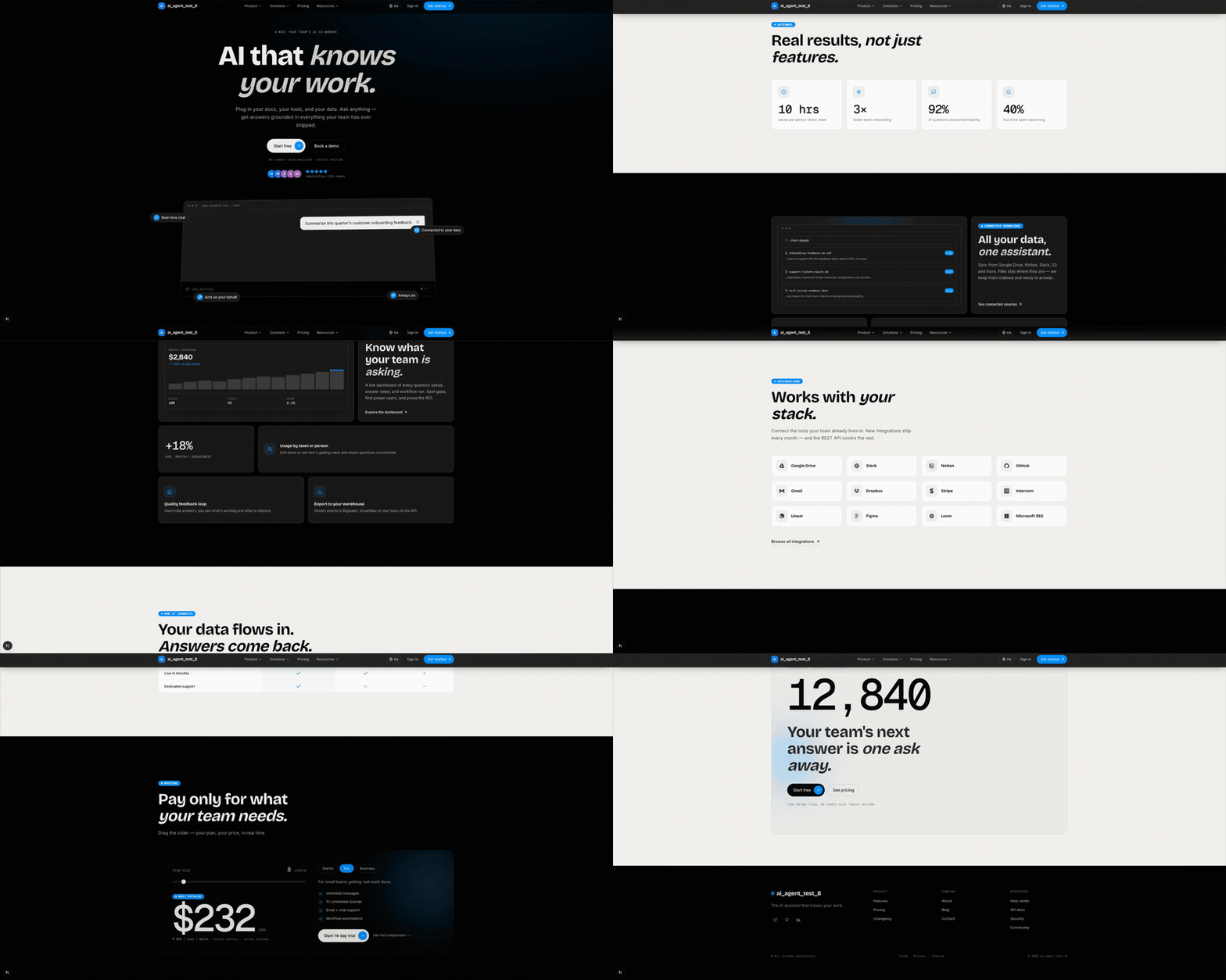
Generated marketing site — public landing page with hero, pricing, blog, and legal pages (enable_marketing_site):
📸 Screenshots
AI Chat
The chat UI streams responses over WebSocket and renders each tool call as a purpose-built card.
Auth & Dashboard
Teams & Knowledge Bases
Billing & Usage
Profile & Settings
Admin Panel
Marketing Site
Background Tasks, Observability & Channels
🎯 Why This Template
Building AI/LLM applications requires more than just an API wrapper. You need:
- Type-safe AI agents with tool/function calling
- Real-time streaming responses via WebSocket
- Conversation persistence and history management
- Production infrastructure - auth, rate limiting, observability
- Enterprise integrations - background tasks, webhooks, admin panels
This template gives you all of that out of the box, with 20+ configurable integrations so you can focus on building your AI product, not boilerplate.
Perfect For
- 🤖 AI Chatbots & Assistants - PydanticAI or LangChain agents with streaming responses
- 📊 ML Applications - Background task processing with Celery/Taskiq
- 🏢 Enterprise SaaS - Full auth, admin panel, webhooks, and more
- 🚀 Startups - Ship fast with production-ready infrastructure
AI-Agent Friendly
Generated projects include CLAUDE.md and AGENTS.md files optimized for AI coding assistants (Claude Code, Codex, Copilot, Cursor, Zed). Following progressive disclosure best practices - concise project overview with pointers to detailed docs when needed.
They also ship a ready-to-use .claude/ toolkit that adapts to the options you selected:
- Agent Skills (
.claude/skills/) — model-invoked playbooks that auto-trigger when relevant:alembic-migration,pytest-suite,agent-tool(framework-aware),frontend-feature,rag-knowledge,background-task(queue-aware),billing-stripe, andchannel-bot. Feature-gated — only the skills that match your stack are generated. - Slash commands (
.claude/commands/) —/add-endpoint,/fix-issue,/review. - Convention rules (
.claude/rules/) — architecture, code style, schemas, exceptions/security, testing, and frontend conventions, loaded automatically.
✨ Features
🤖 AI/LLM First
- 5 AI Frameworks - PydanticAI, PydanticDeep, LangChain, LangGraph, DeepAgents
- 4 LLM Providers - OpenAI, Anthropic, Google Gemini, OpenRouter
- RAG - Document ingestion, vector search, reranking (Milvus, Qdrant, ChromaDB, pgvector)
- WebSocket Streaming - Real-time responses with full event access
- Rich Chat UI - Specialized tool-call cards (web search, knowledge base, Python, charts, skills), live subagent feed, citation sources panel, plan/task checklist, reasoning view, and in-chat file previews
- Agent Tools - Web search, URL fetch, charts, code execution (
run_python), skills,ask_user, plus optional Deep Research (TODO planner + parallel subagents) - Messaging Channels - Telegram and Slack multi-bot integration with polling, webhooks, per-thread sessions, group concurrency control
- Conversation Sharing - Share conversations with users or via public links, admin conversation browser
- Conversation Persistence - Save chat history to database
- Message Ratings - Like/dislike responses with feedback, admin analytics
- Image Description - Extract images from documents, describe via LLM vision
- Multimodal Embeddings - Provider-aware: OpenAI, Voyage (Anthropic), Gemini (multimodal text + images)
- Document Sources - Local files, API upload, Google Drive, S3/MinIO
- Sync Sources - Per-organization connector management UI (Google Drive, S3/MinIO) with scheduled sync, manual triggers, encrypted credentials, and per-run logs
- Observability - Logfire for PydanticAI, LangSmith for LangChain/LangGraph/DeepAgents
⚡ Backend (FastAPI)
- FastAPI + Pydantic v2 - High-performance async API
- PostgreSQL (async) - SQLAlchemy 2.0 + Alembic migrations, pgvector-ready
- Authentication - JWT + Refresh tokens, API Keys, OAuth2 (Google)
- Background Tasks - Celery, Taskiq, ARQ, or Prefect
- Django-style CLI - Custom management commands with auto-discovery
🎨 Frontend (Next.js 15)
- React 19 + TypeScript + Tailwind CSS v4
- AI Chat Interface - WebSocket streaming, tool call visualization
- Authentication - HTTP-only cookies, auto-refresh, password reset, magic link
- Marketing Site - hero, pricing, FAQ, blog, contact form, legal pages (PL + EN)
- Billing Dashboard - subscription, payment methods, invoices, credits balance/ledger, and usage charts (Stripe)
- User Settings - profile, API keys CRUD (
sk_*tokens), onboarding tracking - Admin Panel - workspace stats, message-rating analytics, Stripe events browser
- SEO - per-page metadata, OG image, sitemap, robots, manifest, favicons
- Dark Mode + i18n (PL/EN via next-intl, locale-prefixed routes)
🔌 20+ Enterprise Integrations
| Category | Integrations |
|---|---|
| AI Frameworks | PydanticAI, PydanticDeep, LangChain, LangGraph, DeepAgents |
| LLM Providers | OpenAI, Anthropic, Google Gemini, OpenRouter |
| RAG / Vector Stores | Milvus, Qdrant, ChromaDB, pgvector |
| RAG Sources | Local files, API upload, Google Drive, S3/MinIO, Sync Sources (per-org UI, scheduled) |
| Embeddings | OpenAI, Voyage, Gemini (multimodal), SentenceTransformers |
| Background Tasks | Celery, Taskiq, ARQ, Prefect |
| Billing | Stripe subscriptions (seat-based), credits + usage metering, invoices, Customer Portal |
| Caching & State | Redis, fastapi-cache2 |
| Security | Rate limiting, CORS, CSRF protection |
| Observability | Logfire, LangSmith, Sentry, Prometheus |
| Admin | SQLAdmin panel with auth |
| Collaboration | Conversation sharing (direct + link), admin conversation browser |
| Messaging | Telegram multi-bot (polling + webhook), Slack multi-bot (Events API + Socket Mode) |
| Events | Webhooks, WebSockets |
| DevOps | Docker, GitHub Actions, GitLab CI, Kubernetes |
🗺️ Architecture Overview
┌──────────────────────────────────────────────────────────────────────────┐
│                         FRONTEND  (Next.js 15)                           │
│  Chat UI · Knowledge Base · Dashboard · Settings · Dark Mode · i18n      │
└──────────────┬───────────────────────────────────────────┬───────────────┘
               │  REST / WebSocket                         │  Vercel
               ▼                                           ▼
┌──────────────────────────────────────────────────────────────────────────┐
│                         BACKEND  (FastAPI)                               │
│                                                                          │
│  ┌─────────────────────────────────────────────────────────────────┐     │
│  │                     AI AGENTS                                   │     │
│  │  PydanticAI · LangChain · LangGraph · DeepAgents                │     │
│  │  ────────────────────────────────────────────────────────────   │     │
│  │  Tools: datetime · web_search (Tavily) · search_knowledge_base  │     │
│  │  Providers: OpenAI · Anthropic · Gemini · OpenRouter            │     │
│  └─────────────────────────────────────────────────────────────────┘     │
│                                                                          │
│  ┌─────────────────────────────────────────────────────────────────┐     │
│  │                     RAG PIPELINE                                │     │
│  │                                                                 │     │
│  │  Sources        Parse           Chunk          Embed            │     │
│  │  ─────────      ──────────      ──────────     ──────────────   │     │
│  │  Local files    PyMuPDF         recursive      OpenAI           │     │
│  │  API upload     LiteParse       markdown       Voyage           │     │
│  │  Google Drive   LlamaParse      fixed          Gemini (multi)   │     │
│  │  S3/MinIO       python-docx                    SentenceTransf.  │     │
│  │  Sync Sources                                                   │     │
│  │                                                                 │     │
│  │  Store              Search              Rank                    │     │
│  │  ──────────────     ──────────────      ──────────────          │     │
│  │  Milvus             Vector similarity   Cohere reranker         │     │
│  │  Qdrant             BM25 + vector RRF   CrossEncoder            │     │
│  │  ChromaDB           Multi-collection                            │     │
│  │  pgvector                                                       │     │
│  └─────────────────────────────────────────────────────────────────┘     │
│                                                                          │
│  Auth (JWT/API Key/OAuth) · Rate Limiting · Webhooks · Admin Panel       │
│  Billing (Stripe + credits) · Background Tasks (Celery/Taskiq/ARQ/       │
│  Prefect) · Django-style CLI · Observability (Logfire/LangSmith/         │
│  Sentry/Prometheus)                                                      │
└───────┬──────────────┬──────────────┬──────────────┬─────────────────────┘
        │              │              │              │
        ▼              ▼              ▼              ▼
   PostgreSQL       Redis         Vector DB      LLM APIs
   (async)                        (Milvus/       (OpenAI/
                                  Qdrant/        Anthropic/
                                  ChromaDB/      Gemini)
                                  pgvector)
🏗️ Architecture
graph TB
    subgraph Frontend["Frontend (Next.js 15)"]
        UI[React Components]
        WS[WebSocket Client]
        Store[Zustand Stores]
    end

    subgraph Backend["Backend (FastAPI)"]
        API[API Routes]
        Services[Services Layer]
        Repos[Repositories]
        Agent[AI Agent]
    end

    subgraph Infrastructure
        DB[(PostgreSQL)]
        Redis[(Redis)]
        Queue[Celery/Taskiq/ARQ/Prefect]
    end

    subgraph External
        LLM[OpenAI/Anthropic]
        Webhook[Webhook Endpoints]
    end

    UI --> API
    WS  Agent
    API --> Services
    Services --> Repos
    Services --> Agent
    Repos --> DB
    Agent --> LLM
    Services --> Redis
    Services --> Queue
    Services --> Webhook
Layered Architecture
The backend follows a clean Repository + Service pattern:
graph LR
    A[API Routes] --> B[Services]
    B --> C[Repositories]
    C --> D[(Database)]

    B --> E[External APIs]
    B --> F[AI Agents]
| Layer | Responsibility |
|---|---|
| Routes | HTTP handling, validation, auth |
| Services | Business logic, orchestration |
| Repositories | Data access, queries |
See Architecture Documentation for details.
🤖 AI Agent
Choose from 5 AI frameworks and 4 LLM providers when generating your project:
# PydanticAI with OpenAI (default)
fastapi-fullstack create my_app --ai-framework pydantic_ai

# LangGraph with Anthropic
fastapi-fullstack create my_app --ai-framework langgraph --llm-provider anthropic

# DeepAgents with OpenAI
fastapi-fullstack create my_app --ai-framework deepagents

# With RAG enabled
fastapi-fullstack create my_app --rag --database postgresql --task-queue celery
Supported Combinations
| Framework | OpenAI | Anthropic | Gemini | OpenRouter |
|---|---|---|---|---|
| PydanticAI | ✓ | ✓ | ✓ | ✓ |
| PydanticDeep | ✓ | ✓ | ✓ | - |
| LangChain | ✓ | ✓ | ✓ | - |
| LangGraph | ✓ | ✓ | ✓ | - |
| DeepAgents | ✓ | ✓ | ✓ | - |
PydanticAI Integration
Type-safe agents with full dependency injection:
# app/agents/assistant.py
from pydantic_ai import Agent, RunContext

@dataclass
class Deps:
    user_id: str | None = None
    db: AsyncSession | None = None

agent = Agent[Deps, str](
    model="openai:gpt-4o-mini",
    system_prompt="You are a helpful assistant.",
)

@agent.tool
async def search_database(ctx: RunContext[Deps], query: str) -> list[dict]:
    """Search the database for relevant information."""
    # Access user context and database via ctx.deps
    ...
LangChain Integration
Flexible agents with LangGraph:
# app/agents/langchain_assistant.py
from langchain.tools import tool
from langgraph.prebuilt import create_react_agent

@tool
def search_database(query: str) -> list[dict]:
    """Search the database for relevant information."""
    ...

agent = create_react_agent(
    model=ChatOpenAI(model="gpt-4o-mini"),
    tools=[search_database],
    prompt="You are a helpful assistant.",
)
WebSocket Streaming
Both frameworks use the same WebSocket endpoint with real-time streaming:
@router.websocket("/ws")
async def agent_ws(websocket: WebSocket):
    await websocket.accept()

    # Works with both PydanticAI and LangChain
    async for event in agent.stream(user_input):
        await websocket.send_json({
            "type": "text_delta",
            "content": event.content
        })
Observability
Each framework has its own observability solution:
| Framework | Observability | Dashboard |
|---|---|---|
| PydanticAI | Logfire | Agent runs, tool calls, token usage |
| LangChain | LangSmith | Traces, feedback, datasets |
See AI Agent Documentation for more.
📄 RAG (Retrieval-Augmented Generation)
Enable RAG to give your AI agents access to a knowledge base built from your documents.
Vector Store Backends
| Backend | Type | Docker Required | Best For |
|---|---|---|---|
| Milvus | Dedicated vector DB | Yes (3 services) | Production, large scale |
| Qdrant | Dedicated vector DB | Yes (1 service) | Production, simple setup |
| ChromaDB | Embedded / HTTP | No | Development, prototyping |
| pgvector | PostgreSQL extension | No (uses existing PG) | Already have PostgreSQL |
Document Ingestion (CLI)
# Local files
uv run my_app rag-ingest /path/to/document.pdf --collection docs
uv run my_app rag-ingest /path/to/folder/ --recursive

# Google Drive (service account)
uv run my_app rag-sync-gdrive --collection docs --folder-id

# S3/MinIO
uv run my_app rag-sync-s3 --collection docs --prefix reports/ --bucket my-bucket
Embedding Providers
| Provider | Model | Dimensions | Multimodal |
|---|---|---|---|
| OpenAI | text-embedding-3-small | 1536 | - |
| Voyage | voyage-3 | 1024 | - |
| Gemini | gemini-embedding-exp-03-07 | 3072 | Text + Images |
| SentenceTransformers | all-MiniLM-L6-v2 | 384 | - |
Features
- Document parsing - PDF (PyMuPDF with tables, headers/footers, OCR), DOCX, TXT, MD + 130+ formats via LlamaParse
- Image description - Extract images from documents, describe via LLM vision API (opt-in)
- Chunking - RecursiveCharacterTextSplitter with configurable size/overlap
- Reranking - Cohere API or local CrossEncoder for improved search quality
- Agent integration - All 5 AI frameworks get a
search_knowledge_basetool automatically
📊 Observability
Logfire (for PydanticAI)
Logfire provides complete observability for your application - from AI agents to database queries. Built by the Pydantic team, it offers first-class support for the entire Python ecosystem.
graph LR
    subgraph Your App
        API[FastAPI]
        Agent[PydanticAI]
        DB[(Database)]
        Cache[(Redis)]
        Queue[Celery/Taskiq]
        HTTP[HTTPX]
    end

    subgraph Logfire
        Traces[Traces]
        Metrics[Metrics]
        Logs[Logs]
    end

    API --> Traces
    Agent --> Traces
    DB --> Traces
    Cache --> Traces
    Queue --> Traces
    HTTP --> Traces
| Component | What You See |
|---|---|
| PydanticAI | Agent runs, tool calls, LLM requests, token usage, streaming events |
| FastAPI | Request/response traces, latency, status codes, route performance |
| PostgreSQL | Query execution time, slow queries, connection pool stats |
| Redis | Cache hits/misses, command latency, key patterns |
| Celery/Taskiq | Task execution, queue depth, worker performance |
| HTTPX | External API calls, response times, error rates |
LangSmith (for LangChain)
LangSmith provides observability specifically designed for LangChain applications:
| Feature | Description |
|---|---|
| Traces | Full execution traces for agent runs and chains |
| Feedback | Collect user feedback on agent responses |
| Datasets | Build evaluation datasets from production data |
| Monitoring | Track latency, errors, and token usage |
LangSmith is automatically configured when you choose LangChain:
# .env
LANGCHAIN_TRACING_V2=true
LANGCHAIN_API_KEY=your-api-key
LANGCHAIN_PROJECT=my_project
Configuration
Enable Logfire and select which components to instrument:
fastapi-fullstack new
# ✓ Enable Logfire observability
#   ✓ Instrument FastAPI
#   ✓ Instrument Database
#   ✓ Instrument Redis
#   ✓ Instrument Celery
#   ✓ Instrument HTTPX
Usage
# Automatic instrumentation in app/main.py
import logfire

logfire.configure()
logfire.instrument_fastapi(app)
logfire.instrument_asyncpg()
logfire.instrument_redis()
logfire.instrument_httpx()
# Manual spans for custom logic
with logfire.span("process_order", order_id=order.id):
    await validate_order(order)
    await charge_payment(order)
    await send_confirmation(order)
For more details, see Logfire Documentation.
🛠️ Django-style CLI
Each generated project includes a powerful CLI inspired by Django’s management commands:
Built-in Commands
# Server
my_app server run --reload
my_app server routes

# Database (Alembic wrapper)
my_app db init
my_app db migrate -m "Add users"
my_app db upgrade

# Users
my_app user create --email [email protected] --superuser
my_app user list
Custom Commands
Create your own commands with auto-discovery:
# app/commands/seed.py
from app.commands import command, success, error
import click

@command("seed", help="Seed database with test data")
@click.option("--count", "-c", default=10, type=int)
@click.option("--dry-run", is_flag=True)
def seed_database(count: int, dry_run: bool):
    """Seed the database with sample data."""
    if dry_run:
        info(f"[DRY RUN] Would create {count} records")
        return

    # Your logic here
    success(f"Created {count} records!")
Commands are automatically discovered from app/commands/ - just create a file and use the @command decorator.
my_app cmd seed --count 100
my_app cmd seed --dry-run
📁 Generated Project Structure
my_project/
├── backend/
│   ├── app/
│   │   ├── main.py              # FastAPI app with lifespan
│   │   ├── api/
│   │   │   ├── routes/v1/       # Versioned API endpoints
│   │   │   ├── deps.py          # Dependency injection
│   │   │   └── router.py        # Route aggregation
│   │   ├── core/                # Config, security, middleware
│   │   ├── db/models/           # SQLAlchemy 2.0 models
│   │   ├── schemas/             # Pydantic schemas
│   │   ├── repositories/        # Data access layer
│   │   ├── services/            # Business logic
│   │   ├── agents/              # AI agents with centralized prompts
│   │   ├── rag/                 # RAG module (vector store, embeddings, ingestion)
│   │   ├── commands/            # Django-style CLI commands
│   │   └── worker/              # Background tasks
│   ├── cli/                     # Project CLI
│   ├── tests/                   # pytest test suite
│   └── alembic/                 # Database migrations
├── frontend/
│   ├── src/
│   │   ├── app/                 # Next.js App Router
│   │   ├── components/          # React components
│   │   ├── hooks/               # useChat, useWebSocket, etc.
│   │   └── stores/              # Zustand state management
│   └── e2e/                     # Playwright tests
├── docker-compose.yml
├── Makefile
└── README.md
Generated projects include version metadata in pyproject.toml for tracking:
[tool.fastapi-fullstack]
generator_version = "0.1.5"
generated_at = "2024-12-21T10:30:00+00:00"
⚙️ Configuration Options
Core Options
| Option | Values | Description |
|---|---|---|
| Database | postgresql, none |
Async PostgreSQL (SQLAlchemy 2.0 + Alembic) |
| ORM | sqlalchemy, sqlmodel |
SQLModel for simplified syntax |
| Auth | jwt, api_key, both, none |
JWT includes user management |
| OAuth | none, google |
Social login |
| AI Framework | pydantic_ai, pydantic_deep, langchain, langgraph, deepagents |
Choose your AI agent framework |
| LLM Provider | openai, anthropic, google, openrouter |
OpenRouter only with PydanticAI |
| RAG | --rag |
Enable RAG with vector database |
| Vector Store | milvus, qdrant, chromadb, pgvector |
pgvector uses existing PostgreSQL |
| Background Tasks | none, celery, taskiq, arq, prefect |
Distributed queues / orchestration |
| Frontend | none, nextjs |
Next.js 15 + React 19 |
Presets
| Preset | Description |
|---|---|
--preset production |
Full production setup with Redis, Sentry, Kubernetes, Prometheus |
--preset ai-agent |
AI agent with WebSocket streaming and conversation persistence |
--minimal |
Minimal project with no extras |
Integrations
Select what you need:
fastapi-fullstack new
# ✓ Redis (caching/sessions)
# ✓ Rate limiting (slowapi)
# ✓ Pagination (fastapi-pagination)
# ✓ Admin Panel (SQLAdmin)
# ✓ AI Agent (PydanticAI or LangChain)
# ✓ Webhooks
# ✓ Sentry
# ✓ Logfire / LangSmith
# ✓ Prometheus
# ... and more
🔄 Comparison
vs. Manual Setup
Setting up a production AI agent stack manually means wiring together 10+ tools yourself:
# Without this template, you'd need to manually:
# 1. Set up FastAPI project structure
# 2. Configure SQLAlchemy + Alembic migrations
# 3. Implement JWT auth with refresh tokens
# 4. Build WebSocket streaming for AI responses
# 5. Integrate PydanticAI/LangChain with tool calling
# 6. Set up RAG pipeline (parsing, chunking, embedding, vector store)
# 7. Configure Celery + Redis for background tasks
# 8. Build Next.js frontend with auth and chat UI
# 9. Write Docker Compose for all services
# 10. Add observability, rate limiting, admin panel...

# With this template:
pip install fastapi-fullstack
fastapi-fullstack
# Done. All of the above, configured and working.
vs. Alternatives
| Feature | This Template | full-stack-fastapi-template | create-t3-app |
|---|---|---|---|
| AI Agents (5 frameworks) | ✅ | ❌ | ❌ |
| RAG Pipeline (4 vector stores) | ✅ | ❌ | ❌ |
| WebSocket Streaming | ✅ | ❌ | ❌ |
| Conversation Persistence | ✅ | ❌ | ❌ |
| LLM Observability (Logfire/LangSmith) | ✅ | ❌ | ❌ |
| FastAPI Backend | ✅ | ✅ | ❌ |
| Next.js Frontend | ✅ (v15) | ❌ | ✅ |
| JWT + OAuth Authentication | ✅ | ✅ | ✅ (NextAuth) |
| Background Tasks (Celery/Taskiq/ARQ/Prefect) | ✅ | ✅ (Celery) | ❌ |
| Billing & Credits (Stripe + usage metering) | ✅ | ❌ | ❌ |
| Admin Panel | ✅ (SQLAdmin) | ❌ | ❌ |
| Async PostgreSQL (SQLAlchemy 2.0 + pgvector) | ✅ | ✅ | Prisma |
| Docker + K8s | ✅ | ✅ | ❌ |
| Interactive CLI Wizard | ✅ | ❌ | ✅ |
| Django-style Commands | ✅ | ❌ | ❌ |
| Document Sources (GDrive, S3, API) | ✅ | ❌ | ❌ |
| AI-Agent Friendly (CLAUDE.md) | ✅ | ❌ | ❌ |
❓ FAQ
📚 Documentation
| Document | Description |
|---|---|
| Architecture | Repository + Service pattern, layered design |
| Frontend | Next.js setup, auth, state management |
| AI Agent | PydanticAI, tools, WebSocket streaming |
| Observability | Logfire integration, tracing, metrics |
| Deployment | Docker, Kubernetes, production setup |
| Development | Local setup, testing, debugging |
| Changelog | Version history and release notes |
Star History
🙏 Inspiration
This project is inspired by:
- full-stack-fastapi-template by @tiangolo
- fastapi-template by @s3rius
- FastAPI Best Practices by @zhanymkanov
- Django’s management commands system
🤝 Contributing
Contributions are welcome! Please read our Contributing Guide for details.
📄 License
MIT License - see LICENSE for details.
Рекомендуемые инструменты
Попробуйте другой запрос или уберите фильтр.
Установка
npx skillfish add maxcode917/full-stack-ai-agent-template