
Build production apps, write PRDs with AI, and go from idea to deployed product using Claude Code. No coding background required.
Обзор
Build production apps, write PRDs with AI, and go from idea to deployed product using Claude Code. No coding background required.
README
Claude Code in Practice
A hands-on course for product managers who want to ship real things — without waiting on engineering.
Build production apps, write PRDs with AI, and go from idea to deployed product using Claude Code. No coding background required.






Taught by Hamza Farooq — Founder at Traversaal.ai · UCLA Anderson · ex-Google
⭐ #1 Highest Rated Claude Course on Maven
Three ways to learn:
| What you get | |
|---|---|
| 🆓 Free self-paced course — Traversaal Academy | 15 chapters, video walkthroughs, all exercises. Go at your own pace. |
| 🎓 Live cohort — Maven | Weekly sessions, live Q&A with Hamza, cohort community. |
| 📖 Free book — Claude Code: A Practitioner’s Approach | Real examples. Practical workflows. Better software. By Hamza Farooq, Amina Javaid & Ali Shafique. |
✨ Featured Project — Royal Pop
A premium scroll-driven product landing page built from a single 15-second video. Drop in a product video, brief Claude with the video-to-website skill, and Claude scaffolds the whole site: frame-by-frame canvas playback bound to scroll, GSAP timelines per section, Lenis smooth scroll, persistent CTA. Vanilla HTML/CSS/JS, no bundler.
→ Open the example · README walkthrough · video-to-website skill · 20-sec demo (mp4) · Live site
Built live for the Audemars Piguet × Swatch Royal Pop launch. The full README walks through how to do the same thing with your own product video, including the exact prompt for generating a luxury product turnaround video and the seven readability fixes that always come up.
🚀 Get Started
Three steps to your first session:
# 1. Clone the repo
git clone https://github.com/hamzafarooq/claude-code-starter.git
cd claude-code-starter

# 2. Launch Claude Code
claude

# 3. Explore skills, agents, and demos
# → See README.md for what's available
First time? Follow the full Installation guide below — takes about 10 minutes.
📦 What’s in This Repo
All course code, templates, skills, and commands live here. Come back here whenever you need files from class.
| What | Where |
|---|---|
| Skills | .claude/skills//SKILL.md |
| Slash commands | .claude/commands/.md |
| Sub-agents | .claude/agents/.md |
| Demo apps | demos// |
| Community resources | docs/resources.md |
📝 Course Assignments
If you’re following the live cohort or self-paced course, these are the hands-on assignments for each module.
Module 1 — From Idea to Shipped Product
| Assignment | What you’ll do |
|---|---|
| 1a: Set up your CLAUDE.md | Write your project context file — tells Claude who you are, what you’re building, and how to work with you |
| 1b: Install your skills | Test /prd-generator and /user-story-writer on a real feature idea; read the SKILL.md to understand how it works |
| 1c (Bonus): Idea → PRD → MVP | Take a real product idea through the full workflow: generate a PRD, write user stories, build the MVP with Claude Code |
Skills used: /prd-generator, /user-story-writer
Module 2 — How the Web Works
| Assignment | What you’ll do |
|---|---|
| 2a: Build your first custom skill | Write the /explain-me-a-repo skill from scratch — a skill that reads a GitHub URL and returns a full repo briefing |
| 2b: Set up Brave MCP | Install and register Brave MCP so Claude can browse live pages; verify with a real repo URL |
2c: Use /explain-me-a-repo on a real repo |
Run the skill on a repo Claude has never seen; compare the output with and without MCP |
Skills used: /explain-me-a-repo, /youtube-deepdive, /youtube-researcher
Module 3 — Sub-Agents: Your Team of Specialists
| Assignment | What you’ll do |
|---|---|
| 3a: Build your research-agent | Create a research-agent sub-agent that searches the web and returns structured findings with sources |
| 3b: Build your prd-reviewer | Create a prd-reviewer that reads any PRD and returns exactly 3 risks, 3 edge cases, 1 scope creep flag |
| 3c: Build a sub-agent pipeline | Chain research → PRD → review in one prompt: competitor research to reviewed spec in 3–5 minutes |
| 3d: Add your code-reviewer | Create a read-only code-reviewer sub-agent to audit code before committing or sharing with engineering |
| 3e: Add remaining agents (optional) | Add data-analyst and copy-writer to your agent team |
| 3f (Bonus): Design your agent team blueprint | Map out your ideal agent team for your actual job — what agents would save you the most time? |
Agents used: research-agent, prd-reviewer, code-reviewer, data-analyst, copy-writer
Module 4 — Evals, Deploy & Production
| Assignment | What you’ll do |
|---|---|
| 4a: Write evals for your Skill | Score your skill against ground truth using /skill-evaluator — know it works before you ship it |
| 4b: Deploy to Vercel | Get your product to a live URL using vercel --prod — see the Deploy to Vercel section |
| 4c: Skills in Production | Convert your Claude Code skill pipeline into a FastAPI app that runs on a server |
Skills used: /skill-evaluator, /deploy-checklist
🛠️ Projects
Real apps built live in class using Claude Code — no engineering team. Fork them, break them, learn from them.
| Project | What it does | Where |
|---|---|---|
| royal-pop-website | Scroll-driven product landing page built from a 15-second video — GSAP timelines, Lenis smooth scroll, frame-by-frame canvas playback | In repo |
| skill-sub-multi-agent | Interactive 4-level visualization showing how skills, sub-agents, and multi-agent pipelines work — Next.js | In repo |
| meetingmemo | Converts raw meeting notes into a structured standup update — Next.js + Anthropic API | In repo |
| meeting-notes-summarizer | Summarizes meeting notes into action items — Node.js + Express | In repo |
| competitor-research-agent | End-to-end competitor research using sub-agents (pricing-fetcher + review-miner) | In repo |
| research-agent | Claude Code agent for deep competitive landscape research with MCP | In repo |
| research-frontend | Chat UI teaching LLM modes: tools, memory, RAG, and long-term storage | In repo |
| full-stack-demo | Interactive visual explainer — how frontend, backend, and AI backend talk to each other | In repo |
| prd-generator | Single-page PRD generator app | In repo |
| word-humanizer | Word add-in that rewrites AI-generated paragraphs to sound human | GitHub |
| seo-writer | AI agent that researches a topic and produces a finished SEO article in Markdown, HTML, and DOCX | GitHub |
| linkedin-growth | Audits your LinkedIn profile and produces a 90-day content plan | GitHub |
| sprint-zero | Give it a URL and 3 questions — ships a full spec + working app using parallel sub-agents in 10–20 min | GitHub |
More projects get added as the course runs.
🧩 Skills Library
Skills are triggered with a /command. Install them once; Claude runs them on demand. All skills live in .claude/skills//SKILL.md. Most skills have a matching slash command file in .claude/commands/.md so you can invoke them as / directly from Claude Code.
.claude/
├── skills//SKILL.md   ← the full instruction set
└── commands/.md        ← thin wrapper that triggers the skill via /
To install a skill in your own project, copy the skills// folder and, if present, the matching commands/.md file into your project’s .claude/ directory. Note: a few entries appear only in one location — explain-me-a-repo is a command with no skill folder (it runs inline), and claude-code-deck is a skill folder with no command wrapper.
51 skills across 8 categories. Click any skill name to open its SKILL.md file.
🔍 Research
| Skill | Command | What it does |
|---|---|---|
| Competitor Research | /competitor-research |
Researches 3–5 competitors: positioning, pricing, differentiators, and gap analysis |
| Market Sizing | /market-sizing |
Estimates TAM/SAM/SOM from a product description using a bottom-up approach |
| Customer Persona | /customer-persona |
Builds a deep ICP: jobs-to-be-done, pain points, objections, buying triggers |
| Meeting Analyzer | /meeting-analyzer |
Extracts action items, decisions, risks, and open questions from meeting notes |
| Trend Spotter | /trend-spotter |
Scans a market for strong signals, weak signals, and noise — with evidence |
| YouTube Deep Dive | /youtube-deepdive |
Visits YouTube URLs with Brave MCP — returns timestamps, key moments, top comments |
| YouTube Researcher | /youtube-researcher |
Searches YouTube on any topic, returns ranked videos with a top-pick recommendation |
| Explain Me a Repo | /explain-me-a-repo |
Visits a GitHub URL with Brave MCP — returns what it does, how it’s built, key files |
✍️ Content Writing
| Skill | Command | What it does |
|---|---|---|
| Voice DNA | /voice-dna |
Analyzes your writing samples and extracts your voice fingerprint — tone, patterns, taboo words |
| Newsletter Ideator | /newsletter-ideator |
Generates 7 unique angles for a newsletter issue using SCAMPER and contrarian frameworks |
| LinkedIn Post | /linkedin-post |
Writes 2 versions of a LinkedIn post — story-led and insight-led — with hook and CTA |
| Email Writer | /email-writer |
Writes launch, follow-up, re-engagement, or cold outreach emails with 3 subject line options |
| Content Repurposer | /content-repurposer |
Turns one long-form piece into 5 formats: tweet thread, LinkedIn, newsletter blurb, Substack Note, TL;DR |
| SEO Optimizer | /seo-optimizer |
Analyzes a draft for keyword gaps, rewrites title/meta/H2s for search without killing the voice |
📋 Product Management
| Skill | Command | What it does |
|---|---|---|
| PRD Generator | /prd-generator |
Writes a full 9-section PRD: problem, solution, risks, acceptance criteria, open questions |
| User Story Writer | /user-story-writer |
Turns rough ideas into user stories with Given/When/Then criteria and edge cases |
| Sprint Planner | /sprint-planner |
Turns a backlog into a prioritized 2-week sprint with effort estimates and capacity check |
| Business Case | /business-case |
Builds a business case: problem, options analysis, ROI estimate, risks, recommendation |
| Feature Prioritizer | /feature-prioritizer |
Scores features using RICE (Reach × Impact × Confidence ÷ Effort) and returns a ranked table |
| OKR Writer | /okr-writer |
Turns a goal into 3 Objectives with 3 measurable Key Results each — with a health check |
| Stakeholder Update | /stakeholder-update |
Writes a weekly/monthly status update from raw notes: progress, blockers, decisions needed |
| Retro Facilitator | /retro-facilitator |
Generates a sprint retrospective doc: what worked, what didn’t, 3 action items with owners |
| Launch Checklist | /launch-checklist |
Creates a go-to-market launch checklist phased across 2 weeks before → launch day → post-launch |
💻 Code & Quality
| Skill | Command | What it does |
|---|---|---|
| Verify Work | /verify-work |
End-of-session review: console.logs, unused imports, hardcoded values, missing error handling |
| Changelog Writer | /changelog-writer |
Reads git log and writes a user-facing changelog in Keep a Changelog format |
| Test Writer | /test-writer |
Writes unit tests for any function — happy path, edge cases, and error cases |
| Dockerfile Generator | /dockerfile-generator |
Creates a production Dockerfile and deployment config optimized for size and security |
| Code Reviewer | (sub-agent) | Read-only audit: security vulnerabilities, logic errors, missing test coverage |
| Skill Evaluator | /skill-evaluator |
Scores a Skill’s output against ground truth, identifies failure patterns |
| Deploy Checklist | /deploy-checklist |
Pre-deploy checks before pushing to Vercel or Fly.io — catches the five most common failures |
🎤 Presentations & Docs
| Skill | Command | What it does |
|---|---|---|
| Slides Builder | /slides-builder |
Generates a complete self-contained HTML slide deck — McKinsey-style, one insight per slide |
| Frontend Slides | /frontend-slides |
Builds animation-rich single-file HTML presentations — shows 3 style previews first, supports .pptx conversion |
| Exec Summary | /exec-summary |
Rewrites any document as a 3-bullet executive summary — optimized for a VP with 30 seconds |
| Proposal Writer | /proposal-writer |
Writes a structured proposal: problem, solution, timeline, investment, and next steps |
🤖 Sub-Agent Skills (auto-triggered, no command needed)
| Skill | Triggers when… | What it does |
|---|---|---|
| Research Agent | You ask for research, competitors, or market context | Web search specialist — structured findings with sources |
| PRD Reviewer | You ask to review or audit a PRD | Returns 3 risks, 3 missing edge cases, 1 scope creep flag |
| Data Analyst | You share a CSV, JSON, or data export | Returns 3 key stats, 1 anomaly, 1 trend |
| Copy Writer | You ask for in-app copy, tooltips, or button labels | Returns 3 options: [Direct], [Warm], [Bold] — all under 12 words |
| Deck Builder | You ask for a presentation or deck | Researches the topic, then builds a McKinsey-style deck |
🏆 Best Practices (from the experts)
Inspired by how the best practitioners actually use Claude Code. These skills enforce those principles directly in your workflow.
| Skill | Command | What it does |
|---|---|---|
| Karpathy Review | /karpathy-review |
Reviews code or a plan against Karpathy’s 4 principles: explicit assumptions, simplicity, surgical changes, verifiable goals · inspired by Andrej Karpathy, adapted by Forrest Chang |
| Boris Plan | /boris-plan |
Writes a complete plan with assumptions, steps, scope, and verification — waits for your approval before touching a single file · based on Boris Cherny’s workflow at howborisusesclaudecode.com |
🎨 Design & UI (auto-triggered by description — no command needed)
A set of design-focused skills that Claude pulls in automatically when you ask it to build, redesign, or art-direct an interface. No /command — Claude matches them to your request, the same way it does sub-agents.
| Skill | What it does |
|---|---|
| Taste (design-taste-frontend) | Anti-slop frontend skill for landing pages, portfolios, and redesigns — infers the right direction and ships interfaces that don’t look templated |
| Taste v1 | The original v1 taste-skill, preserved for projects that depend on its exact behavior |
| UI/UX Pro Max | Design intelligence: 67 styles, 96 palettes, 57 font pairings, 25 charts, 13 stacks (React, Next.js, Vue, Svelte, SwiftUI, Flutter, Tailwind, shadcn/ui) |
| High-End Visual Design (soft) | Designs like a high-end agency — exact fonts, spacing, shadows, and animations that make a site feel expensive; blocks cheap AI defaults |
| Minimalist UI | Clean editorial interfaces — warm monochrome palette, typographic contrast, flat bento grids, no heavy shadows |
| Industrial Brutalist UI | Raw mechanical interfaces — Swiss typographic print meets military terminal, rigid grids, extreme type-scale contrast |
| Redesign Existing Projects | Audits an existing site/app, flags generic AI patterns, and upgrades it to premium without breaking functionality |
| GPT Taste | Elite UX/UI + GSAP motion engineer — randomized layout variance, strict AIDA structure, scroll-driven animation |
| Stitch Design Taste | Semantic design-system skill for Google Stitch — generates agent-friendly DESIGN.md files enforcing premium UI standards |
| Beautiful HTML | Turns any document, proposal, or outline into a stunning single-file HTML presentation using 34 pre-built templates |
| Brand Kit | Premium brand-kit image generation — brand-guideline boards, logo systems, identity decks, visual-world presentations |
| Imagegen — Web | Generates premium, conversion-aware website design references — one image per section, consistent palette |
| Imagegen — Mobile | Generates premium app-native screen concepts and flows for iOS, Android, and cross-platform mobile |
| Image to Code | Generates the design image first, analyzes it, then builds the website to match it as closely as possible |
| Full Output Enforcement | Overrides LLM truncation — enforces complete code generation, bans placeholders, handles token-limit splits cleanly |
Skills Library — Inspiration & Credits
The 51 skills in this library were designed for this course, informed by research across the community. Key sources:
| Source | What we learned from it |
|---|---|
| hesreallyhim/awesome-claude-code by @hesreallyhim | Definitive index of skills, commands, and agent patterns |
| ComposioHQ/awesome-claude-skills by Composio | Business, marketing, and data skill patterns |
| travisvn/awesome-claude-skills by @travisvn | Curated skill examples and workflow patterns |
| VoltAgent/awesome-claude-code-subagents by VoltAgent | Sub-agent patterns and specialist agent design |
| Imbad0202/academic-research-skills by @Imbad0202 | Research pipeline skill design |
| aiblewmymind.substack.com | Real-world skill examples from 23 creators |
All SKILL.md files in this repo are original work, written for a PM audience. Patterns and ideas from the above are adapted, not copied.
🤖 Sub-Agents Library
Sub-agents are specialists Claude delegates to automatically — no /command needed. When your request matches an agent’s description, Claude hands it off, runs it in a separate context, and returns only the findings. All agents live in .claude/agents/.md.
| Agent | Model | What it does |
|---|---|---|
research-agent |
Opus | Searches the web and returns structured findings: key facts, sources, and gaps. Triggers on any research, competitor analysis, or market context request |
prd-reviewer |
Sonnet | Reads any PRD and returns exactly 3 risks (rated HIGH/MED/LOW), 3 missing edge cases, and 1 scope creep flag — no summaries, no praise |
code-reviewer |
Sonnet | Read-only audit of code files — flags security vulnerabilities, logic errors, and missing test coverage. Never modifies files |
data-analyst |
Sonnet | Reads CSV, JSON, or data exports and returns 3 key stats, 1 anomaly worth investigating, and 1 directional trend |
copy-writer |
Haiku | Writes in-app copy, tooltips, button labels, and microcopy. Returns 3 options tagged [Direct], [Warm], or [Bold] — all under 12 words |
deck-builder |
Sonnet | Researches a topic using Brave MCP (Reddit, Medium, YouTube) and produces a McKinsey-style presentation deck with speaker notes — designed for non-technical audiences |
🧠 Skills vs Sub-Agents vs Agents — What’s the Difference?
Three different ways to extend Claude Code. Here’s when to use each one:
| Skill | Sub-Agent | Agent | |
|---|---|---|---|
| What it is | A prompt template you invoke with a /command |
A specialist Claude spins up automatically and delegates to | A fully autonomous Claude instance with its own tools, model, and instructions |
| How it’s triggered | You type /skill-name |
Claude decides when to use it based on your request | Triggered by Claude or called explicitly via the Agent tool |
| Who controls it | You — you call it deliberately | Claude — it decides when to hand off | Claude or the system |
| Memory/context | Shares the main conversation context | Runs in a separate context, returns only results | Fully isolated context with its own tool access |
| Best for | Repeatable tasks you always want to run the same way (PRD generation, user stories) | Background specialists that shouldn’t clutter your main thread (research, code review, data analysis) | Complex multi-step tasks that need dedicated focus or different model/tool access |
| Lives in | .claude/skills//SKILL.md |
.claude/agents/.md |
.claude/agents/.md (same file format as sub-agents) |
| Example | /prd-generator — you run it, Claude fills in a PRD |
research-agent — Claude uses it when you ask for competitor research |
A pipeline agent that runs research → writes PRD → reviews PRD autonomously |
Simple rule of thumb:
- Use a skill when you want to run the same prompt yourself, on demand.
- Use a sub-agent when you want Claude to automatically hand off specialist work (and you don’t want the details in your main chat).
- An agent is the underlying mechanism — sub-agents are agents, just scoped to delegate-and-return behavior. You’ll hear both terms used interchangeably.
🌐 Playwright vs MCP — What’s the Difference?
Both let Claude interact with a browser. Here’s when to use each:
| Playwright | MCP (e.g. Brave MCP) | |
|---|---|---|
| What it is | A code library that automates browsers via scripts | A live browser Claude controls in real time through a protocol |
| How it works | You (or Claude) writes code that drives the browser — clicks, fills forms, scrapes pages | Claude connects to a running browser and takes actions directly, no code required |
| Best for | Repeatable, scheduled, or high-volume browser tasks (scraping, regression testing, form automation) | One-off research, reading live pages, visiting URLs during a conversation |
| Requires coding? | Yes — Python or JavaScript scripts | No — Claude drives it through natural language |
| Speed | Fast at scale, runs headless | Slower, real browser with a visible UI |
| When you’d use it | “Scrape 500 product pages every night” or “Run login tests on every deploy” | “Visit this GitHub repo and summarise it” or “Read the top 3 results for this search” |
| In this course | Not covered (engineering territory) | Used in Module 2 for /explain-me-a-repo and /youtube-deepdive |
Simple rule of thumb: Use MCP when you want Claude to browse something now, in conversation. Use Playwright when you need browser automation to run reliably at scale or on a schedule — that’s usually an engineering task.
📚 Course Topics
| Topic | What you’ll learn | Files |
|---|---|---|
| Setup & Your First Skill | Install Claude Code, write CLAUDE.md, run your first skill, ship an MVP |
demos/meeting-notes-summarizer/ |
| How the Web Works | Frontend, backend, and AI backend explained visually; read code you didn’t write; set up Brave MCP | demos/full-stack-demo/ |
| Skills: Reusable Prompts | What a skill really is (a .md file), how skills differ from sub-agents, 4-level interactive visualization |
demos/skill-sub-multi-agent/ |
| Sub-Agents & Pipelines | Build a library of specialist agents; chain them into a research → PRD → review pipeline | .claude/agents/ |
| Multi-Agent Architectures | Parallel agents, orchestrators, fan-out/fan-in patterns with Python code | demos/skill-sub-multi-agent/ |
| Evals, Deploy & Production | Score your skills against ground truth, deploy to Vercel, convert a pipeline to a FastAPI app | demos/meetingmemo/ |
| Competitor Research Workshop | End-to-end capstone: research a competitor space using sub-agents | demos/competitor-research-agent/ |
🌐 Deploy to Vercel
Once you’ve built something — a static site like Royal Pop, a Next.js app like MeetingMemo, or any project in this repo — get it on a live URL in under a minute. No build config, no DNS wrangling.
One-time setup
# Install the Vercel CLI (one time, globally)
npm i -g vercel

# Log in (opens your browser; pick GitHub / Google / email)
vercel login
Deploy from any project folder
# 1. Move into the project you want to deploy
cd demos/royal-pop-website   # or any folder with an index.html / package.json

# 2. First deploy — Vercel auto-detects the framework and creates the project
vercel --yes

# 3. Promote to production
vercel --prod
That’s it. Vercel returns two URLs — a preview URL for that deployment and the production alias (e.g. https://your-project.vercel.app). Every subsequent vercel --prod re-deploys instantly.
What gets auto-detected
| Project type | Framework preset | Build command | Output |
|---|---|---|---|
| Static HTML/CSS/JS (Royal Pop) | Other | none | repo root |
| Next.js (MeetingMemo) | Next.js | next build |
.next/ |
| Vite / React | Vite | vite build |
dist/ |
| FastAPI / Python backend | — | — | use Fly.io instead (Vercel runs serverless functions, not long-lived servers) |
Before you deploy
Run the /deploy-checklist skill — it catches the five most common failures (missing env vars, hardcoded localhost URLs, oversized assets, missing .gitignore entries, broken build commands) before Vercel tells you about them.
# In Claude Code:
/deploy-checklist
Environment variables
If your app uses an ANTHROPIC_API_KEY (or any other secret), don’t commit it. Add it in the Vercel dashboard:
- Open your project on vercel.com
- Settings → Environment Variables
- Add
ANTHROPIC_API_KEYfor Production (and Preview if you want PR previews to work) - Re-deploy:
vercel --prod
Full walk-through in MeetingMemo demo.
⚡ Install the Skill Pack (npx)
Get all 51 Claude Code skills in one command — no cloning required.
Prerequisite: Node.js 20 or later must be installed. Check with node --version. If you don’t have it, install from nodejs.org or run nvm install 22 && nvm use 22 if you use nvm.
# Install all 51 skills globally (~/.claude/skills/)
npx github:hamzafarooq/claude-code-starter@main --global

# Install only specific skills
npx github:hamzafarooq/claude-code-starter@main --global okr-writer sprint-planner competitor-research

# See what's available
npx github:hamzafarooq/claude-code-starter@main --list

# Install into the current project only (./.claude/skills/)
npx github:hamzafarooq/claude-code-starter@main --local

# Remove skills you no longer want
npx github:hamzafarooq/claude-code-starter@main --uninstall okr-writer
Note: Existing skills with the same name are never overwritten unless you add
--force. Restart Claude Code after installing for skills to appear in/help.
🌐 Community Resources
Top GitHub repos for going deeper on skills, best practices, and memory management. Full write-ups in docs/resources.md.
Discover & Browse
| Repo | Stars | What it is |
|---|---|---|
| hesreallyhim/awesome-claude-code | ⭐ 39k | The definitive curated list: skills, hooks, commands, agents, plugins |
| sickn33/antigravity-awesome-skills | ⭐ 33k | 1,400+ installable agentic skills for Claude Code and other AI CLIs |
| VoltAgent/awesome-claude-code-subagents | ⭐ 17k | 100+ specialized Claude Code subagents for development use cases |
| VoltAgent/awesome-agent-skills | ⭐ 16k | 1,000+ agent skills from official teams and the community |
| travisvn/awesome-claude-skills | ⭐ 11k | Curated Claude Skills list with workflow examples |
Skills & Best Practices
| Repo | Stars | What it is |
|---|---|---|
| YYH211/Claude-meta-skill | ⭐ 256 | Reusable skill modules — good reference for structuring your own |
| agamm/claude-code-owasp | ⭐ 128 | OWASP security best practices skill (Top 10:2025, ASVS 5.0) |
| ThamJiaHe/claude-code-handbook | ⭐ 104 | Guide for professional Claude prompts with MCP and Skills |
Memory Management
| Repo | What it is |
|---|---|
| lucasrosati/claude-code-memory-setup | Obsidian + Graphify — up to 71.5x fewer tokens per session. Persistent memory and codebase knowledge graphs. |
⚙️ Installation
Takes about 10 minutes. You’ll do it once.
Step 1 — Choose your access method
Option A: Claude Max (recommended)
Claude Max ($100/month) includes Claude Code with no usage limits and no per-token billing.
- Go to claude.ai/upgrade → subscribe to Max
- Claude Code is included — no API key needed
- Run
claudeand log in with your Claude account
Option B: API Key (pay as you go)
Better if you want to control costs or are already an API customer.
- Go to console.anthropic.com → create account → API Keys → Create Key
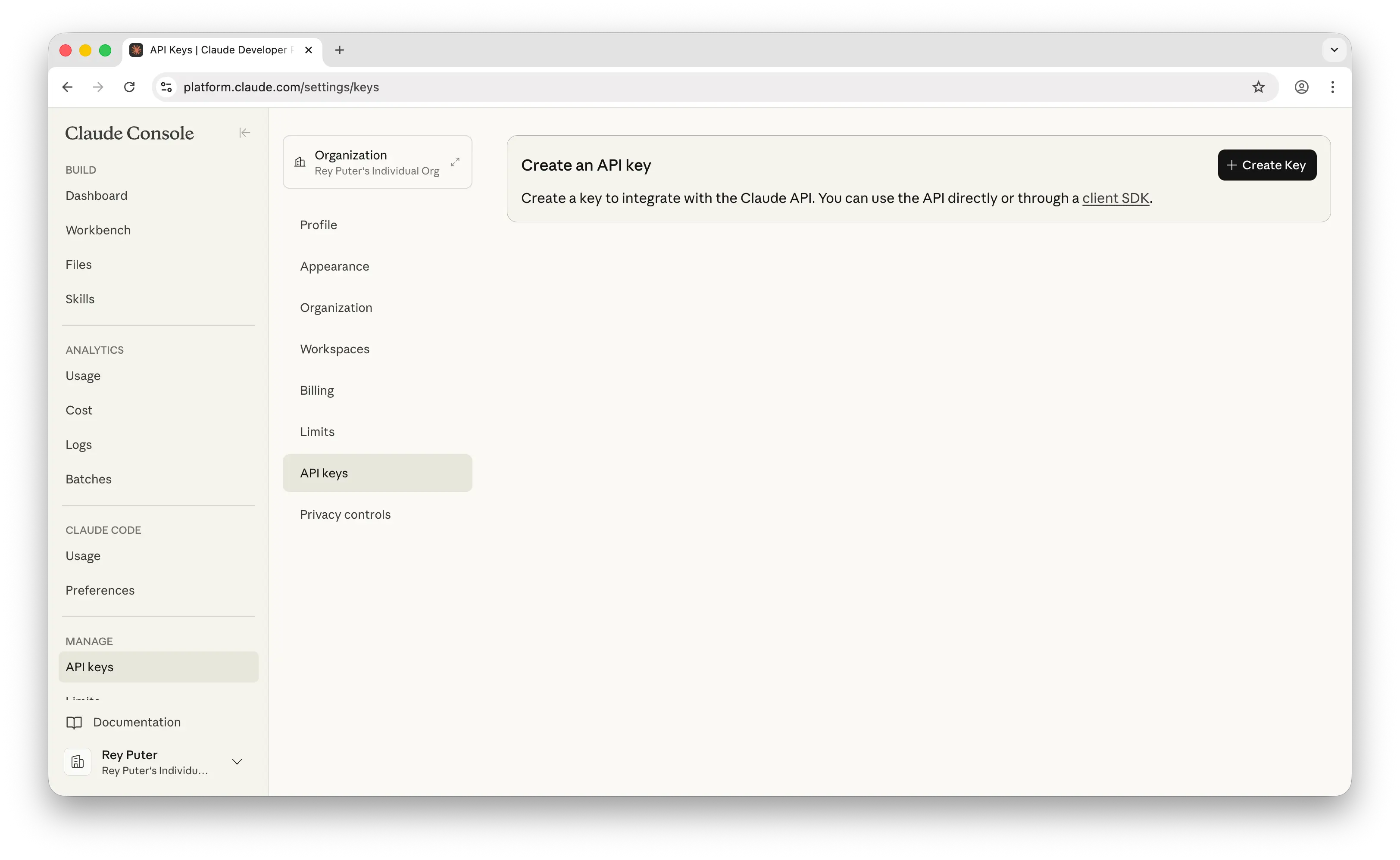
- Copy the key (starts with
sk-ant-...) — you won’t see it again - Set it in your terminal:
export ANTHROPIC_API_KEY=sk-ant-your-key-here

# Make it permanent:
echo 'export ANTHROPIC_API_KEY=sk-ant-your-key-here' >> ~/.zshrc
source ~/.zshrc
Never commit your API key to GitHub.
Step 2 — Install Claude Code
Requires Node.js (LTS version).
npm install -g @anthropic-ai/claude-code

# Verify:
claude --version
Step 3 — Start Claude Code
cd claude-code-starter
claude
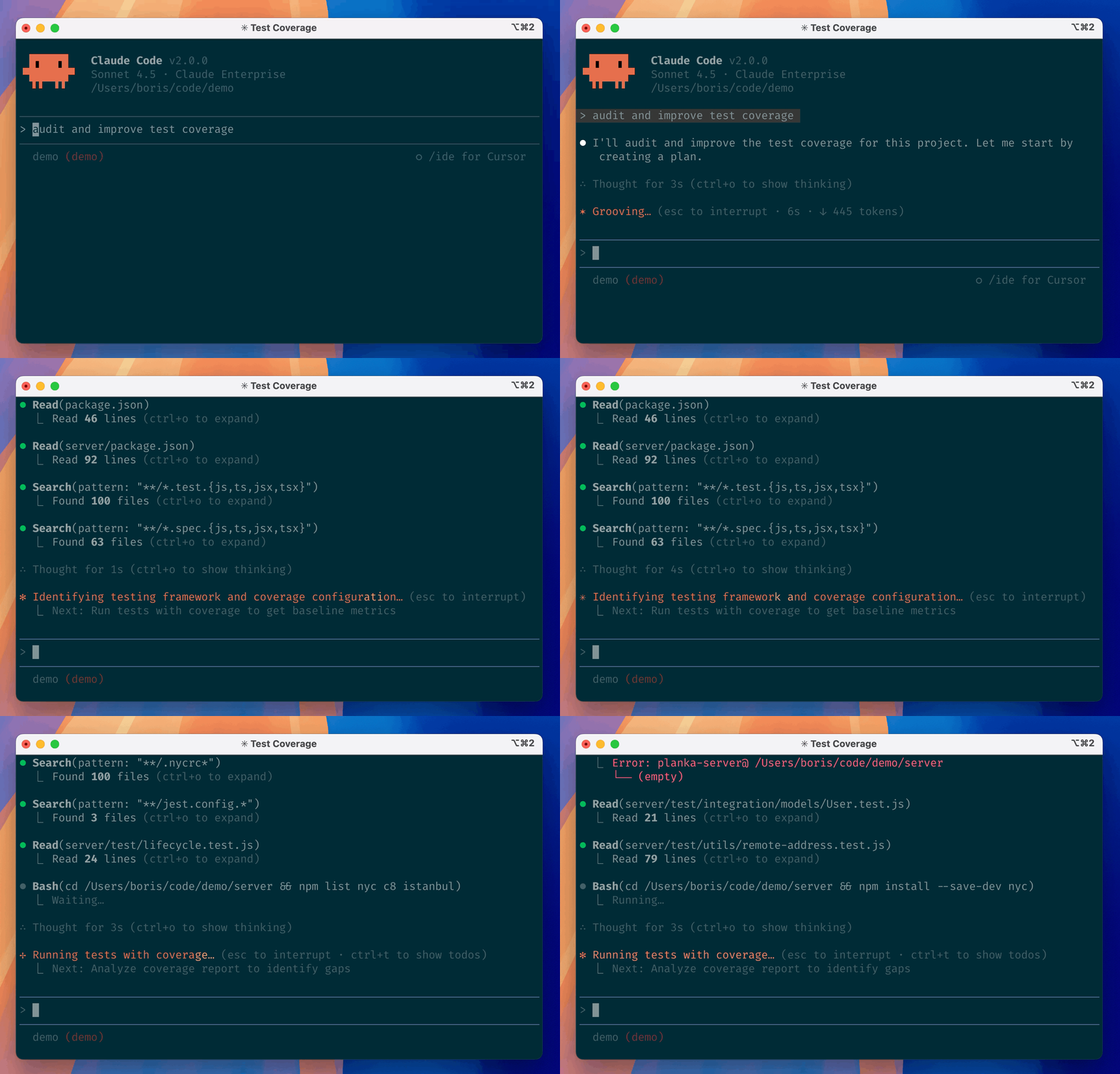
You’re in. Explore demos/ for apps, .claude/skills/ for skills, and .claude/agents/ for agents.
💬 Prompts Worth Keeping
| What you want | What to type |
|---|---|
| Generate a PRD | /prd-generator |
| Write user stories | /user-story-writer |
| Plan a sprint | /sprint-planner |
| Prioritize features | /feature-prioritizer |
| Write OKRs | /okr-writer |
| Write a stakeholder update | /stakeholder-update |
| Build a business case | /business-case |
| Research competitors | /competitor-research |
| Size a market | /market-sizing |
| Build a customer persona | /customer-persona |
| Analyze meeting notes | /meeting-analyzer |
| Scan for market trends | /trend-spotter |
| Write a LinkedIn post | /linkedin-post |
| Repurpose content | /content-repurposer |
| Optimize for SEO | /seo-optimizer |
| Build a slide deck | /slides-builder |
| Write a proposal | /proposal-writer |
| Summarize for an exec | /exec-summary |
| Eval a skill | /skill-evaluator |
| Pre-deploy check | /deploy-checklist |
| Review code against Karpathy’s principles | /karpathy-review |
| Plan a task before touching any files | /boris-plan |
| Final code review | /verify-work |
| Write tests | /test-writer |
| Find gaps in a spec | "Review docs/prd.md and tell me what's missing" |
| Prep for engineering | "What questions will engineers ask about this PRD?" |
| Stress-test a flow | "What edge cases am I missing here?" |
🔧 Troubleshooting
command not found: claude
Run npm install -g @anthropic-ai/claude-code again. Check Node.js is installed: node --version.
API key error
Run export ANTHROPIC_API_KEY=your-key-here. Make sure the key includes sk-ant-.
Claude isn’t reading my CLAUDE.md
The file must be named exactly CLAUDE.md (all caps) in the folder where you ran claude.
Skill not triggering
Check the path is .claude/skills//SKILL.md and the name: field in the frontmatter matches what you typed after /.
Claude Code in Practice · Hamza Farooq · Traversaal.ai · ⭐ #1 Highest Rated Claude Course on Maven
Рекомендуемые инструменты
Попробуйте другой запрос или уберите фильтр.
Установка
npx skillfish add hamzafarooq/claude-code-starter