
reading-plus-ai/mcp-server-deep-research
Developer toolsЭта страница переведена автоматически. Технические детали смотрите в оригинале. Открыть оригинал
reading-plus-ai/mcp-server-deep-research — это кандидат на сервер MCP, импортированный из https://github.com/reading-plus-ai/mcp-server-deep-research.
Обзор
reading-plus-ai/mcp-server-deep-research — это кандидат на сервер MCP, импортированный из https://github.com/reading-plus-ai/mcp-server-deep-research.
Обзор (машинный перевод)
MCP Server for Deep Research — это инструмент, разработанный для проведения комплексных исследований по сложным темам. Он помогает глубоко исследовать вопросы, находить релевантные источники и создавать структурированные исследовательские отчёты.
Ваш личный научный ассистент, превращающий исследовательские вопросы в подробные, хорошо цитируемые отчёты.
🚀 Попробуй
) Youtube: https://youtu.be/_a7sfo5yxoI
- Скачать Claude Desktop
- Принеси сюда
- Установка и настройка
- В macOS выполните следующую команду в вашем терминале:
- Начните исследование
- Выберите шаблон подсказки для глубокого исследования из MCP
- Начните исследование с задания исследовательского вопроса
Особенности
Deep Research MCP Server предлагает полный исследовательский рабочий процесс:
- Уточнение вопросов
- Расширяет и уточняет ваш исследовательский вопрос
- Выявляет ключевые термины и понятия
- Определяет область действия и параметры
- Генерация подвопросов
- Создаёт сфокусированные подвопросы, охватывающие разные аспекты
- Обеспечивает всестороннее освещение основной темы
- Обеспечивает структуру для систематических исследований
- Интеграция с веб-поиском
- Использует встроенные возможности веб-поиска Claude
- Выполняет целенаправленный поиск по каждому подвопросу
Эта страница переведена автоматически. Технические детали смотрите в оригинале.
README
Показан фрагмент оригинального README. Открыть оригинал.
MCP Server for Deep Research
MCP Server for Deep Research is a tool designed for conducting comprehensive research on complex topics. It helps you explore questions in depth, find relevant sources, and generate structured research reports.
Your personal Research Assistant, turning research questions into comprehensive, well-cited reports.
🚀 Try it Out
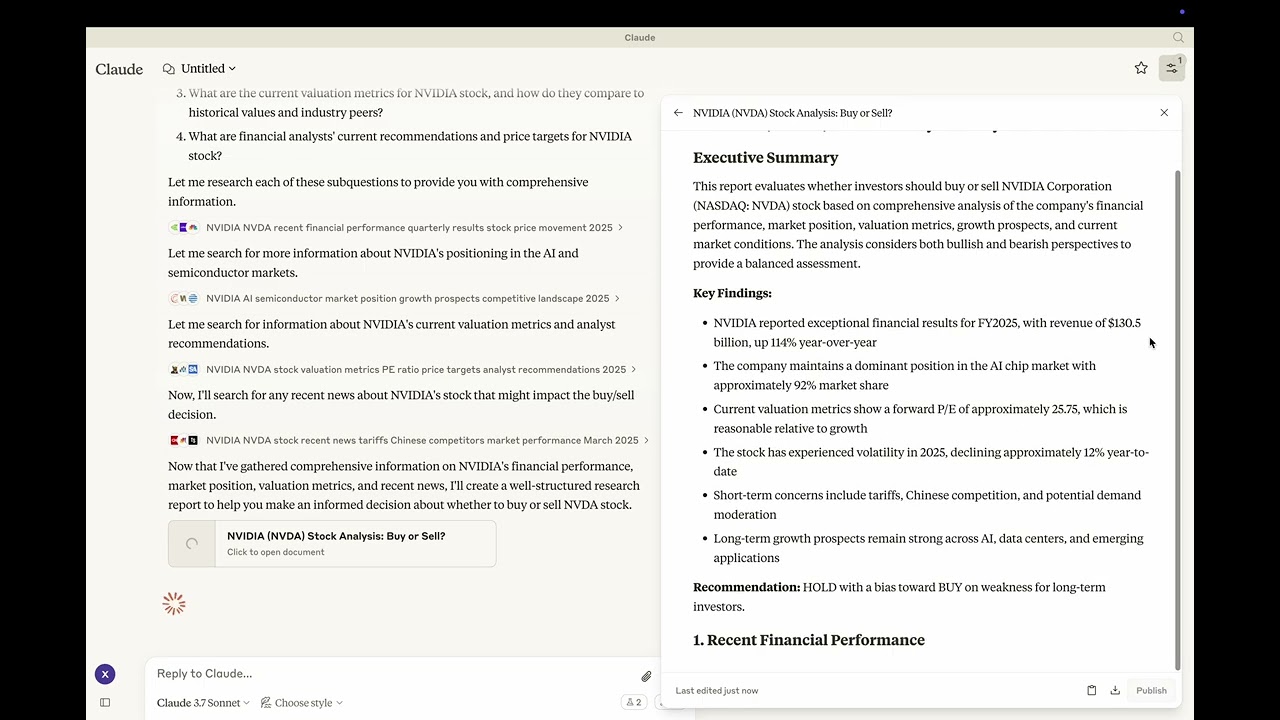 Youtube: https://youtu.be/_a7sfo5yxoI
-
Download Claude Desktop
- Get it here
-
Install and Set Up
- On macOS, run the following command in your terminal:
python setup.py -
Start Researching
- Select the deep-research prompt template from MCP
- Begin your research by providing a research question
Features
The Deep Research MCP Server offers a complete research workflow:
-
Question Elaboration
- Expands and clarifies your research question
- Identifies key terms and concepts
- Defines scope and parameters
-
Subquestion Generation
- Creates focused subquestions that address different aspects
- Ensures comprehensive coverage of the main topic
- Provides structure for systematic research
-
Web Search Integration
- Uses Claude’s built-in web search capabilities
- Performs targeted searches for each subquestion
- Identifies relevant and authoritative sources
- Collects diverse perspectives on the topic
-
Content Analysis
- Evaluates information quality and relevance
- Synthesizes findings from multiple sources
- Provides proper citations for all sources
-
Report Generation
- Creates well-structured, comprehensive reports as artifacts
- Properly cites all sources used
- Presents a balanced view with evidence-based conclusions
- Uses appropriate formatting for clarity and readability
📦 Components
Prompts
- deep-research: Tailored for comprehensive research tasks with a structured approach
⚙️ Modifying the Server
Claude Desktop Configurations
- macOS:
~/Library/Application\ Support/Claude/claude_desktop_config.json - Windows:
%APPDATA%/Claude/claude_desktop_config.json
Development (Unpublished Servers)
"mcpServers": {
  "mcp-server-deep-research": {
    "command": "uv",
    "args": [
      "--directory",
      "/Users/username/repos/mcp-server-application/mcp-server-deep-research",
      "run",
      "mcp-server-deep-research"
    ]
  }
}
Published Servers
"mcpServers": {
  "mcp-server-deep-research": {
    "command": "uvx",
    "args": [
      "mcp-server-deep-research"
    ]
  }
}
🛠️ Development
Building and Publishing
-
Sync Dependencies
uv sync -
Build Distributions
uv buildGenerates source and wheel distributions in the dist/ directory.
-
Publish to PyPI
uv publish
Установка
uvx mcp-server-deep-researchКонфигурация
"mcpServers": {
  "mcp-server-deep-research": {
    "command": "uv",
    "args": [
      "--directory",
      "/Users/username/repos/mcp-server-application/mcp-server-deep-research",
      "run",
      "mcp-server-deep-research"
    ]
  }
}