
openlinksoftware/mcp-odbc-server
Developer toolsЭта страница переведена автоматически. Технические детали смотрите в оригинале. Открыть оригинал
Typescript based Model Context Procotol (MCP) Server for Open Database Connectivity (ODBC)
Обзор
This document covers the set up and use of a generic ODBC server for the Model Context Protocol (MCP), referred to as an mcp-odbc server. It has been developed to provide Large Language Models with transparent access to ODBC-accessible data sources via a Data Source Name configured for a specific ODBC Connector (also called an ODBC Driver). This is a small TypeScript layer built on top of node-odbc. It routes calls to the host system's local ODBC Driver Manager via node.js (specifically using npx for TypeScript). While the examples that follow are oriented toward the Virtuoso ODBC Connector, this guide will also work with other ODBC Connectors. We strongly encourage code contributions and submissions of usage demos related to other database management systems (DBMS) for incorporation into this project. 1. Check the node.js version. If it's not 21.1.0 or higher, upgrade or install explicitly using: 2. Install MCP components using: 3. Set the nvm version using: 1. Run 2.
README
Показан фрагмент оригинального README. Открыть оригинал.
OpenLink MCP Server for ODBC
This document covers the set up and use of a generic ODBC server for the Model Context Protocol (MCP), referred to as an mcp-odbc server. It has been developed to provide Large Language Models with transparent access to ODBC-accessible data sources via a Data Source Name configured for a specific ODBC Connector (also called an ODBC Driver).
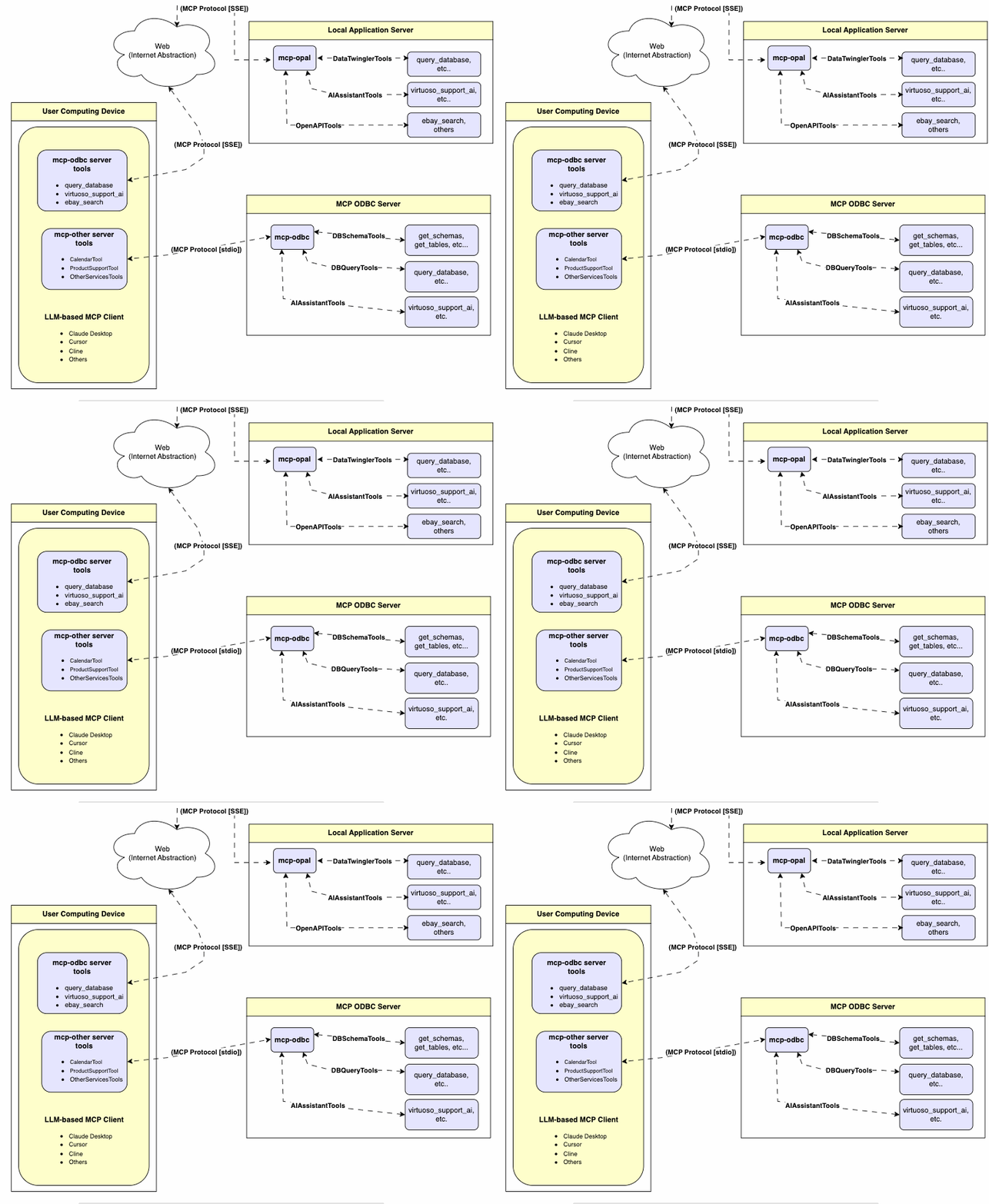
Server Implementation
This MCP Server for ODBC is a small TypeScript layer built on top of node-odbc. It routes calls to the host system’s local ODBC Driver Manager via node.js (specifically using npx for TypeScript).
Operating Environment Set Up & Prerequisites
While the examples that follow are oriented toward the Virtuoso ODBC Connector, this guide will also work with other ODBC Connectors. We strongly encourage code contributions and submissions of usage demos related to other database management systems (DBMS) for incorporation into this project.
Key System Components
- Check the
node.jsversion. If it’s not21.1.0or higher, upgrade or install explicitly using:nvm install v21.1.0 - Install MCP components using:
npm install @modelcontextprotocol/sdk zod tsx odbc dotenv - Set the
nvmversion using:nvm alias default 21.1.0
Installation
- Run
git clone https://github.com/OpenLinkSoftware/mcp-odbc-server.git - Change directory
cd mcp-odbc-server - Run
npm init -y - Run
npm install @modelcontextprotocol/sdk zod tsx odbc dotenv
unixODBC Runtime Environment Checks
- Check installation configuration (i.e., location of key INI files) by running:
odbcinst -j - List available data source names (DSNs) by running:
odbcinst -q -s
Environment Variables
As good security practice, you should use the .env file situated in the same directory as the mcp-ser to set bindings for the ODBC Data Source Name (ODBC_DSN), the User (ODBC_USER), the Password (ODBC_PWD), the ODBC INI (ODBCINI), and, if you want to use the OpenLink AI Layer (OPAL) via ODBC, the target Large Language Model (LLM) API Key (API_KEY).
API_KEY=sk-xxx
ODBC_DSN=Local Virtuoso
ODBC_USER=dba
ODBC_PASSWORD=dba
ODBCINI=/Library/ODBC/odbc.ini
Usage
Tools
After successful installation, the following tools will be available to MCP client applications.
Overview
| name | description |
|---|---|
get_schemas |
List database schemas accessible to connected database management system (DBMS). |
get_tables |
List tables associated with a selected database schema. |
Установка
This server does not publish a one-line install command.
Open the repository installation guide Новичок в MCP? Начните с руководства на mcpskill.org →Конфигурация
{
    "mcpServers": {
        "ODBC": {
            "command": "/path/to/.nvm/versions/node/v21.1.0/bin/node",
            "args": [
                "/path/to/mcp-odbc-server/node_modules/.bin/tsx",
                "/path/to/mcp-odbc-server/src/main.ts"
            ],
            "env": {
                "ODBCINI": "/Library/ODBC/odbc.ini",
                "NODE_VERSION": "v21.1.0",
                "PATH": "~/.nvm/versions/node/v21.1.0/bin:${PATH}"
            },
            "disabled": false,
            "autoApprove": []
        }
    }
}