
huaqiu-electronics/kicad-mcp
Developer toolsKiCad MCP integrated with the KiCad IPC API.
Обзор
KiCad MCP integrated with the KiCad IPC API. You can run the MCP server directly without installing it using uvx: This will download and execute the latest version from PyPI in an isolated environment. Add the following configuration to your MCP client: Modify the code and restart your MCP client to see changes. - Requires uv: https://github.com/astral-sh/uv - Python 3.11+ - Ensure KiCad is running with IPC enabled
README
kicad-mcp
KiCad MCP integrated with the KiCad IPC API.


Usage
Run the latest release
You can run the MCP server directly without installing it using uvx:
uvx kicad-mcp --editor-type schematic
This will download and execute the latest version from PyPI in an isolated environment.
MCP client configuration
- Claude Code
{
	"mcpServers": {
		"Kicad-Schematic-MCP": {
			"type": "stdio",
			"command": "uvx",
			"args": [
				"kicad-mcp",
				"--editor-type",
				"schematic"
			]
		},
		"Kicad-PCB-MCP": {
			"type": "stdio",
			"command": "uvx",
			"args": [
				"kicad-mcp",
				"--editor-type",
				"pcb"
			]
		}
	},
	"inputs": []
}
- VSCode
Add the following configuration to your MCP client:
{
	"servers": {
		"Kicad-Schematic-MCP": {
			"type": "stdio",
			"command": "uvx",
			"args": [
				"kicad-mcp",
				"--editor-type",
				"schematic"
			]
		},
		"Kicad-PCB-MCP": {
			"type": "stdio",
			"command": "uvx",
			"args": [
				"kicad-mcp",
				"--editor-type",
				"pcb"
			]
		}
	},
	"inputs": []
}
- Cherry Studio
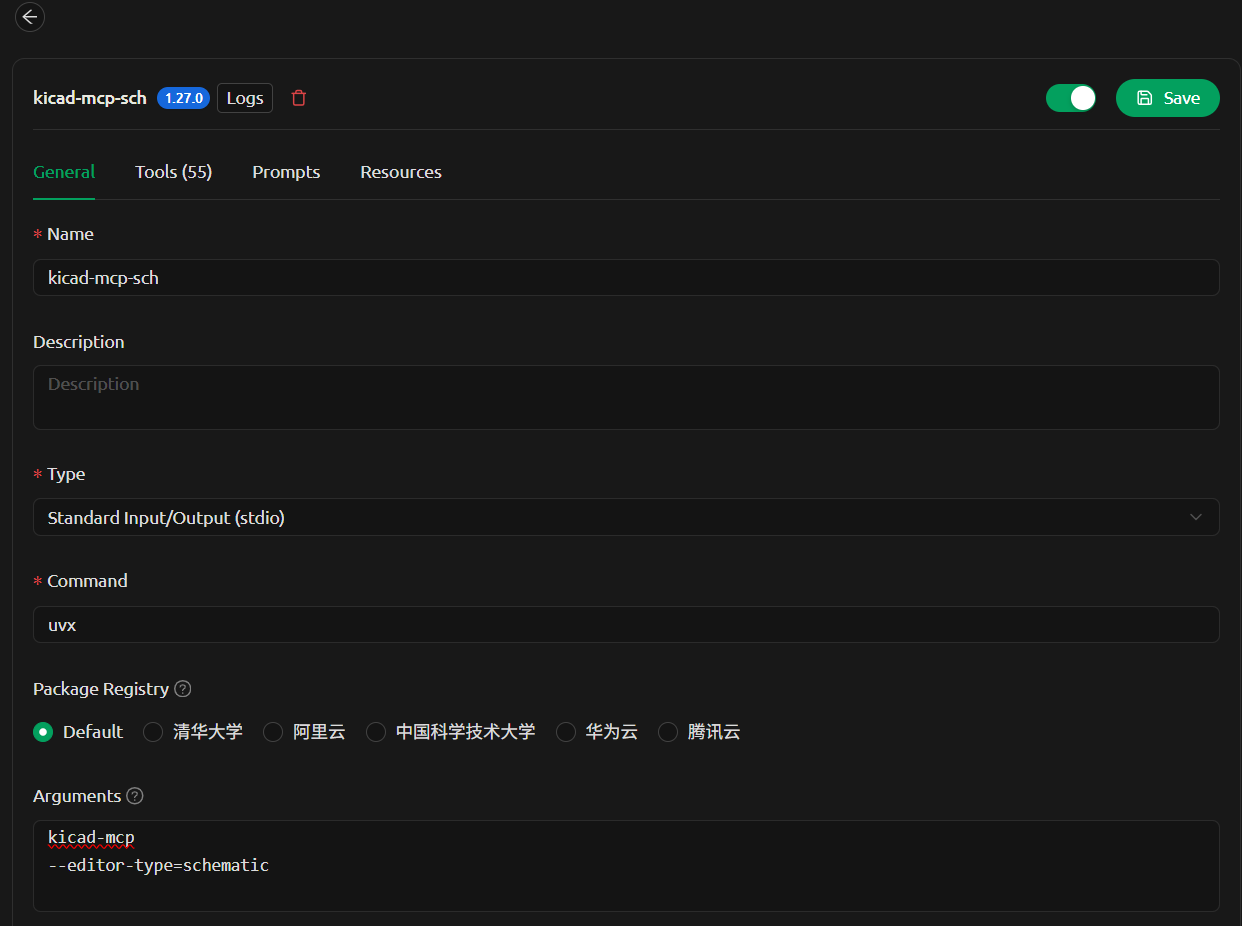
Options
--editor-type supports:
schematicpcbsymbolfootprint
Development
1. Clone the repository
git clone
cd kicad-mcp
2. Configure MCP client (local development)
Example configuration in VSCode:
{
  "servers": {
    "kicad-pcb-mcp": {
      "type": "stdio",
      "command": "uv",
      "args": [
        "--directory",
        "C:/code/kicad-mcp",
        "run",
        "kicad-mcp",
        "--editor-type",
        "pcb"
      ]
    },
    "kicad-schematic-mcp": {
      "type": "stdio",
      "command": "uv",
      "args": [
        "--directory",
        "C:/code/kicad-mcp",
        "run",
        "kicad-mcp",
        "--editor-type",
        "schematic"
      ]
    }
  }
}
3. Run locally
Install dependencies and run:
uv sync
uv run kicad-mcp --editor-type schematic
4. Iterate
Modify the code and restart your MCP client to see changes.
Notes
- Requires
uv: https://github.com/astral-sh/uv - Python 3.11+
- Ensure KiCad is running with IPC enabled
Установка
uvx kicad-mcp --editor-type schematicКонфигурация
{
	"mcpServers": {
		"Kicad-Schematic-MCP": {
			"type": "stdio",
			"command": "uvx",
			"args": [
				"kicad-mcp",
				"--editor-type",
				"schematic"
			]
		},
		"Kicad-PCB-MCP": {
			"type": "stdio",
			"command": "uvx",
			"args": [
				"kicad-mcp",
				"--editor-type",
				"pcb"
			]
		}
	},
	"inputs": []
}