
gethopp/figma-mcp-bridge
Developer toolsЭта страница переведена автоматически. Технические детали смотрите в оригинале. Открыть оригинал
gethopp/figma-mcp-bridge — это кандидат на MCP-сервер, импортированный из https://github.com/gethopp/figma-mcp-bridge.
Обзор
gethopp/figma-mcp-bridge — это кандидат на MCP-сервер, импортированный из https://github.com/gethopp/figma-mcp-bridge.
Обзор (машинный перевод)
- Демо
- Быстрый старт
- Доступные инструменты
- Местное развитие
- Структура
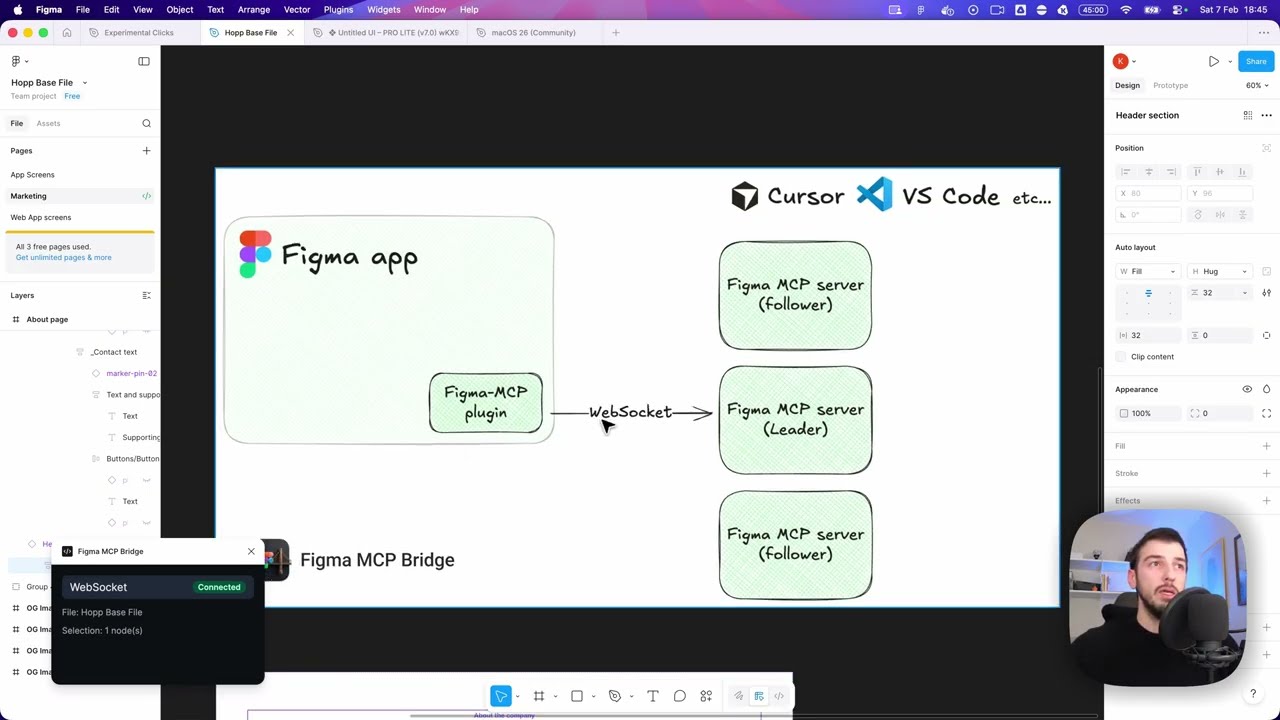
- Как это работает
[! ПРИМЕЧАНИЕ] Требуется десктопное приложение Figma (macOS/Windows). Браузерная версия Figma не поддерживает импорт плагинов для разработки.
Хотя существуют другие отличные серверы Figma MCP, такие как Figma-Context-MCP, одна из проблем — ограничение API для бесплатных пользователей.
Лимит для бесплатных аккаунтов — 6 запросов в месяц, да, в месяц.
Figma MCP Bridge — это решение этой проблемы. Это плагин + MCP-сервер, который транслирует живые данные Figma документов на AI-инструменты, не достигая ограничений скорости Figma API, поэтому для остальных ✊ из нас это Figma MCP
Он поддерживает несколько файлов Figma, подключённых одновременно; откройте плагин в каждом файле, и ваш AI-агент сможет запросить любой из них с помощью fileKey. Однофайлные настройки работают точно так же, как раньше, без необходимости изменений.
Также включен небольшой набор инструментов write для безопасных редактирования, управляемых агентами — см. ниже раздел Edit Notes.
Демо
Посмотрите демонстрацию создания интерфейса в Cursor с помощью Figma MCP Bridge
Быстрый старт
1. Добавьте сервер MCP в ваш любимый инструмент ИИ
Добавьте в конфигурацию MCP вашего AI-инструмента (например, Cursor, Windsurf, Claude Desktop):
Эта страница переведена автоматически. Технические детали смотрите в оригинале.
README
Показан фрагмент оригинального README. Открыть оригинал.
Figma MCP Bridge

[!NOTE]
Requires the Figma desktop app (macOS/Windows). The browser version of Figma does not support importing development plugins.
While other amazing Figma MCP servers like Figma-Context-MCP exist, one issues is the API limiting for free users.
The limit for free accounts is 6 requests per month, yes per month.
Figma MCP Bridge is a solution to this problem. It is a plugin + MCP server that streams live Figma document data to AI tools without hitting Figma API rate limits, so its Figma MCP for the rest of us ✊
It supports multiple Figma files connected simultaneously; open the plugin in each file and your AI agent can query any of them by fileKey. Single-file setups work exactly as before with no changes required.
It also includes a small, opt-in set of write tools for safe agent-driven edits — see Editing Notes below.
Demo
Watch a demo of building a UI in Cursor with Figma MCP Bridge
Quick Start
1. Add the MCP server to your favourite AI tool
Add the following to your AI tool’s MCP configuration (e.g. Cursor, Windsurf, Claude Desktop):
{
  "figma-bridge": {
    "command": "npx",
    "args": ["-y", "@gethopp/figma-mcp-bridge"]
  }
}
That’s it — no binaries to download or install.
2. Add the Figma plugin
Download the plugin from the latest release page, then in Figma go to Plugins > Development > Import plugin from manifest and select the manifest.json file from the plugin/ folder. The same plugin runs in Figma design files, Dev Mode (read-only), and FigJam boards.
3. Start using it 🎉
Open a Figma file, run the plugin, and start prompting your AI tool. The MCP server will automatically connect to the plugin.
To work across multiple files, just open the plugin in each Figma file. The bridge keeps all connections active and your AI agent can target any of them by fileKey.
If you want to know more about how it works, read the How it works section.
Available Tools
| Tool | Description |
Установка
npx -y @gethopp/figma-mcp-bridge