
elliotttate/splicekit
Developer toolsЭта страница переведена автоматически. Технические детали смотрите в оригинале. Открыть оригинал
elliotttate/splicekit — это кандидат для MCP-сервера, импортированный из https://github.com/elliotttate/splicekit.
Обзор
elliotttate/splicekit — это кандидат для MCP-сервера, импортированный из https://github.com/elliotttate/splicekit.
Обзор (машинный перевод)
Final Cut Pro, разблокирован. Палитра команд, сервер MCP и открытый фреймворк плагинов для практически любых задач.
| 🎹 Палитра команд | 🤖 Сервер MCP | 🧩 Фреймворк плагинов |
|---|---|---|
Нажмите Cmd+Shift+P и введите то, что хотите. Apple Intelligence управляет этим. |
Любая LLM может читать и редактировать вашу таймлайн — и создавать новые инструменты по мере развития. | Каждая встроенная функция — это просто пример плагина. Вы (или ИИ) можете выпускать больше. |
Редактор? Начните здесь. Официальный сайт SpliceKit и FAQ — самый дружелюбный способ войти. Вопросы, помощь или запросы на функции? Присоединяйтесь к каналам SpliceKit в Discord FCP Cafe. Отчёты об ошибках: откройте выпуск на GitHub.
Не могу дождаться, чтобы увидеть, что ты с этим сделаешь. 🥳
Три столпа
🎹 1. Палитра команд
Один нажатие клавиши — что угодно.
Нажмите Cmd+Shift+P внутри патчированного FCP. Нечеткое поиск 100+ встроенных действий редактирования — blade, trim, color, speed, markers, effects, transitions, export — или введите простым английским и пусть Apple Intelligence (на устройстве, приватный) разберётся, что вы имели в виду.
Попробуй сказать…
- “добавляйте маркеры каждые 5 секунд”
- “замедли этот клип до половины скорости”
- “лезвие при каждой смене сцены”
- “убери все молчания”
Эта страница переведена автоматически. Технические детали смотрите в оригинале.
README
Показан фрагмент оригинального README. Открыть оригинал.
SpliceKit




Final Cut Pro, unlocked. A Command Palette, MCP server, and an open plugin framework to do almost anything.
| 🎹 Command Palette | 🤖 MCP Server | 🧩 Plugin Framework |
|---|---|---|
Hit Cmd+Shift+P and type what you want. Apple Intelligence runs it. |
Any LLM can read and edit your timeline — and build new tools as it goes. | Every built-in feature is just an example plugin. You (or an AI) can ship more. |
Editor? Start here. The official SpliceKit site and the FAQ are the friendliest way in. Questions, help, or feature requests? Join the SpliceKit channels on the FCP Cafe Discord. Bug reports: open a GitHub issue.
Can’t wait to see what you do with it. 🥳
The Three Pillars
🎹 1. The Command Palette
One keystroke to anything.
Hit Cmd+Shift+P inside the patched FCP. Fuzzy-search 100+ built-in editing actions — blade, trim, color, speed, markers, effects, transitions, export — or type plain English and let Apple Intelligence (on-device, private) figure out what you meant.
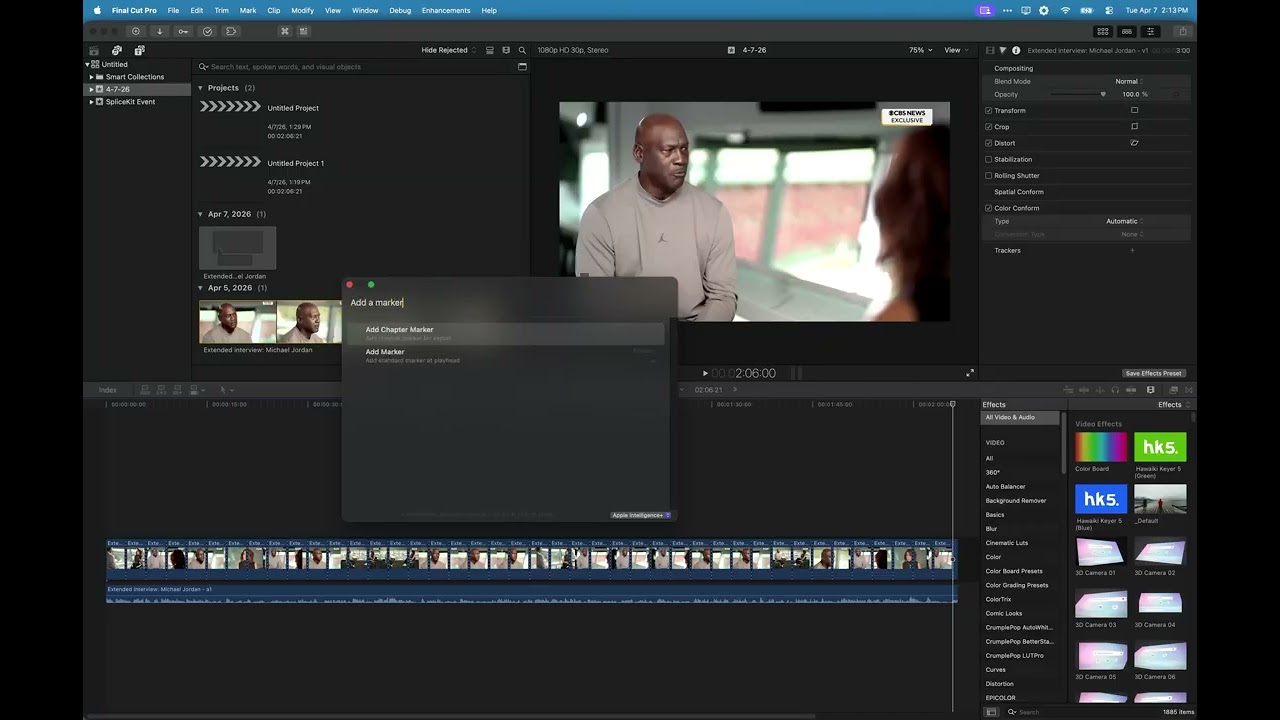
Try saying…
- “add markers every 5 seconds”
- “slow this clip to half speed”
- “blade at every scene change”
- “remove all the silences”
- “add a cross dissolve”
No more menu hunting. No more memorizing shortcuts. No cloud.
🤖 2. The MCP Server
Claude (or any other LLM) can drive your editor — and teach it new tricks.
SpliceKit ships with an MCP server that exposes ~200 tools covering every major FCP subsystem. Point Claude Code, Claude Desktop, or any MCP-compatible AI client at it and you can say things like:
- “cut this 40-minute interview down to its best moments”
- “remove the silences from this podcast, add captions, and export”
- “assemble a rough cut from these clips, synced to the beat of this song”
It’s not a chat wrapper around keyboard shortcuts. The MCP talks to FCP’s internal ObjC runtime directly — so it can read timeline state, inspect clips, blade, retime, color-correct, apply effects, and render without ever touching the UI.
The editor that gets smarter every week
Установка
This server does not publish a one-line install command.
Open the repository installation guide Новичок в MCP? Начните с руководства на mcpskill.org →Конфигурация
{
  "mcpServers": {
    "splicekit": {
      "command": "/Users/yourname/.venvs/splicekit-mcp/bin/python",
      "args": ["/absolute/path/to/SpliceKit/mcp/server.py"]
    }
  }
}