
daoyuanli2816/mcp-fence
Security testingЭта страница переведена автоматически. Технические детали смотрите в оригинале. Открыть оригинал
Local-first security scanner, MCP protocol inspector, dynamic fuzzer, Docker sandbox, and report generator for Model Context Protocol servers.
Обзор
Local-first security scanner, MCP protocol inspector, dynamic fuzzer, Docker sandbox, and report generator for servers. mcp-fence is a developer tool. Point it at your mcp.json (or any running MCP server you wrote) and it will: 1. the config and source for tool poisoning, dangerous startup commands, plaintext secrets, schema gaps, and unauthenticated HTTP transports. 2. the server live over stdio — runs initialize, tools/list, gathers schemas/annotations. 3. every tool with schema-aware payloads (path traversal, command injection, SSRF, prompt injection, oversize input, type confusion). Safe by default; opt in to runtime payloads via --toy-mode or --allow-unsafe. 4. any stdio server in Docker with sensible profiles (strict, filesystem-readonly, network-deny, dev). 5. findings as a plain-text table, JSON, SARIF 2.1.0 (for GitHub code scanning), or a fully offline HTML page. It is , , and uses . An optional local-LLM judge can talk to a local Ollama or OpenAI-compatible endpoint.
README
Показан фрагмент оригинального README. Открыть оригинал.
Local-first security scanner, MCP protocol inspector, dynamic fuzzer, Docker sandbox, and report generator for Model Context Protocol servers.
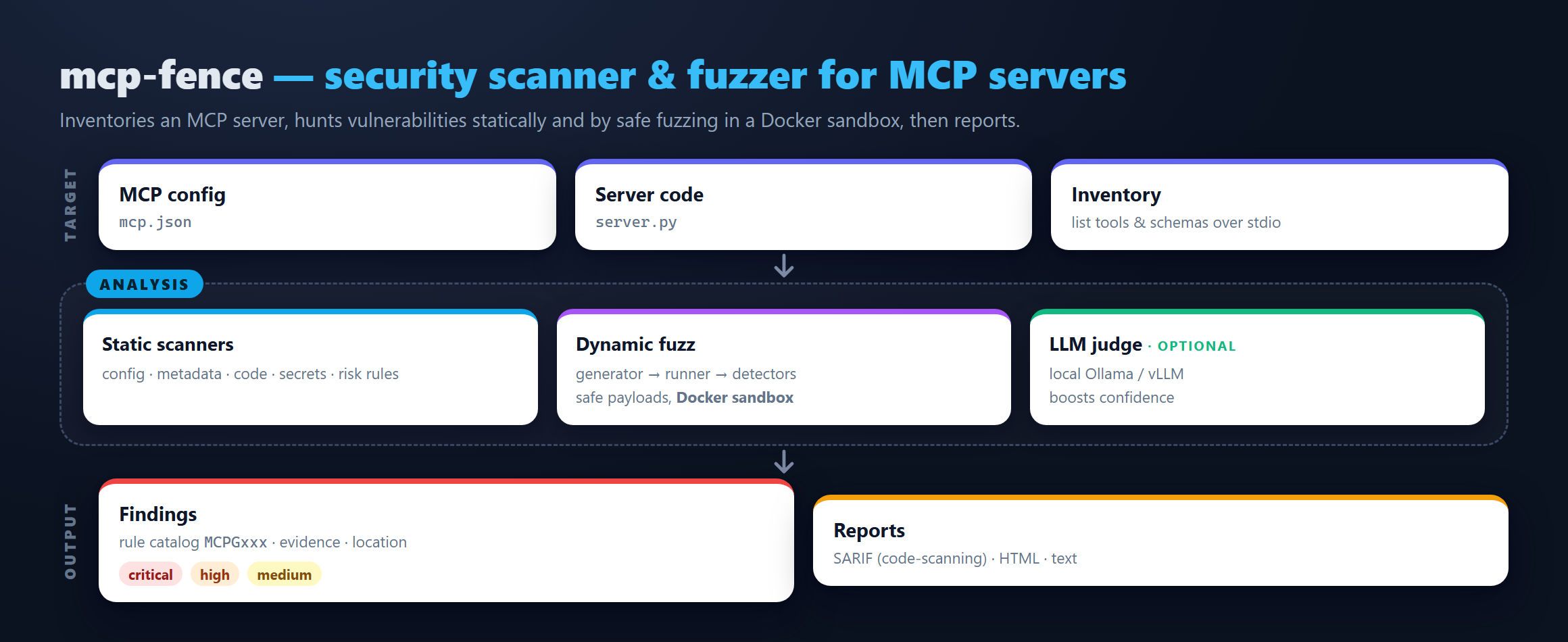
mcp-fence is a developer tool. Point it at your mcp.json (or any
running MCP server you wrote) and it will:
- Statically scan the config and source for tool poisoning, dangerous startup commands, plaintext secrets, schema gaps, and unauthenticated HTTP transports.
- Inspect the server live over stdio — runs
initialize,tools/list, gathers schemas/annotations. - Fuzz every tool with schema-aware payloads (path traversal,
command injection, SSRF, prompt injection, oversize input, type
confusion). Safe by default; opt in to runtime payloads via
--toy-modeor--allow-unsafe. - Sandbox any stdio server in Docker with sensible profiles
(
strict,filesystem-readonly,network-deny,dev). - Report findings as a plain-text table, JSON, SARIF 2.1.0 (for GitHub code scanning), or a fully offline HTML page.
It is non-destructive, local-first, and uses no cloud LLM by default. An optional local-LLM judge can talk to a local Ollama or OpenAI-compatible endpoint.
Install
From PyPI:
pip install mcp-fence
From source (for contributors):
git clone https://github.com/DaoyuanLi2816/mcp-fence
cd mcp-fence
python -m venv .venv
source .venv/bin/activate          # Windows: .venv\Scripts\activate
python -m pip install -e ".[dev]"
Requires Python 3.11+.
30-second quickstart
# 1. Bring up the bundled examples in your working directory.
mcp-fence init-example ./mcp-fence-examples

# 2. Static scan the intentionally poisoned metadata server.
mcp-fence scan mcp-fence-examples/vulnerable_metadata_server/mcp.json

# 3. Live-inspect the safe baseline.
mcp-fence inspect mcp-fence-examples/safe_server/mcp.json

# 4. Fuzz the arbitrary-file-read server.
mcp-fence fuzz mcp-fence-examples/vulnerable_filesystem_server/mcp.json

# 5. Generate a `docker run` command that sandboxes any of the above.Установка
This server does not publish a one-line install command.
Open the repository installation guide Новичок в MCP? Начните с руководства на mcpskill.org →