
Эта страница переведена автоматически. Технические детали смотрите в оригинале. Открыть оригинал
counterpoint-studio/audio-file-mcp-app - это кандидат на сервер MCP, импортированный из https://github.com/counterpoint-studio/audio-file-mcp-app.
Обзор
counterpoint-studio/audio-file-mcp-app - это кандидат на сервер MCP, импортированный из https://github.com/counterpoint-studio/audio-file-mcp-app.
Обзор (машинный перевод)
Приложение MCP для воспроизведения и проверки локальных аудиофайлов в MCP-хосте.
Осуществляет интерфейс разговора с воспроизведением, метаданными, громкостью, а спектрограмма и необязательная линия времени аннотации.
Метаданные файлов, статистика громкости, текущая позиция плейхеда, любые выбранный регион, а также аннотационные полосы, активные на игровом плацдарме Возврат к модели, поэтому последующие задачи могут относиться к тому, что пользователь На самом деле слушать и смотреть.
Особенности
** Глобальные показатели громкости**, рассчитанные по EBU R128: Integrated Loudness (LUFS), Loudness Range (LRA), True Peak (dBTP), Sample Peak и RMS. Мгновенные показатели громкости во время игры или зависания: моментально (400 мс) и краткосрочный (3 с) LUFS, а также пик образца и RMS Положение курсора. Waveform coloring by spectral centroid — каждый срез формы волны затененный вдоль тонального пандуса, используя низкое / среднее / высокое отношение энергии полосы, поэтому Яркие / темные области читаются с первого взгляда как яркий / темный звук. -** Переназначенная спектрограмма** с лог-частотными контейнерами (20 Гц) и Цветовая шкала ада; временная частота переназначения обостряет переходные процессы и тональные части за пределами того, что показывает простой STFT. ** Выбор региона.
Эта страница переведена автоматически. Технические детали смотрите в оригинале.
README
Показан фрагмент оригинального README. Открыть оригинал.
Audio File MCP App
An MCP App for playing and inspecting local audio files in an MCP host.
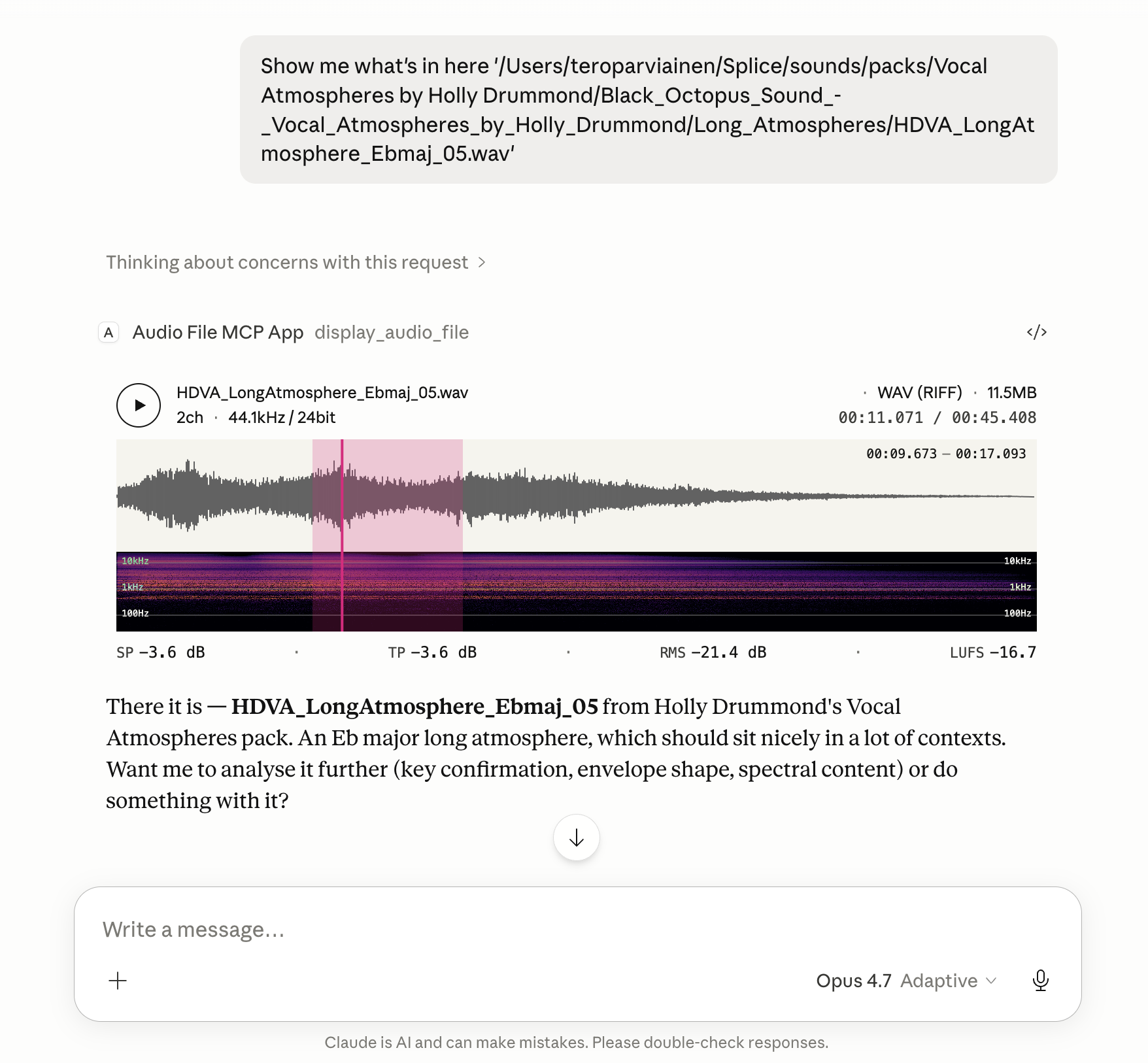
Renders an in-conversation UI with playback, metadata, loudness, a spectrogram, and an optional annotation-lane timeline.
File metadata, loudness statistics, the current playhead position, any selected region, and the annotation lanes active at the playhead are also exposed back to the model, so follow-up tasks can refer to what the user is actually hearing and looking at.
Features
- Global loudness metrics computed to EBU R128: Integrated Loudness (LUFS), Loudness Range (LRA), True Peak (dBTP), Sample Peak, and RMS.
- Instantaneous loudness metrics while playing or hovering: Momentary (400 ms) and Short-Term (3 s) LUFS, plus sample-peak and RMS at the cursor position.
- Waveform colouring by spectral centroid — each waveform slice is shaded along a tonal ramp using a low/mid/high band-energy ratio, so bright/dark regions read at a glance as bright/dark sound.
- Reassigned spectrogram with log-frequency bins (20 Hz floor) and an Inferno colour scale; time-frequency reassignment sharpens transients and tonal partials beyond what a plain STFT shows.
- Looping region selection. Drag on the timeline to mark a region; playback loops over it, and the region’s start/end are passed back to the model alongside the file’s loudness and playhead state.
- Annotation-lane timeline. Supply timeline annotations and the widget draws a stack of thin labelled lanes between the waveform and spectrogram, aligned to the audio’s own timeline. Each lane carries time spans, an optional colour, and an optional envelope that fades span opacity along the lane. Hovering a span reveals its label, and the lanes active at the playhead — plus those starting, ending, or active within a selected region — are reported back to the model.
Install
The server runs locally over stdio. Every install path below configures the
same command: npx -y @counterpoint-studio/audio-file-mcp-app.
Claude Desktop
Easiest: grab the latest .mcpb from the
Releases page
and double-click it. Claude Desktop has Node bundled, so no extra runtime
is needed.
Or add the server by hand to claude_desktop_config.json:
{
  "mcpServers": {
    "audio-file": {
      "command": "npx",
      "args": ["-y", "@counterpoint-studio/audio-file-mcp-app"]
    }
  }
}
Codex Desktop
- Go to Settings -> MCP Servers
- Add Server
- Name:
audiofile-mcp-app - Command to launch:
npx - Arguments
-yand@counterpoint-studio/audio-file-mcp-app
VS Code (Copilot, Agent mode)
Установка
npx -y @counterpoint-studio/audio-file-mcp-appКонфигурация
{
  "mcpServers": {
    "audio-file": {
      "command": "npx",
      "args": ["-y", "@counterpoint-studio/audio-file-mcp-app"]
    }
  }
}