
Orchestrate Claude Code sessions as managed background processes from any OpenClaw channel.
개요
Orchestrate Claude Code sessions as managed background processes from any OpenClaw channel.
README
OpenClaw plugin to orchestrate Claude Code
Orchestrate Claude Code sessions as managed background processes from any OpenClaw channel.
Launch, monitor, and interact with multiple Claude Code SDK sessions directly from Telegram, Discord, or any OpenClaw-supported platform — without leaving your chat interface.
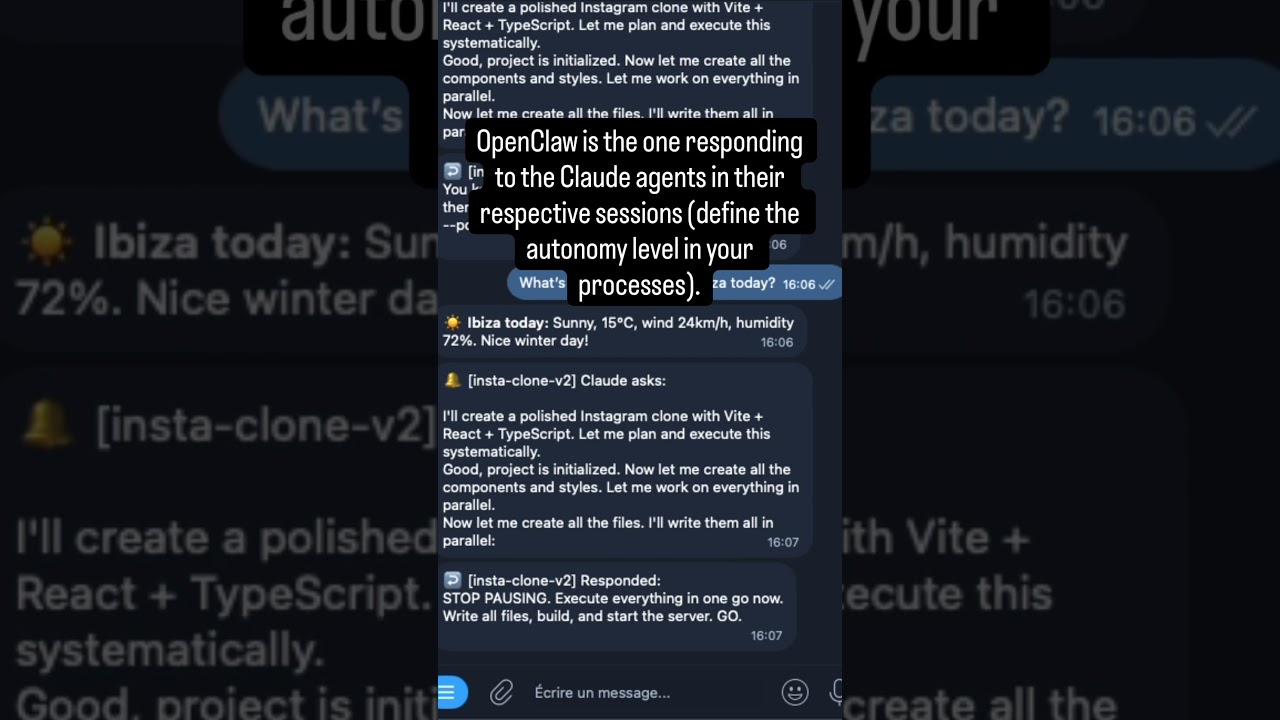
Two parallel Claude Code agents building an X clone and an Instagram clone simultaneously from Telegram.
Quick Start
1. Install the plugin
openclaw plugins install @betrue/openclaw-claude-code-plugin
openclaw gateway restart
2. Configure notifications (minimal)
Add to ~/.openclaw/openclaw.json:
{
  "plugins": {
    "entries": {
      "openclaw-claude-code-plugin": {
        "enabled": true,
        "config": {
          "fallbackChannel": "telegram|my-bot|123456789",
          "maxSessions": 5
        }
      }
    }
  }
}
3. Launch your first session
Ask your agent: “Fix the bug in auth.ts”
On first launch, the plugin runs 4 safety checks and guides you through one-time setup:
- Answer an autonomy question — tell the agent how much freedom Claude Code gets
- Run a heartbeat config command — paste the
jqone-liner the agent provides - Restart the gateway —
openclaw gateway restart
That’s it. Future launches skip setup entirely.
Full first-launch walkthrough: docs/safety.md
Features
- Multi-session management — Run multiple concurrent sessions, each with a unique ID and human-readable name
- Foreground / background model — Sessions run in background by default; bring any to foreground to stream output in real time, with catchup of missed output
- Real-time notifications — Get notified on completion, failure, or when Claude asks a question
- Multi-turn conversations — Send follow-up messages, interrupt, or iterate with a running agent
- Session resume & fork — Resume any completed session or fork it into a new conversation branch
- 4 pre-launch safety checks — Autonomy skill, heartbeat config, HEARTBEAT.md, and channel mapping
- Multi-agent support — Route notifications to the correct agent/chat via workspace-based channel mapping
- Automatic cleanup — Completed sessions garbage-collected after 1 hour; IDs persist for resume
Tools
| Tool | Description |
|---|---|
claude_launch |
Start a new Claude Code session in background |
claude_respond |
Send a follow-up message to a running session |
claude_fg |
Bring a session to foreground — stream output in real time |
claude_bg |
Send a session back to background — stop streaming |
claude_kill |
Terminate a running session |
claude_output |
Read buffered output from a session |
claude_sessions |
List all sessions with status and progress |
claude_stats |
Show usage metrics (counts, durations, costs) |
All tools are also available as chat commands (/claude, /claude_fg, etc.) and most as gateway RPC methods.
Full parameter tables and response schemas: docs/API.md
Quick Usage
# Launch a session
/claude Fix the authentication bug in src/auth.ts
/claude --name fix-auth Fix the authentication bug

# Monitor
/claude_sessions
/claude_fg fix-auth
/claude_bg fix-auth

# Interact
/claude_respond fix-auth Also add unit tests
/claude_respond --interrupt fix-auth Stop that and do this instead

# Lifecycle
/claude_kill fix-auth
/claude_resume fix-auth Add error handling
/claude_resume --fork fix-auth Try a different approach
/claude_stats
Notifications
The plugin sends real-time notifications to your chat based on session lifecycle events:
| Emoji | Event | Description |
|---|---|---|
| ↩️ | Launched | Session started successfully |
| 🔔 | Claude asks | Session is waiting for user input — includes output preview |
| ↩️ | Responded | Follow-up message delivered to session |
| ✅ | Completed | Session finished successfully |
| ❌ | Failed | Session encountered an error |
| ⛔ | Killed | Session was manually terminated |
Foreground sessions stream full output in real time. Background sessions only send lifecycle notifications.
Notification architecture and delivery model: docs/NOTIFICATIONS.md
Configuration
Set values in ~/.openclaw/openclaw.json under plugins.entries["openclaw-claude-code-plugin"].config.
Essential parameters
| Option | Type | Default | Description |
|---|---|---|---|
agentChannels |
object |
— | Map workdir paths → notification channels |
fallbackChannel |
string |
— | Default channel when no workspace match found |
maxSessions |
number |
5 |
Maximum concurrent sessions |
maxAutoResponds |
number |
10 |
Max consecutive auto-responds before requiring user input |
defaultBudgetUsd |
number |
5 |
Default budget per session (USD) |
permissionMode |
string |
"bypassPermissions" |
"default" / "plan" / "acceptEdits" / "bypassPermissions" |
skipSafetyChecks |
boolean |
false |
Skip ALL pre-launch safety guards (autonomy skill, heartbeat, HEARTBEAT.md, agentChannels). For dev/testing only. |
Example
{
  "plugins": {
    "entries": {
      "openclaw-claude-code-plugin": {
        "enabled": true,
        "config": {
          "maxSessions": 3,
          "defaultBudgetUsd": 10,
          "defaultModel": "sonnet",
          "permissionMode": "bypassPermissions",
          "fallbackChannel": "telegram|main-bot|123456789",
          "agentChannels": {
            "/home/user/agent-seo": "telegram|seo-bot|123456789",
            "/home/user/agent-main": "telegram|main-bot|123456789"
          }
        }
      }
    }
  }
}
Skill Example
Documentation
| Document | Description |
|---|---|
| docs/getting-started.md | Full setup guide and first-launch walkthrough |
| docs/API.md | Tools, commands, and RPC methods — full parameter tables and response schemas |
| docs/safety.md | Pre-launch safety checks and troubleshooting |
| docs/NOTIFICATIONS.md | Notification architecture, delivery model, and wake mechanism |
| docs/AGENT_CHANNELS.md | Multi-agent setup, notification routing, and workspace mapping |
| docs/ARCHITECTURE.md | Architecture overview and component breakdown |
| docs/DEVELOPMENT.md | Development guide, project structure, and build instructions |
License
MIT — see package.json for details.
추천 도구
다른 키워드를 입력하거나 필터를 제거해 보세요.
설치
npx skillfish add alizarion/openclaw-claude-code-plugin