
wjc9011/comsol_multiphysics_mcp
Developer tools이 페이지는 AI로 자동 번역되었습니다. 기술적인 세부 사항은 원문을 확인하세요. 원문 보기
AI 에이전트를 통한 COMSOL 다물리 시뮬레이션 자동화를 위한 MCP 서버.
개요
AI 에이전트를 통한 COMSOL 다물리 시뮬레이션 자동화를 위한 MCP 서버. AI 에이전트(예: Claude, 오픈코드)가 MCP 프로토콜을 통해 다중 물리 시뮬레이션을 수행할 수 있도록 완전한 COMSOL MCP 서버를 구축하세요: 1. - 생성, 불러오기, 저장, 버전 관리 2. - 블록, 원통, 구, 불리언 연산 3. - 열 전달, 유체 흐름, 정전기학, 고체 역학 4. - 자동 메쉬, 고정/시간 의존 연구 5. - 식식 평가, 플롯 내보내기 6. - 내장 가이드 + PDF 의미 검색 - (버전 5.x 또는 6.x) - (Windows Store 버전이 아님) - (MPh/COMSOL 필수) Through-Silicon Via(TSV)를 이용한 실리콘 칩의 3D 열 분석. : 60×60×5 μm 칩, 5 μm 직경 TSV 구멍, 10×10 μm 열원 : client_script/create_chip_tsv_final.py : 1 MW/m²의 열 플럭스를 가진 주변 온도에서 온도 상승
개요(AI 번역)
AI 에이전트를 통한 COMSOL 다물리 시뮬레이션 자동화를 위한 MCP 서버.
영어 | 中文
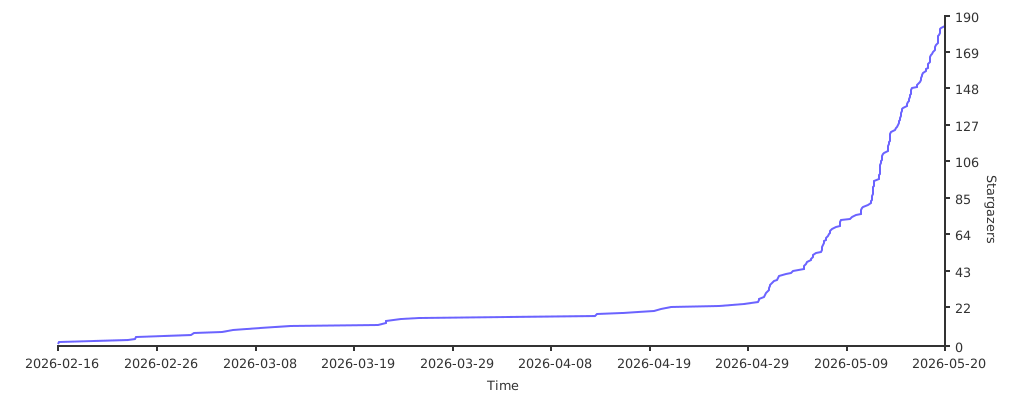
스타 히스토리
출판 및 인용문
COMSOL-MCP를 설명한 연구 논문은 Neurocomputing에 실려 있습니다:
장나이인 & 왕 준차오, “COMSOL-MCP: AI 지원 다물리 시뮬레이션을 위한 오픈 소스 모델 컨텍스트 프로토콜 인터페이스,” Neurocomputing, 703권, 논문 134481, 2026.
출판사 페이지: ScienceDirect
COMSOL-MCP가 연구에 기여한다면, 논문을 인용해 주세요:
인용 지침
- COMSOL-MCP 방법, 아키텍처, 역량 또는 평가를 참조할 때 논문을 인용하십시오.
- 소프트웨어를 사용하거나 수정할 경우, 논문과 저장소 모두를 인용하세요. GitHub의 cite this repository 메뉴를 사용하세요. 이 메뉴는
CITATION.cff로 뒷받침됩니다. - 재현성을 위해 정확한 릴리스 태그나 커밋을 식별하고, 저장소 URL과 접근 날짜를 데이터/코드 가용성 명세서에 포함하세요.
프로젝트 목표
AI 에이전트(예: Claude, 오픈코드)가 MCP 프로토콜을 통해 다중 물리 시뮬레이션을 수행할 수 있도록 완전한 COMSOL MCP 서버를 구축하세요:
- 모델 관리 - 생성, 로드, 저장, 버전 관리
이 페이지는 AI로 자동 번역되었습니다. 기술적인 세부 사항은 원문을 확인하세요.
README
원문 README의 일부입니다. 원문 보기.
COMSOL MCP Server
MCP Server for COMSOL Multiphysics simulation automation via AI agents.
English | 中文
Star History

Publication and Citation
The research paper describing COMSOL-MCP is available in Neurocomputing:
Naiyin Zhang and Junchao Wang, “COMSOL-MCP: An open-source model context protocol interface for AI-assisted multiphysics simulation,” Neurocomputing, vol. 703, article 134481, 2026.
Publisher page: ScienceDirect
If COMSOL-MCP contributes to your research, please cite the paper:
@article{Zhang2026COMSOLMCP,
  title   = {COMSOL-MCP: An Open-Source Model Context Protocol Interface for AI-Assisted Multiphysics Simulation},
  author  = {Zhang, Naiyin and Wang, Junchao},
  journal = {Neurocomputing},
  volume  = {703},
  pages   = {134481},
  year    = {2026},
  doi     = {10.1016/j.neucom.2026.134481},
  url     = {https://doi.org/10.1016/j.neucom.2026.134481}
}
Citation guidance
- Cite the paper when referring to the COMSOL-MCP method, architecture, capabilities, or evaluation.
- If you use or modify the software, cite both the paper and the repository. Use GitHub’s Cite this repository menu, which is backed by
CITATION.cff. - For reproducibility, identify the exact release tag or commit used and include the repository URL and access date in your data/code availability statement.
Project Goal
Build a complete COMSOL MCP Server enabling AI agents (like Claude, opencode) to perform multiphysics simulations through the MCP protocol:
- Model Management - Create, load, save, version control
- Geometry Building - Blocks, cylinders, spheres, boolean operations
- Physics Configuration - Heat transfer, fluid flow, electrostatics, solid mechanics
- Meshing & Solving - Auto mesh, stationary/time-dependent studies
- Results Visualization - Evaluate expressions, export plots
- Knowledge Integration - Embedded guides + PDF semantic search
Requirements
- COMSOL Multiphysics (version 5.x or 6.x)
- Python 3.10+ (NOT Windows Store version)
- Java runtime (required by MPh/COMSOL)
Installation
# Clone repository
git clone https://github.com/wjc9011/COMSOL_Multiphysics_MCP.git
cd COMSOL_Multiphysics_MCP

# Install dependencies
python -m pip install -e .

# Test server
python -m src.server
Building PDF Knowledge Base
# Install additional dependencies
pip install pymupdf chromadb sentence-transformers

# Build knowledge base
python scripts/build_knowledge_base.py

# Check status설치
This server does not publish a one-line install command.
Open the repository installation guide MCP 초보자라면? mcpskill.org 가이드부터 시작하세요 →설정
{
  "mcpServers": {
    "comsol": {
      "command": "python",
      "args": ["-m", "src.server"],
      "cwd": "/path/to/COMSOL_Multiphysics_MCP"
    }
  }
}