
veelenga/claude-mermaid
Developer tools이 페이지는 AI로 자동 번역되었습니다. 기술적인 세부 사항은 원문을 확인하세요. 원문 보기
veelenga/claude-mermaid는 https://github.com/veelenga/claude-mermaid.에서 가져온 MCP 서버 후보입니다.
개요
veelenga/claude-mermaid는 https://github.com/veelenga/claude-mermaid.에서 가져온 MCP 서버 후보입니다.
개요(AI 번역)
Claude 코드로 머메이드 다이어그램을 렌더링하는 MCP 서버로, 라이브 리로딩 기능과 전문가 지도를 위한 내장 스킬이 포함되어 있습니다.
다이어그램을 브라우저에서 자동으로 렌더링하고, 다듬을 때마다 실시간으로 업데이트됩니다. 반복적인 다이어그램 개발 및 문서 작업 흐름에 완벽합니다.
✨ 특징
- 🔄 라이브 리로드 - 편집 시 브라우저에서 도표가 자동으로 새로고침됩니다
- 🎨 여러 저장 포맷 - SVG, PNG 또는 PDF로 내보내기
- 🌈 테마 - 기본값, 숲, 어두운 테마, 중립 테마 중 선택
- 📐 커스터마이징 가능 - 크기, 축척, 배경색 제어
- 🪄 인터랙티브 미리보기 - 드래그로 다이어그램을 이동, 브라우저 컨트롤로 확대, 한 번의 클릭으로 위치 재설정
- ⬇️ 브라우저 내보내기 - 미리보기에서 SVG 또는 PNG로 다이어그램을 직접 다운로드할 수 있습니다
- 🗂️ 다중 미리보기 -
preview_id를 사용하여 여러 다이어그램을 동시에 작업할 수 있습니다. - 💾 영속 작업 파일 - 실시간 미리보기는
~/.config/claude-mermaid/live아래에 저장됩니다. - 🤖 내장 스킬 - 다이어그램 작성에 대한 모범 사례와 전문가의 안내가 포함된 Claude 스킬 포함
건축
프로젝트 아키텍처 다이어그램
사용자 워크플로우 다이어그램
이 페이지는 AI로 자동 번역되었습니다. 기술적인 세부 사항은 원문을 확인하세요.
README
원문 README의 일부입니다. 원문 보기.
Claude Mermaid MCP Server
MCP server for rendering Mermaid diagrams in Claude Code with live reload functionality and a built-in skill for expert guidance.
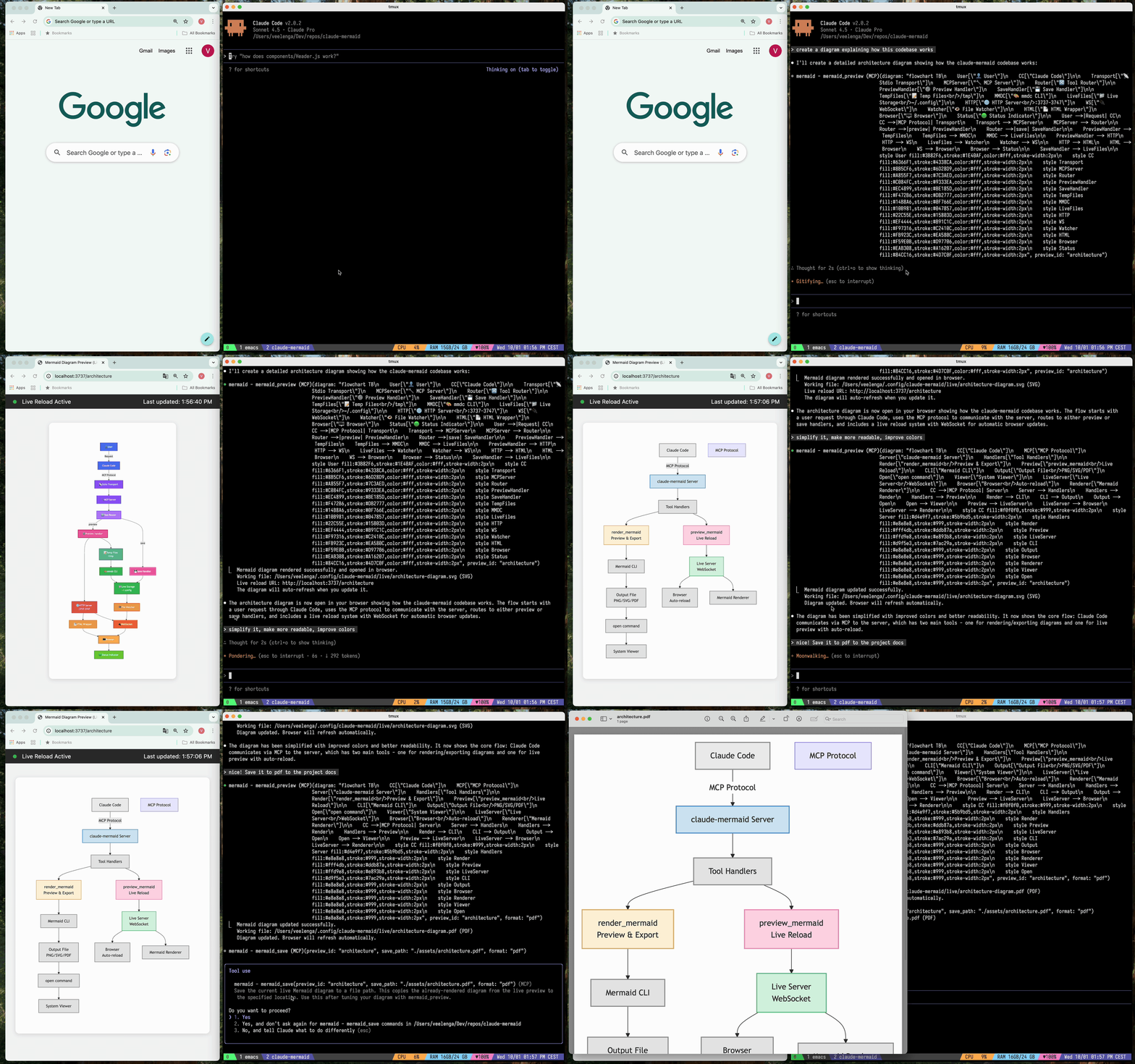
Automatically renders diagrams in your browser with real-time updates as you refine them. Perfect for iterative diagram development and documentation workflows.
✨ Features
- 🔄 Live Reload - Diagrams auto-refresh in your browser as you edit
- 🪄 Artifact Mode - Optionally publish diagrams as shareable Claude artifacts instead of running a local server
- 🎨 Multiple Save Formats - Export to SVG, PNG, or PDF
- 🌈 Themes - Choose from default, forest, dark, or neutral themes
- 📐 Customizable - Control dimensions, scale, and background colors
- 🪄 Interactive Preview - Pan diagrams by dragging, zoom with browser controls, reset position with one click
- ⬇️ Browser Export - Download diagrams as SVG or PNG directly from the preview
- 🗂️ Multiple Previews - Use
preview_idto work on multiple diagrams simultaneously - 💾 Persistent Working Files - Live previews are stored under
~/.config/claude-mermaid/live - 🤖 Built-in Skill - Includes a Claude skill with best practices and expert guidance for creating diagrams
Architecture
🚀 Quick Start
1. Install
Plugin Install (Recommended)
In Claude Code, add the marketplace and install the plugin:
/plugin marketplace add veelenga/claude-mermaid
/plugin install claude-mermaid@claude-mermaid
Then restart Claude Code to activate the plugin.
From npm:
npm install -g claude-mermaid
From source:
git clone https://github.com/veelenga/claude-mermaid.git
cd claude-mermaid
npm install && npm run build && npm install -g .
2. Verify Installation
Plugin install: The MCP server is configured automatically. Just verify:
/mcp
You should see mermaid in the MCP server list.
npm install: Configure the MCP server manually:
claude mcp add --scope user mermaid claude-mermaid
Then verify:
claude mcp list
You should see mermaid: claude-mermaid - ✓ Connected
🔌 Other MCP Client Configurations
While this server is optimized for Claude Code, it can work with any MCP-compatible client. Here’s how to configure it for other popular tools:
설치
This server does not publish a one-line install command.
Open the repository installation guide MCP 초보자라면? mcpskill.org 가이드부터 시작하세요 →설정
{
  "mcpServers": {
    "mermaid": {
      "command": "claude-mermaid"
    }
  }
}