
thuanpham582002/tabby-mcp-server
Developer tools이 페이지는 AI로 자동 번역되었습니다. 기술적인 세부 사항은 원문을 확인하세요. 원문 보기
thuanpham582002/tabby-mcp 서버는 https://github.com/thuanpham582002/tabby-mcp-server.]에서 수입된 MCP 서버 후보입니다
개요
thuanpham582002/tabby-mcp 서버는 https://github.com/thuanpham582002/tabby-mcp-server.]에서 수입된 MCP 서버 후보입니다
개요(AI 번역)
모델 Context Protocol (MCP)을 통해 활성 터미널 세션을 노출하는 Tabby Terminal 플러그인. MCP 호환 AI 클라이언트는 터미널 탭을 발견하고 명령을 실행하고, 터미널 버퍼를 읽고 긴 명령 출력을 검색합니다.
Tabby는 터미널 UI를 유지한다. 당신의 AI 클라이언트는 MCP를 통해 Tabby에 연결합니다.
하이라이트
-MCP 서버 내부 Tabby - [T0]에서 SSE endpoint 노출 -Terminal session discovery - 지역 및 SSH 백업 Tabby 터미널 세션 목록
- **Command 실행 ** - 선택한 Tabby 터미널 탭에서 명령 실행
- Robust output Capture - 출구 코드 파싱과 간단한 마커 프로토콜
- **Terminal 버퍼 액세스 ** - 탭에서 눈에 보이는/history 버퍼 범위
-Long output pagination -
outputId에 의해 출력되는 전체 명령을 검색 - **Pair 프로그래밍 모드 ** - 옵션 확인 대화 상자 및 사용자 피드백
- **Docker 기반 빌드 ** - Tabby에 대한 재현 가능한 로컬 플러그인 빌드
데모
내용 표
- 요구 사항
- 설치
- 빠른 시작
- MCP 클라이언트 연결
- SSE 클라이언트
- 클로드 코드
- 코덱/OpenAI 코덱 CLI
- 도구
- 구성
- 개발
- 라이센스
요구 사항
이 페이지는 AI로 자동 번역되었습니다. 기술적인 세부 사항은 원문을 확인하세요.
README
원문 README의 일부입니다. 원문 보기.
Tabby MCP Server


A Tabby Terminal plugin that exposes your active terminal sessions through the Model Context Protocol (MCP). It lets MCP-compatible AI clients discover terminal tabs, execute commands, read terminal buffers, and retrieve long command output.
Tabby stays the terminal UI. Your AI client connects to Tabby through MCP.
Highlights
- MCP server inside Tabby — exposes an SSE endpoint at
http://localhost:3001/sse - Terminal session discovery — list local and SSH-backed Tabby terminal sessions
- Command execution — run commands in a selected Tabby terminal tab
- Robust output capture — simple marker protocol with exit-code parsing
- Terminal buffer access — read visible/history buffer ranges from a tab
- Long output pagination — retrieve full command output by
outputId - Pair programming mode — optional confirmation dialogs and user feedback
- Docker-based build — reproducible local plugin builds for Tabby
Demo
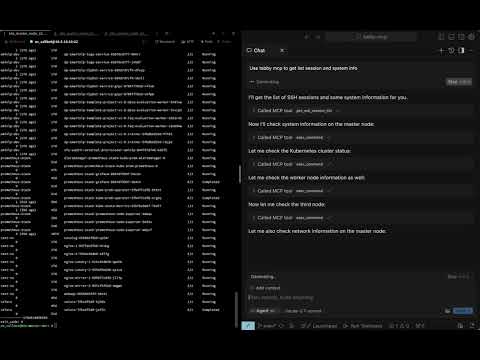
Table of Contents
- Requirements
- Installation
- Quick Start
- Connecting MCP Clients
- Tools
- Configuration
- Development
- License
Requirements
- Tabby Terminal installed and running
- Docker, for local builds
- macOS for the provided install script path
- An MCP-compatible client with SSE support, such as Claude Code, Cursor, Windsurf, Codex, or another SSE-capable MCP client
Installation
Option 1: Tabby Plugin Store
- Open Tabby
- Go to Settings → Plugins
- Install Tabby MCP
- Restart Tabby
- Open Settings → Plugins → MCP and confirm the server configuration
Option 2: Local Docker Build
git clone https://github.com/thuanpham582002/tabby-mcp-server.git
cd tabby-mcp-server

make build-dist
bash scripts/copy_to_plugin_folder.sh
The install script copies the plugin to:
~/Library/Application Support/tabby/plugins/node_modules/tabby-mcp
Restart Tabby after installing or updating the plugin.
설치
This server does not publish a one-line install command.
Open the repository installation guide MCP 초보자라면? mcpskill.org 가이드부터 시작하세요 →설정
{
  "mcpServers": {
    "tabby-mcp": {
      "type": "sse",
      "url": "http://localhost:3001/sse"
    }
  }
}