
thinkeryzu/foxmcp
Developer tools이 페이지는 AI로 자동 번역되었습니다. 기술적인 세부 사항은 원문을 확인하세요. 원문 보기
파이어 폭스 MCP
개요
Model Context Protocol (MCP)을 통해 AI 보조 및 자동화 도구에 브라우저 기능을 노출하는 Firefox 확장. 탭, 역사, 책갈피, 네비게이션, 콘텐츠 및 창 프로그래밍. 신뢰할 수 있는 AI 서비스만 사용 하 고 테스트에 대 한 전용 브라우저 프로필을 사용 하 여 고려. - : 탭, 창, 내비게이션, 북마크, 역사 - : 설정 가능한 필터링과 HTTP 요청을 모니터링하고 분석 - : 텍스트를 추출, HTML, 페이지에 JavaScript를 실행 - : Claude Desktop, Claude Code 및 기타 MCP 클라이언트와 함께 작동 - : 브라우저 탭에서 매개 변수 스크립트를 실행 - : 자동 연결 기반 WebSocket 기반 - : 포괄적 인 입력 유효성 검사와 Localhost 전용 작동. 웹 페이지는 deliberately 둘 다 떨어져 지켜집니다; 위협 모형을 위해 SECURITY.md를 보십시오 이 스크립트는 자동으로: - 최신 v1.3 다운로드.
개요(AI 번역)
- Claude Code와 FoxMCP 회의에 대한 Prepare : 탭 구성, 프로젝트를 저장 페이지, 그리고 멀리 distractions.*
FoxMCP - MCP를 통해 Firefox 브라우저 자동화
MCP 호환 AI 보조를 Firefox에 연결하십시오. 탭 및 창 관리, 페이지를 읽고, 로컬 파일을 업로드, 책갈피를 구성, 검색 기록, 검사 네트워크 요청.
FoxMCP는 두 부분이 있습니다. Firefox 확장 및 로컬 파이썬 서버. 당신의 AI 클라이언트는 명령을 확장에 보내는 서버로 대화합니다.
Privacy: Connected AI 클라이언트는 브라우저 데이터를 액세스하고 페이지를 실행할 수 있습니다. 스크립트. 신뢰할 수있는 클라이언트를 사용하고 전용 Firefox 프로필을 고려하십시오. 위협 모델에 대한 SECURITY.md를 참조하십시오.
버전 1.6.0은 PyPI에 게시됩니다. 그리고 GitHub. 일치하는 연장은 유효합니다 Firefox 추가 기능
** 업그레이드:** 서버 및 확장을 함께 업데이트, 공유 된 근로자를 다시 시작,
고객의 도구 스키마를 새로 고침하십시오. 호출 profiles_list 그리고 그것의 정수를 전달
profile_id 각 브라우저 도구에 연결되는 하나의 프로필도 있습니다. 검색 :
연결 후에 표적. 참고 사항
빠른 시작
uv 설치
uvx]로 서버를 실행하려면 파이썬 환경을 관리합니다.
이 페이지는 AI로 자동 번역되었습니다. 기술적인 세부 사항은 원문을 확인하세요.
README
원문 README의 일부입니다. 원문 보기.
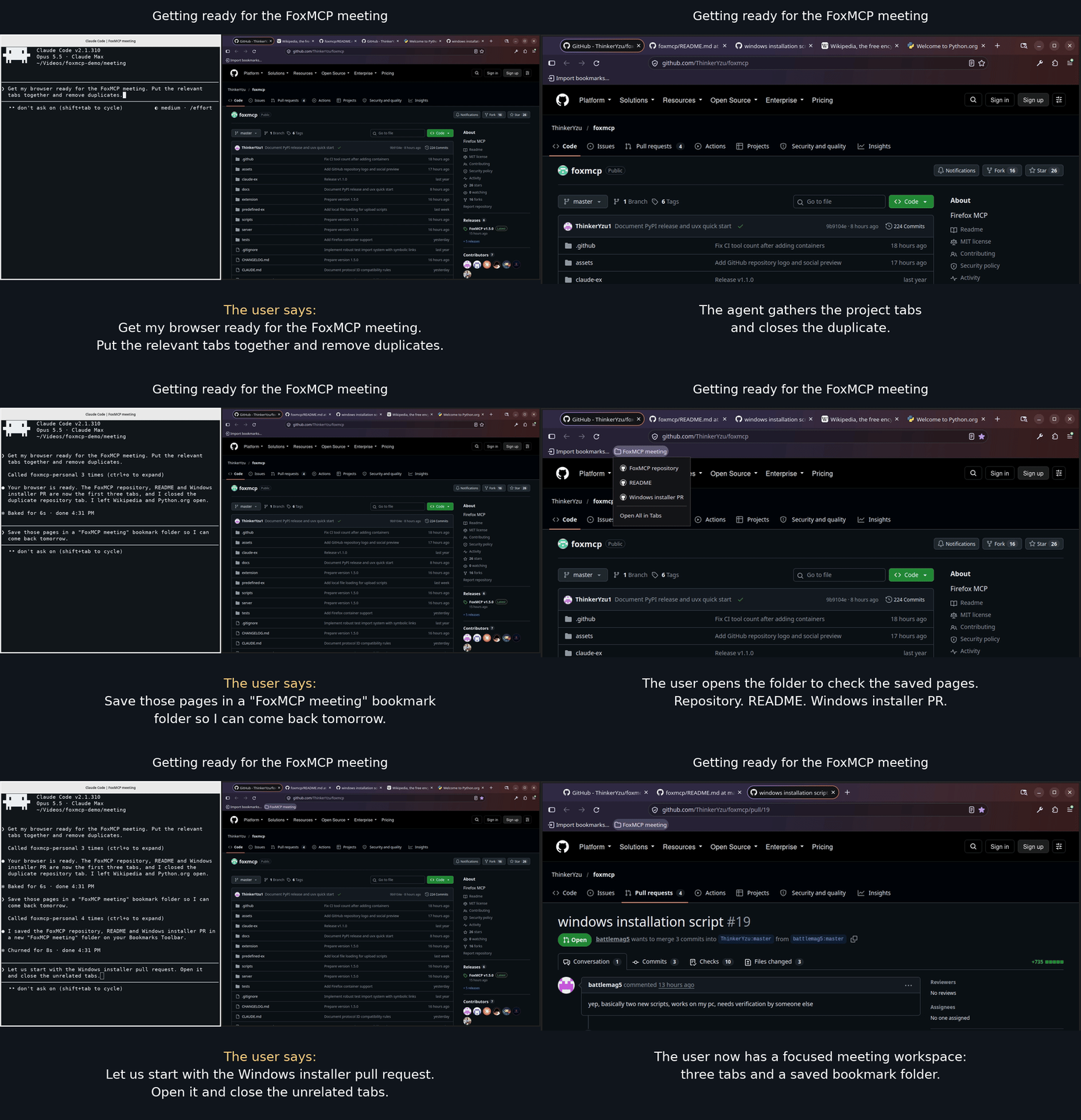
Prepare for a FoxMCP meeting with Claude Code: organize tabs, save the project pages, and clear away distractions.
FoxMCP — Firefox Browser Automation via MCP

Connect an MCP-compatible AI assistant to Firefox. Manage tabs and windows, read pages, upload local files, organize bookmarks, search history, and inspect network requests.
FoxMCP has two parts: a Firefox extension and a local Python server. Your AI client talks to the server, which sends commands to the extension.
Privacy: Connected AI clients can access your browser data and run page scripts. Use trusted clients and consider a dedicated Firefox profile. See SECURITY.md for the threat model.
Version 1.7.0 is published on PyPI and GitHub. The 1.7.0 extension update is awaiting Mozilla review; Firefox Add-ons currently serves 1.6.0. See release status.
Upgrading: Update the server and extension together, restart shared workers,
and refresh your client’s tool schemas. Call profiles_list and pass its integer
profile_id to every browser tool, even with one profile connected. Rediscover
targets after reconnection. See release notes.
FoxMCP or firefox-devtools-mcp?
Both let an AI agent use Firefox. They suit different jobs.
Use FoxMCP to work in your own browser. It is an extension in the Firefox you already run, so the agent sees your open tabs, logged-in sites, bookmarks, history, and containers. Nothing needs a restart, and several agents can share the same Firefox.
Use firefox-devtools-mcp to test or debug a web page. It starts its own Firefox, so the browser is clean and disposable. It offers console, network, debugger, and profiler tools, and it works with Firefox for Android.
| FoxMCP | firefox-devtools-mcp | |
|---|---|---|
| Browser | The Firefox you already use | Its own instance, started for the agent |
| Logins and cookies | Yours | Only what its own profile holds |
| Several agents at once | Yes, in one Firefox | One at a time per Firefox |
| Setup | Add the extension, then uvx foxmcp --stdio |
npx @mozilla/firefox-devtools-mcp |
설치
uvx foxmcp --stdio --single-instance` so they share one connection. FoxMCP