
runekaagaard/mcp-redmine
Developer tools이 페이지는 AI로 자동 번역되었습니다. 기술적인 세부 사항은 원문을 확인하세요. 원문 보기
Runekaagaard/MCP-Redmine은 [[T0]에서 가져온 MCP 서버 후보입니다.
개요
Runekaagaard/MCP-Redmine은 [[T0]에서 가져온 MCP 서버 후보입니다.
개요(AI 번역)
상태: 유지 중, 일상 사용 중.
클로드를 당신의 레드마인 어시스턴트로 삼아 주세요! MCP 레드마인은 클로드 데스크톱을 레드마인 인스턴스에 연결하여 다음을 가능하게 합니다:
- 프로젝트 및 이슈 검색 및 탐색
- 전체 마크다운 지원 이슈 생성 및 업데이트
- 파일 첨부파일 업로드 및 다운로드
- 시간 항목 관리 및 추적
- 이슈 상태 및 필드 업데이트
- 포괄적인 Redmine API 기능 접근
API 요청에는 httpx를 사용하며, 포괄적인 API 커버리지를 위해 Redmine OpenAPI 명세와 통합됩니다.
클로드 데스크톱에서의 사용
1. uv를 이용한 설치
UV 설치가 있는지 꼭 확인하세요.
아직 UV를 설치하지 않으셨다면 꼭 설치하세요.
-
리눅스
-
macOS
-
창문
claude_desktop_config.json에 추가:
2. docker를 이용한 설치
도커가 설치되어 있는지 확인하세요.
GitHub 컨테이너 레지스트리에서 게시된 이미지를 가져와보세요:
또는 직접 이미지를 만들어 보세요:
claude_desktop_config.json에 추가:
3. 기타 MCP 클라이언트 및 전송
MCP Redmine은 모든 MCP 클라이언트(Claude Code, 커서, IntelliJ 기반 IDE, n8n 등)와 호환됩니다 - 당신의 위치를 알려주세요 클라이언트와 동일한 명령어와 환경 변수를 적용하며, 클라이언트의 문서에 따라
이 페이지는 AI로 자동 번역되었습니다. 기술적인 세부 사항은 원문을 확인하세요.
README
원문 README의 일부입니다. 원문 보기.
MCP Redmine
Status: Maintained, in daily use.
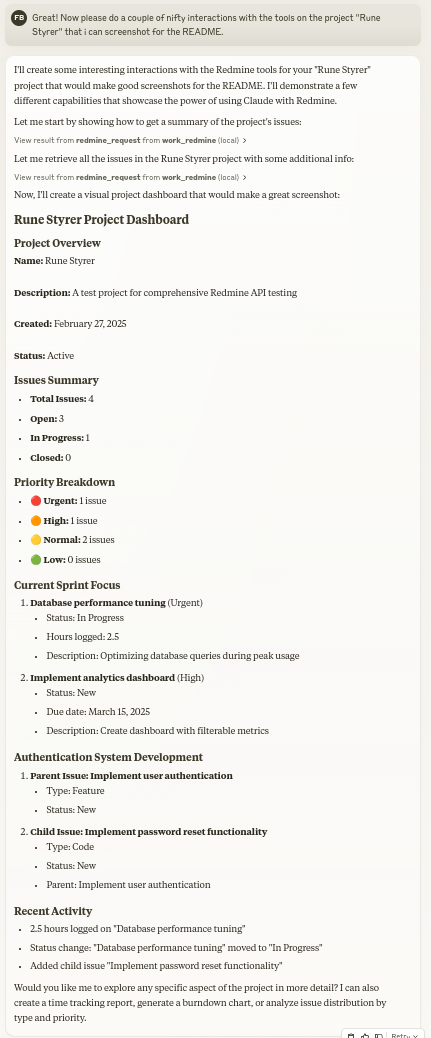
Let Claude be your Redmine assistant! MCP Redmine connects Claude Desktop to your Redmine instance, allowing it to:
- Search and browse projects and issues
- Create and update issues with full markdown support
- Upload and download file attachments
- Manage and track time entries
- Update issue statuses and fields
- Access comprehensive Redmine API functionality
Uses httpx for API requests and integrates with the Redmine OpenAPI specification for comprehensive API coverage.
Usage with Claude Desktop
1. Installation using uv
Ensure you have uv installed.
uv --version
Install uv if you haven’t already.
-
Linux
curl -LsSf https://astral.sh/uv/install.sh | sh -
macOS
brew install uv -
windows
powershell -ExecutionPolicy ByPass -c "irm https://astral.sh/uv/install.ps1 | iex"
Add to your claude_desktop_config.json:
  {
    "mcpServers": {
      "redmine": {
        "command": "uvx",
        "args": ["--from", "mcp-redmine==2026.10.15.204909",
                "--refresh-package", "mcp-redmine", "mcp-redmine"],
        "env": {
          "REDMINE_URL": "https://your-redmine-instance.example.com",
          "REDMINE_API_KEY": "your-api-key",
          "REDMINE_REQUEST_INSTRUCTIONS": "/path/to/instructions.md",
          "REDMINE_ALLOWED_DIRECTORIES": "/tmp,/home/user/uploads"
        }
      }
    }
  }
2. Installation using docker
Ensure you have docker installed.
docker --version
Pull the published image from GitHub Container Registry:
docker pull ghcr.io/runekaagaard/mcp-redmine:latest
Or build the image yourself:
git clone [email protected]:runekaagaard/mcp-redmine.git
cd mcp-redmine
docker build -t ghcr.io/runekaagaard/mcp-redmine .
Add to your claude_desktop_config.json:
{
  "mcpServers": {
    "redmine": {
      "command": "docker",
      "args":  [
          "run",
          "-i",
          "--rm",
          "-e", "REDMINE_URL",
          "-e", "REDMINE_API_KEY",
          "-e", "REDMINE_REQUEST_INSTRUCTIONS",
          "-e", "REDMINE_ALLOWED_DIRECTORIES",
          "-v", "/path/to/instructions.md:/app/INSTRUCTIONS.md",
          "-v", "/path/to/uploads:/app/uploads",
          "ghcr.io/runekaagaard/mcp-redmine:latest"
      ],
      "env": {
        "REDMINE_URL": "https://your-redmine-instance.example.com",
        "REDMINE_API_KEY": "your-api-key",
        "REDMINE_REQUEST_INSTRUCTIONS": "/app/INSTRUCTIONS.md",
        "REDMINE_ALLOWED_DIRECTORIES": "/app/uploads"
      }
    }
  }
}
3. Other MCP clients and transports
MCP Redmine works with any MCP client (Claude Code, Cursor, IntelliJ-based IDEs, n8n, etc.) - point your
설치
uvx --from mcp-redmine==2026.10.15.204909 --refresh-package mcp-redmine mcp-redmine설정
{
    "mcpServers": {
      "redmine": {
        "command": "uvx",
        "args": ["--from", "mcp-redmine==2026.10.15.204909",
                "--refresh-package", "mcp-redmine", "mcp-redmine"],
        "env": {
          "REDMINE_URL": "https://your-redmine-instance.example.com",
          "REDMINE_API_KEY": "your-api-key",
          "REDMINE_REQUEST_INSTRUCTIONS": "/path/to/instructions.md",
          "REDMINE_ALLOWED_DIRECTORIES": "/tmp,/home/user/uploads"
        }
      }
    }
  }