
runekaagaard/mcp-alchemy
Database management이 페이지는 AI로 자동 번역되었습니다. 기술적인 세부 사항은 원문을 확인하세요. 원문 보기
LLM이 SQLite, Postgresql, MySQL & MariaDB, Oracle, MS-SQL과 같은 관계형 데이터베이스에 접근하고 지식을 갖게 해주는 MCP(모델 컨텍스트 프로토콜) 서버입니다.
개요
Claude를 여러분의 데이터베이스 전문가로 삼으세요! MCP Alchemy는 Claude Desktop을 여러분의 데이터베이스와 직접 연결하여 다음과 같은 기능을 제공합니다: - 데이터베이스 구조를 탐색하고 이해할 수 있도록 돕기 - SQL 쿼리 작성 및 검증 지원 - 테이블 간 관계 표시 - 대규모 데이터셋 분석 및 보고서 생성 - Claude Desktop Claude-local-파일을 사용해 매우 큰 데이터셋의 아티팩트를 분석하고 생성할 수 있습니다. PostgreSQL, MySQL, MariaDB, SQLite, Oracle, MS SQL Server, CrateDB, Vertica 및 기타 SQLAlchemy 호환 데이터베이스와 호환됩니다. claude_desktop_config.json에 추가하세요. --with 매개변수에 적절한 데이터베이스 드라이버를 추가해야 합니다. 참고: 새 버전 릴리스 후에는 캐시가 로컬 캐시를 지우는 동안 최대 600초까지 시간이 걸릴 수 있으며, 이로 인해 uv가 버전 관리 오류를 발생시킬 수 있습니다. MCP 클라이언트를 다시 시작하면 이 오류가 다시 해결됩니다. CrateDB Cloud에 연결할 때 URL을 crate://user:[email protected]:4200 같은 것을 사용하세요.
개요(AI 번역)
상태: 활발히 유지되고 있으며 매일 사용 중입니다. 테스트된 릴리스는 git 태그와 함께 PyPI에 게시되며, 이슈와 풀 요청은 정기적으로 분류됩니다.
Claude를 여러분의 데이터베이스 전문가로 삼으세요! MCP Alchemy는 Claude Desktop을 여러분의 데이터베이스와 직접 연결하여 다음과 같은 기능을 제공합니다:
- 데이터베이스 구조를 탐색하고 이해하는 데 도움을 줍니다
- SQL 쿼리 작성 및 검증 지원
- 테이블 간 관계 표시
- 대규모 데이터셋 분석 및 보고서 작성
- Claude Desktop Claude-local-파일을 사용하여 매우 큰 데이터셋에 대한 아티팩트를 분석하고 생성할 수 있습니다.
PostgreSQL, MySQL, MariaDB, SQLite, Oracle, MS SQL Server, CrateDB, Vertica 호환 그리고 다양한 SQLAlchemy 호환 데이터베이스를 포함하고 있습니다.
설치
UV 설치가 있는지 확인하세요:
클로드 데스크톱에서의 사용
claude_desktop_config.json에 추가하세요. ‘--with’ 파라미터에 적절한 데이터베이스 드라이버를 추가해야 합니다.
Note: 새 버전 출시 후에는 캐시가 로컬에서 지워지는 동안 최대 600초까지 시간이 있을 수 있습니다 캐시되어 UV가 버전 관리 오류를 발생시켰습니다. MCP 클라이언트를 다시 재시작하면 error.
SQLite (파이썬에 내장)
PostgreSQL
MySQL/MariaDB
이 페이지는 AI로 자동 번역되었습니다. 기술적인 세부 사항은 원문을 확인하세요.
README
원문 README의 일부입니다. 원문 보기.
MCP Alchemy
Status: Actively maintained and in daily use. Tested releases are published to PyPI with git tags, and issues and pull requests are triaged regularly.
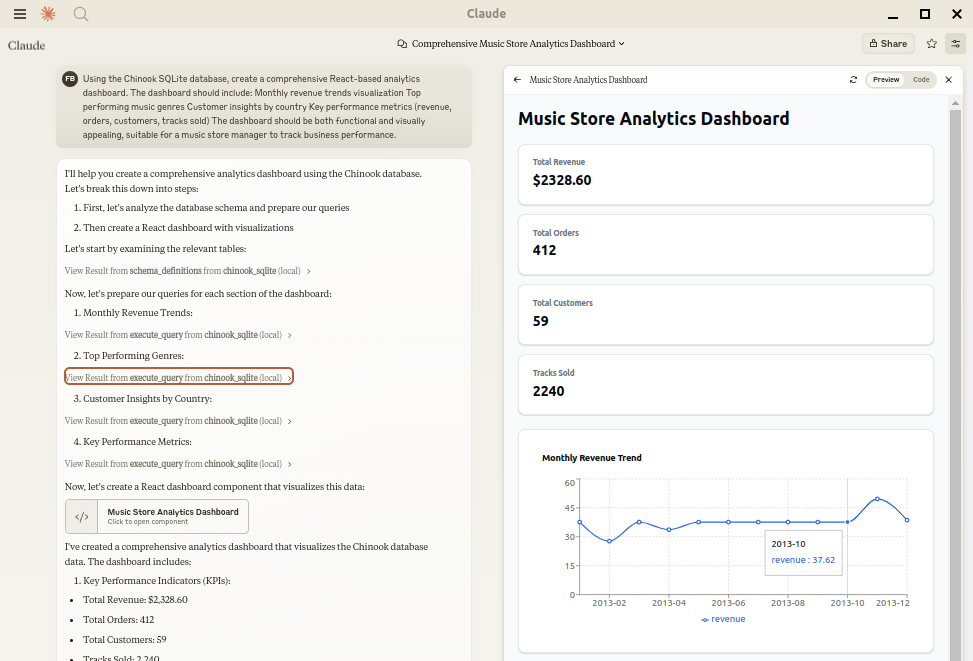
Let Claude be your database expert! MCP Alchemy connects Claude Desktop directly to your databases, allowing it to:
- Help you explore and understand your database structure
- Assist in writing and validating SQL queries
- Displays relationships between tables
- Analyze large datasets and create reports
- Claude Desktop Can analyse and create artifacts for very large datasets using claude-local-files.
Works with PostgreSQL, MySQL, MariaDB, SQLite, Oracle, MS SQL Server, CrateDB, Vertica, and a host of other SQLAlchemy-compatible databases.
Installation
Ensure you have uv installed:
# Install uv if you haven't already
curl -LsSf https://astral.sh/uv/install.sh | sh
Usage with Claude Desktop
Add to your claude_desktop_config.json. You need to add the appropriate database driver in the --with parameter.
Note: After a new version release there might be a period of up to 600 seconds while the cache clears locally cached causing uv to raise a versioning error. Restarting the MCP client once again solves the error.
SQLite (built into Python)
{
  "mcpServers": {
    "my_sqlite_db": {
      "command": "uvx",
      "args": ["--from", "mcp-alchemy==2026.10.15.202659",
               "--refresh-package", "mcp-alchemy", "mcp-alchemy"],
      "env": {
        "DB_URL": "sqlite:////absolute/path/to/database.db"
      }
    }
  }
}
PostgreSQL
{
  "mcpServers": {
    "my_postgres_db": {
      "command": "uvx",
      "args": ["--from", "mcp-alchemy==2026.10.15.202659", "--with", "psycopg2-binary",
               "--refresh-package", "mcp-alchemy", "mcp-alchemy"],
      "env": {
        "DB_URL": "postgresql://user:password@localhost/dbname"
      }
    }
  }
}
MySQL/MariaDB
{
  "mcpServers": {
    "my_mysql_db": {
      "command": "uvx",
      "args": ["--from", "mcp-alchemy==2026.10.15.202659", "--with", "pymysql",
               "--refresh-package", "mcp-alchemy", "mcp-alchemy"],
      "env": {
        "DB_URL": "mysql+pymysql://user:password@localhost/dbname"
      }
    }
  }
}
Microsoft SQL Server
{
  "mcpServers": {
    "my_mssql_db": {
      "command": "uvx",
      "args": ["--from", "mcp-alchemy==2026.10.15.202659", "--with", "pymssql",
               "--refresh-package", "mcp-alchemy", "mcp-alchemy"],
      "env": {
        "DB_URL": "mssql+pymssql://user:password@localhost/dbname"
      }
    }
  }
}
설치
uvx --from mcp-alchemy==2026.10.15.202659 --refresh-package mcp-alchemy mcp-alchemy설정
{
  "mcpServers": {
    "my_sqlite_db": {
      "command": "uvx",
      "args": ["--from", "mcp-alchemy==2026.10.15.202659",
               "--refresh-package", "mcp-alchemy", "mcp-alchemy"],
      "env": {
        "DB_URL": "sqlite:////absolute/path/to/database.db"
      }
    }
  }
}