
reading-plus-ai/mcp-server-deep-research
Developer tools이 페이지는 AI로 자동 번역되었습니다. 기술적인 세부 사항은 원문을 확인하세요. 원문 보기
reading-plus-ai/mcp-server-deep-research는 [[T0]에서 가져온 MCP 서버 후보입니다.
개요
reading-plus-ai/mcp-server-deep-research는 [[T0]에서 가져온 MCP 서버 후보입니다.
개요(AI 번역)
MCP 서버는 복잡한 주제에 대한 포괄적인 연구를 수행하기 위해 설계된 도구입니다. 이 도구는 질문을 깊이 탐구하고 관련 자료를 찾으며 구조화된 연구 보고서를 생성할 수 있도록 도와줍니다.
개인 연구 조교로서 연구 질문을 포괄적이고 인용이 잘 되는 보고서로 전환하는 것입니다.
🚀 한번 해봐
) 유튜브: https://youtu.be/_a7sfo5yxoI
- Claude Desktop을 다운로드하세요
- 여기서 가져와요
- 설치 및 설정
- macOS에서 터미널에서 다음 명령을 실행하세요:
- 조사 시작
- MCP에서 심층 연구 프롬프트 템플릿을 선택하세요
- 연구 질문을 제시하며 연구를 시작하세요
특징
딥 리서치 MCP 서버는 완전한 연구 워크플로우를 제공합니다:
- 질문 설명
- 연구 질문을 확장하고 명확히 합니다
- 핵심 용어와 개념 식별
- 범위와 매개변수 정의
- 하위 질문 생성
- 다양한 측면을 다루는 집중된 하위 질문 생성
- 주요 주제에 대한 포괄적인 보장
- 체계적인 연구를 위한 구조 제공
- 웹 검색 통합
- Claude 내장 웹 검색 기능 사용
- 각 하위 질문에 대해 타겟 검색 수행
이 페이지는 AI로 자동 번역되었습니다. 기술적인 세부 사항은 원문을 확인하세요.
README
원문 README의 일부입니다. 원문 보기.
MCP Server for Deep Research
MCP Server for Deep Research is a tool designed for conducting comprehensive research on complex topics. It helps you explore questions in depth, find relevant sources, and generate structured research reports.
Your personal Research Assistant, turning research questions into comprehensive, well-cited reports.
🚀 Try it Out
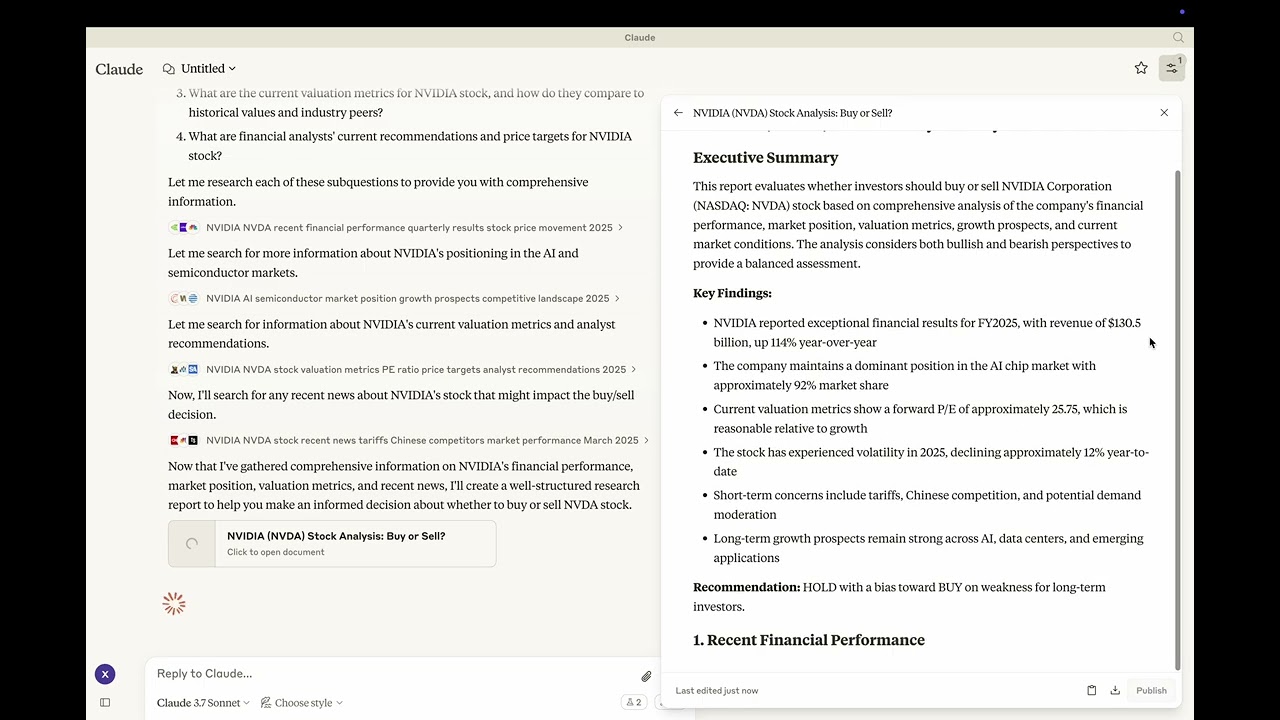 Youtube: https://youtu.be/_a7sfo5yxoI
-
Download Claude Desktop
- Get it here
-
Install and Set Up
- On macOS, run the following command in your terminal:
python setup.py -
Start Researching
- Select the deep-research prompt template from MCP
- Begin your research by providing a research question
Features
The Deep Research MCP Server offers a complete research workflow:
-
Question Elaboration
- Expands and clarifies your research question
- Identifies key terms and concepts
- Defines scope and parameters
-
Subquestion Generation
- Creates focused subquestions that address different aspects
- Ensures comprehensive coverage of the main topic
- Provides structure for systematic research
-
Web Search Integration
- Uses Claude’s built-in web search capabilities
- Performs targeted searches for each subquestion
- Identifies relevant and authoritative sources
- Collects diverse perspectives on the topic
-
Content Analysis
- Evaluates information quality and relevance
- Synthesizes findings from multiple sources
- Provides proper citations for all sources
-
Report Generation
- Creates well-structured, comprehensive reports as artifacts
- Properly cites all sources used
- Presents a balanced view with evidence-based conclusions
- Uses appropriate formatting for clarity and readability
📦 Components
Prompts
- deep-research: Tailored for comprehensive research tasks with a structured approach
⚙️ Modifying the Server
Claude Desktop Configurations
- macOS:
~/Library/Application\ Support/Claude/claude_desktop_config.json - Windows:
%APPDATA%/Claude/claude_desktop_config.json
Development (Unpublished Servers)
"mcpServers": {
  "mcp-server-deep-research": {
    "command": "uv",
    "args": [
      "--directory",
      "/Users/username/repos/mcp-server-application/mcp-server-deep-research",
      "run",
      "mcp-server-deep-research"
    ]
  }
}
Published Servers
"mcpServers": {
  "mcp-server-deep-research": {
    "command": "uvx",
    "args": [
      "mcp-server-deep-research"
    ]
  }
}
🛠️ Development
Building and Publishing
-
Sync Dependencies
uv sync -
Build Distributions
uv buildGenerates source and wheel distributions in the dist/ directory.
-
Publish to PyPI
uv publish
설치
uvx mcp-server-deep-research설정
"mcpServers": {
  "mcp-server-deep-research": {
    "command": "uv",
    "args": [
      "--directory",
      "/Users/username/repos/mcp-server-application/mcp-server-deep-research",
      "run",
      "mcp-server-deep-research"
    ]
  }
}