
punitarani/fli
Developer tools이 페이지는 AI로 자동 번역되었습니다. 기술적인 세부 사항은 원문을 확인하세요. 원문 보기
구글 플라이트 MCP, CLI 및 파이썬 라이브러리
개요
우아한 CLI 인터페이스로 구글 항공편 데이터에 프로그래밍 접근을 제공하는 강력한 파이썬 라이브러리입니다. 항공편 검색, 최고의 할인 상품 찾기, 그리고 결과를 쉽게 필터링할 수 있습니다. 🚀 웹 스크래핑에 의존하는 다른 항공편 검색 라이브러리와 달리, Fli는 구글 플라이트의 API와 리버스 엔지니어링을 통해 직접 상호작용합니다. 즉, * : 직접 API 접근은 더 빠르고 신뢰할 수 있는 결과를 의미합니다 * : HTML 파싱, 브라우저 자동화 없이 순수 API 상호작용 * : UI 변경으로 인한 손상 가능성이 적음 * : 쉽게 맞춤화되고 통합할 수 있는 확장 가능한 아키텍처 : 실제 사용자 이름으로 교체하세요. 터미널에서 어떤 fli-mcp를 실행하면 MCP 서버로 가는 경로를 찾을 수도 있습니다.
개요(AI 번역)
우아한 CLI 인터페이스로 구글 플라이트 데이터에 프로그래밍 접근을 제공하는 강력한 파이썬 라이브러리입니다. 검색 항공편, 최고의 할인 상품을 찾고, 결과를 쉽게 필터링하세요.
🚀
fli가 특별한 이유는 무엇인가요? 웹 스크래핑에 의존하는 다른 비행 검색 라이브러리와 달리, Fli는 구글 비행의 API와 직접 상호작용합니다 역공학을 통해 >. 이는 다음을 의미합니다:
- 빠름: 직접 API 접근은 더 빠르고 신뢰할 수 있는 결과를 의미합니다
- 스크래핑 제로: HTML 파싱, 브라우저 자동화 없이, 순수 API 상호작용만 가능합니다
- 신뢰성: UI 변경으로 인해 손상될 가능성이 적음
- 모듈화: 쉽게 맞춤화되고 통합할 수 있는 확장 가능한 아키텍처
MCP 서버
클로드 데스크톱에 연결 중
참고:
를 실제 사용자 이름으로 교체하세요. 터미널에서which fli-mcp를 실행하면 MCP 서버로 가는 경로를 찾을 수도 있습니다.
MCP 도구 사용 가능
MCP 서버는 두 가지 주요 도구를 제공합니다:
| 도구 | 설명 |
|---|---|
search_flights |
특정 날짜의 항공편을 상세 필터로 검색하세요 |
이 페이지는 AI로 자동 번역되었습니다. 기술적인 세부 사항은 원문을 확인하세요.
README
원문 README의 일부입니다. 원문 보기.
🛫 Fli - Flight Search MCP Server and Library

A powerful Python library that provides programmatic access to Google Flights data with an elegant CLI interface. Search flights, find the best deals, and filter results with ease.
🚀 What makes
flispecial? Unlike other flight search libraries that rely on web scraping, Fli directly interacts with Google Flights’ API through reverse engineering. This means:
- Fast: Direct API access means faster, more reliable results
- Zero Scraping: No HTML parsing, no browser automation, just pure API interaction
- Reliable: Less prone to breaking from UI changes
- Modular: Extensible architecture for easy customization and integration
MCP Server
pipx install flights

# Run the MCP server on STDIO
fli-mcp

# Run the MCP server over HTTP (streamable)
fli-mcp-http  # serves at http://127.0.0.1:8000/mcp/
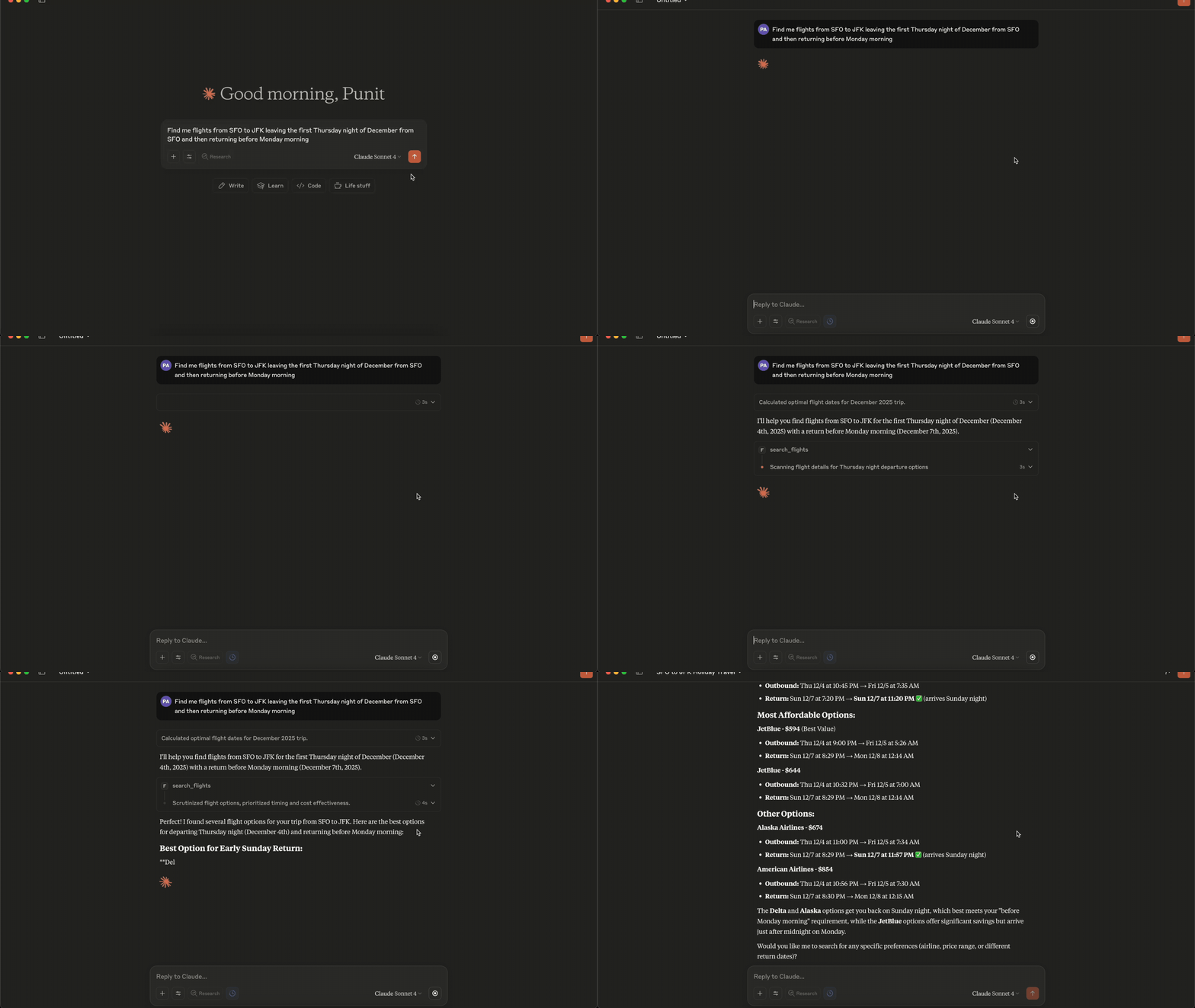
Connecting to Claude Desktop
{
  "mcpServers": {
    "fli": {
      "command": "/Users//.local/bin/fli-mcp"
    }
  }
}
Note: Replace `` with your actual username. You can also find the path to the MCP server by running
which fli-mcpin your terminal.
MCP Tools Available
The MCP server provides two main tools:
| Tool | Description |
|---|---|
search_flights |
Search for flights on a specific date with detailed filters |
search_dates |
Find the cheapest travel dates across a flexible date range |
search_flights Parameters
| Parameter | Type | Description |
|---|---|---|
origin |
string | Departure airport IATA code(s) — comma-separated for multi |
destination |
string | Arrival airport IATA code(s) — comma-separated for multi |
departure_date |
string | Travel date in YYYY-MM-DD format |
return_date |
string | Return date for round trips (optional) |
cabin_class |
string | ECONOMY, PREMIUM_ECONOMY, BUSINESS, or FIRST |
max_stops |
string | ANY, NON_STOP, ONE_STOP, or TWO_PLUS_STOPS |
departure_window |
string | Time window in ‘HH-HH’ format (e.g., ‘6-20’) |
airlines |
list | Filter by airline codes (e.g., [‘BA’, ‘AA’]) |
exclude_airlines |
list | Airline IATA codes to exclude (e.g., [‘DL’, ‘B6’]) |
alliance |
list | Restrict to alliances: ONEWORLD, SKYTEAM, STAR_ALLIANCE |
설치
docker run --rm fli-dev make lint test-all설정
{
  "mcpServers": {
    "fli": {
      "command": "/Users/<user>/.local/bin/fli-mcp"
    }
  }
}