이 페이지는 AI로 자동 번역되었습니다. 기술적인 세부 사항은 원문을 확인하세요. 원문 보기
React, Vue, Svelte, SolidJS, Preact & Next.js 앱을 위한 AI-powered 시각적 디버깅
개요
AI는 코드를 읽을 수 있지만, 실행 시간에 무슨 일이 일어나는지 볼 수 없습니다. DevInspector는 누락 된 컨텍스트를 제공합니다 : 소스 코드 위치, DOM 상태, 스타일, 네트워크, 콘솔, 터미널 출력 및 스크린 샷. : MCP를 통해 IDE의 AI (Cursor, VSCode)를 사용하거나 ACP (, , , , 더 많은)를 통해 브라우저에서 AI 에이전트를 직접 실행합니다. DevInspector 기술을 설치하여 에이전트가 검사기를 설정하고 해결하는 방법을 알고 있습니다. https://www.youtube.com/shorts/TCt2oOtPS_k] [T0]] [T0]] [T0]] [T0]] [T0]] [T0]] [T0]] [T0] [T0] [T0]] [T0] [T0] [T0]] [T0]] [T0] [T0] [T0] [T0] [T0]] [T0] [T0]] [T0] [T0] [T0]] [T0]] [T0] [T0] [T0]] https://www.youtube.com/shorts/TCt2oOtPS_k] https://www.youtube.com/shorts/TCt2oOtPS_k]]] https://www.youtube.com/shorts/TCt2oOtPS_k]]]]]] [[https://www.youtube.com/shorts/TCt2oOtPS_k]]]]]]] [[[[[[https://www.youtube.com/shorts/TCt2oOtPS_k]]]]]]]]]]]]]] [[[[[[[https://www.youtube.com/shorts/TCt2oOtPS_k]]]]]]]]]]]]]]]]]] [[[[[[[[[[[[[[[[[[[[[[ https://x.com/yaoandyan/status/1995082020431753600 그것을 검사하는 어떤 성분을 클릭, 또는 . AI는 전체 컨텍스트를 가져옵니다: 소스 코드 위치, computed 작풍, 성분 hierarchy, IDs, 종류, 원본 내용 및 화소 결함 시각 이해를 위해. get page info 페이지의 semantic 이해와 AI를 제공합니다. URL, viewport 및 표시 랜드 마크, 제목, 양식 및 링크. AI는 스크린 샷없이 페이지 구조를 탐색 할 수 있습니다.
개요(AI 번역)
AI 코딩 에이전트에 대한 누락된 런타임 컨텍스트.
AI는 코드를 읽을 수 있지만, 실행 시간에 무슨 일이 일어나는지 볼 수 없습니다. DevInspector는 누락 된 컨텍스트를 제공합니다 : 소스 코드 위치, DOM 상태, 스타일, 네트워크, 콘솔, 터미널 출력 및 스크린 샷.
** 2 모드 : MCP를 통해 IDE의 AI (Cursor, VSCode)를 사용하거나 ACP (Claude Code, ** Codex CLI, Gemini CLI, OpenCode, more)를 통해 브라우저에서 AI 에이전트를 직접 실행합니다.
클래드 코드 또는 다른 AI 에이전트를 사용? DevInspector 기술을 설치하여 에이전트가 검사기를 설정하고 해결하는 방법을 알고 있습니다. · ·
내용 표
- 데모 영상
- 소셜미디어
- 주요 특징
- 빠른 시작
- 설치
- 자동화된 설정
- 프레임 워크 설정
- 에이전트 기술
- 구성
- 자동 업데이트 MCP Config
- 에이전트 설치
- 주문 에이전트
- MCP 서버 구성
- 무엇 그것
- 2개의 워크 플로우 형태
- MCP 도구
- 사용자 정의 Inspector 도구
- MCP 대변
- 건축
데모 영상
** 데모:** https://www.youtube.com/shorts/TCt2oOtPS_k
소셜 미디어
**Twittter/X 포스트: ** https://x.com/yaoandyan/status/1995082020431753600
키 기능
Visual Context & 지역 선택
이 페이지는 AI로 자동 번역되었습니다. 기술적인 세부 사항은 원문을 확인하세요.
README
원문 README의 일부입니다. 원문 보기.
dev-inspector-mcp


The missing runtime context for AI coding agents.
AI can read your code, but can’t see what’s happening at runtime. DevInspector provides the missing context: source code location, DOM state, styles, network, console, terminal output, and screenshots.
Two modes: Use with your IDE’s AI (Cursor, VSCode) via MCP, or run AI agents directly in the browser via ACP (Claude Code, Codex CLI, Gemini CLI, OpenCode, more).
Using Claude Code or another AI agent? Install the DevInspector skill so your agent knows how to set up and troubleshoot the inspector:
npx skills add mcpc-tech/dev-inspector-mcp
Table of Contents
- Demo Video
- Social Media
- Key Features
- Quick Start
- Agent Skills
- Configuration
- What It Does
- Two Workflow Modes
- MCP Tools
- Custom Inspector Tools
- MCP Prompts
- Architecture
Demo Video
Watch the demo: https://www.youtube.com/shorts/TCt2oOtPS_k
Social Media
Twittter/X Post: https://x.com/yaoandyan/status/1995082020431753600
Key Features
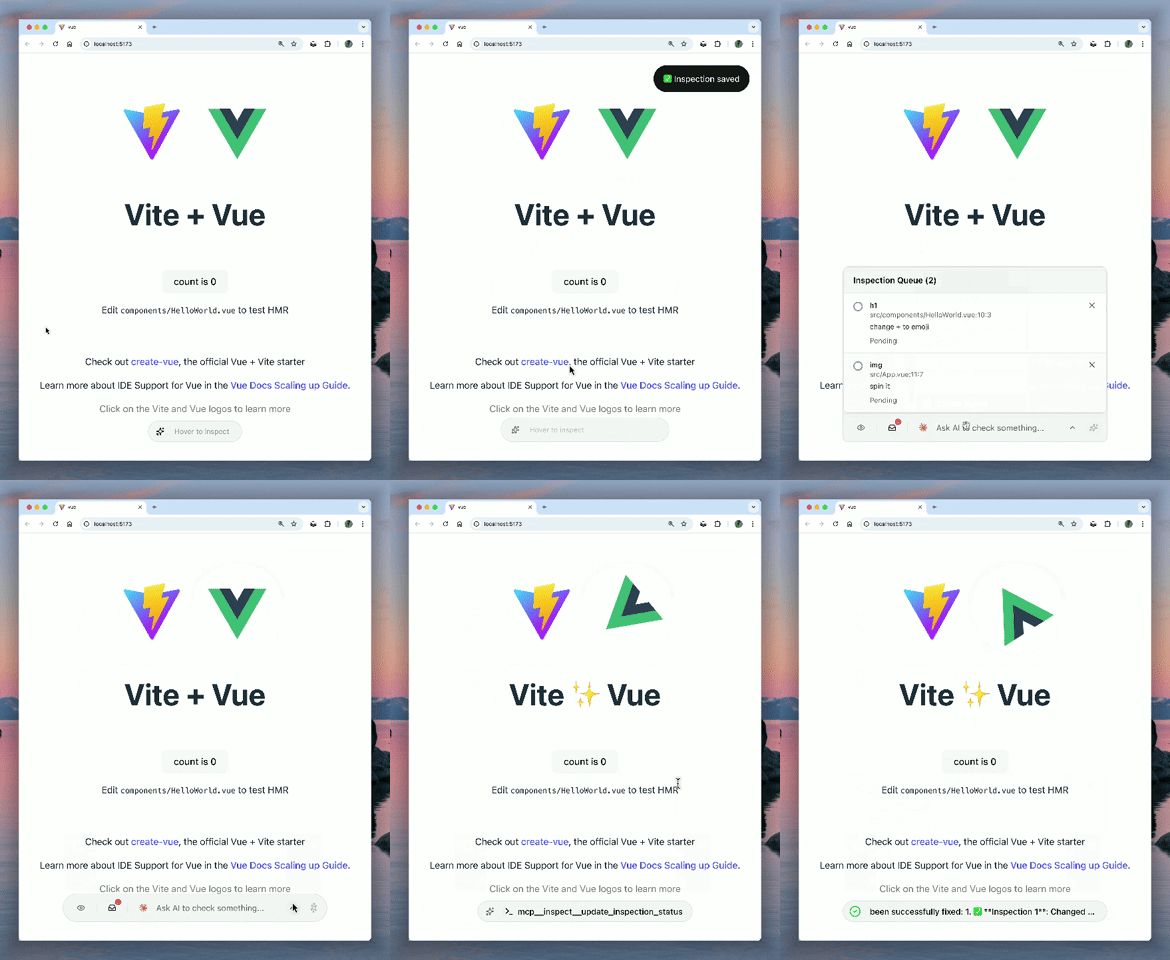
Visual Context & Region Selection
Click any element to inspect it, or drag to select a region. AI gets the full context: source code location, computed styles, component hierarchy, IDs, classes, text content, and automatically captures screenshots for pixel-perfect visual understanding.
Page Overview & Accessibility Tree
get_page_info provides AI with a semantic understanding of the page: URL, viewport, and an accessibility tree showing landmarks, headings, forms, and links. AI can navigate the page structure without screenshots.
Universal DevTools Access
AI can access Network and Console logs from any browser (via client-side interception) or full Chrome DevTools (via chrome devtools mcp). It sees what you see, regardless of your environment.
설치
npx @mcpc-tech/unplugin-dev-inspector-mcp setup