
lvl23ht/next-level-pentesting-using-claude-ai-with-burp-suite-community-via-mcp
Developer tools이 페이지는 AI로 자동 번역되었습니다. 기술적인 세부 사항은 원문을 확인하세요. 원문 보기
Burp Suite Community Edition을 사용한다면 Burp Pro가 필요없는 몇 가지 강력한 AI 지원으로 워크플로우를 충전 할 수 있습니다. 이 가이드는 당신의 마음을 날려줄 것입니다.
개요
Burp Pro가 필요없는 몇 가지 강력한 AI 지원으로 워크플로를 충전하고 싶다면이 가이드가 마음에 들지 않습니다. Model Context Protocol (MCP)을 사용하여 Burp Suite를 통합하는 방법을 보여줍니다. 이것은 AI 조수가 라이브 HTTP 역사를 처리 할 수 있도록, 요청을 분석, 취약점을 식별, 심지어 악용을 통해 안내 - 모든 pentest 흐름. 모형 Context 의정서 (MCP)는 가능하게 하는 열린 기구입니다. 그것은 교량이기 위하여 디자인됩니다, 버클 같이 공구가 Burp Suite 같이 당신의 기술적인 환경에 직접 작동하도록 허용하. MCP는 AI Assistants를 제공합니다. - Analyze Structured tool output - 새로운 데이터에 역동적으로 대응 - Pentest 워크플로우에서 상호 작용하는 Collaborate 에 출시 된이 오픈 표준은 이제 빨간색 팀 ops에서 최첨단 AI 툴링의 백본입니다.
개요(AI 번역)
** ソ Post는 해킹 도구 다크 커뮤니티에 대 한 만든 **
Burp Suite Community Edition를 사용하시면 강력한 AI 지원으로 워크플로우를 충전할 수 있습니다. * Burp Pro*가 필요하면 이 가이드가 마음에 들지 않습니다.
Burp Suite와 **Claude (Anthropic)**를 통합하는 방법을 보여 드리겠습니다. Model Context Protocol (MCP) . 이것은 AI 조수가 라이브 HTTP 역사를 처리 할 수 있도록, 요청을 분석, 취약점을 식별, 심지어 악용을 통해 안내 - 모든 pentest 흐름.
MCP는 무엇입니까?
Model Context Protocol (MCP)은 AI 모델과 실시간 도구** 사이에 ** 동시 상호 작용할 수 있는 개방형 프레임워크입니다. 그것은 교량이기 위하여 디자인됩니다, 버클 같이 공구가 Burp Suite 같이 당신의 기술적인 환경에 직접 작동하도록 허용하.
MCP는 AI 조수를 시켰습니다:
- Analyze Structured 도구 출력
- 새로운 자료에 역동적으로 대응
- pentest 워크플로우에서 대화식 협업
출시 ** 11 월 25, 2024 **,이 오픈 표준은 이제 빨간색 팀 ops에서 최첨단 AI 툴링의 백본입니다.
- → 공식 MCP - 연혁
- → 기술 문서
- → 프로토콜 개요
건축 개요
이 페이지는 AI로 자동 번역되었습니다. 기술적인 세부 사항은 원문을 확인하세요.
README
원문 README의 일부입니다. 원문 보기.
🧬 Next-Level Pentesting: Using Claude AI with Burp Suite Community via MCP
🚀 Post created for Hack Tools Dark Community
If you’re using Burp Suite Community Edition and want to supercharge your workflow with some powerful AI assistance – without needing Burp Pro – then this guide is going to blow your mind.
We’ll show you how to integrate Burp Suite with Claude (by Anthropic) using the Model Context Protocol (MCP). This allows your AI assistant to process live HTTP history, analyze requests, identify vulnerabilities, and even guide you through exploitation – all inside your pentest flow.
What is MCP?
Model Context Protocol (MCP) is an open framework that enables synchronous interaction between AI models and real-time tools. It’s designed to be a bridge, allowing tools like Claude to work directly with your technical environments like Burp Suite.
MCP lets AI assistants:
- Analyze structured tool output
- Respond dynamically to new data
- Collaborate interactively in pentest workflows
Released on November 25, 2024, this open standard is now the backbone of cutting-edge AI tooling in red team ops.
Architecture Overview
- MCP Server (in Burp Suite) – This extension exposes Burp’s internal data to external tools like Claude.
- Claude Desktop Integration – This links your local Claude AI with the MCP server, enabling 2-way sync.
Step-by-Step Setup (Win/macOS)
- Install Burp Suite Community Edition – Get it from PortSwigger and set it up. Or download it from here
- Load MCP Extension – Go to Extender > BApp Store, search for “MCP Server”, and click install.
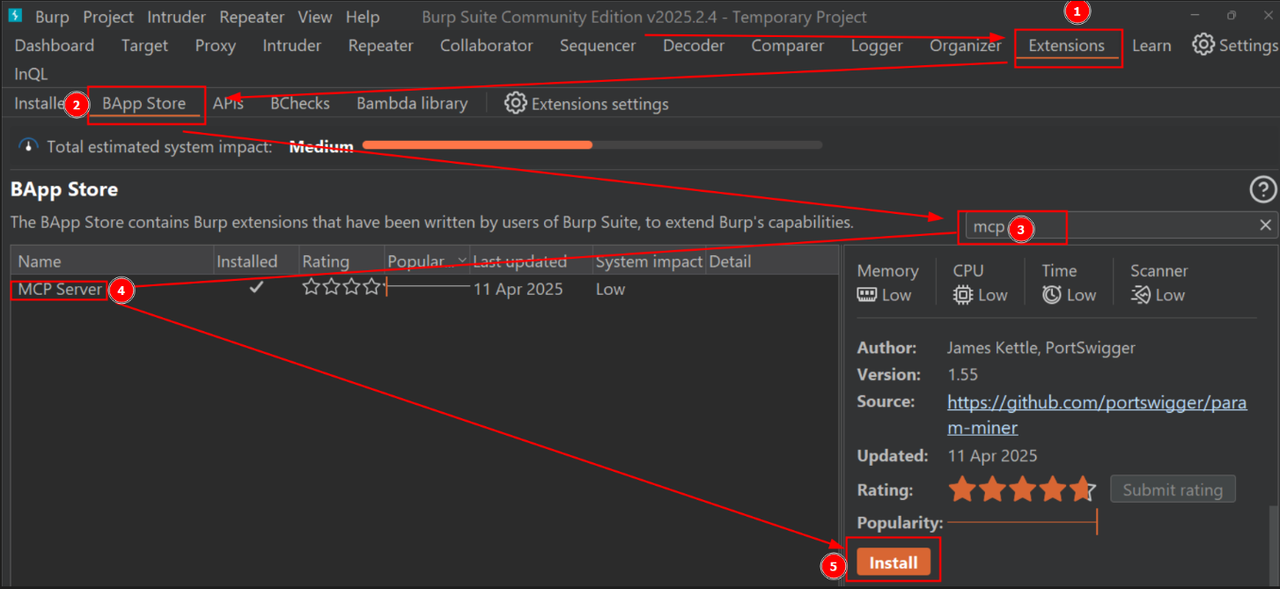
- Install Claude Desktop – Download from: https://claude.ai/download
→ Works only on Windows/macOS for now. - Enable MCP in Burp – Make sure the “MCP” tab is visible in Burp. If not, check if the extension is properly loaded under Installed Extensions.
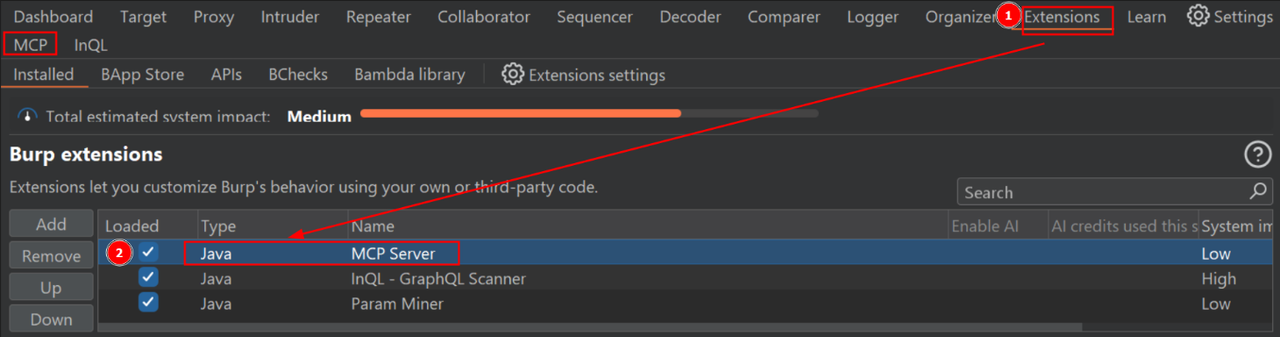
- Connect to Claude – Go to MCP tab, click Install to Claude Desktop. This generates a JSON config that links both tools.
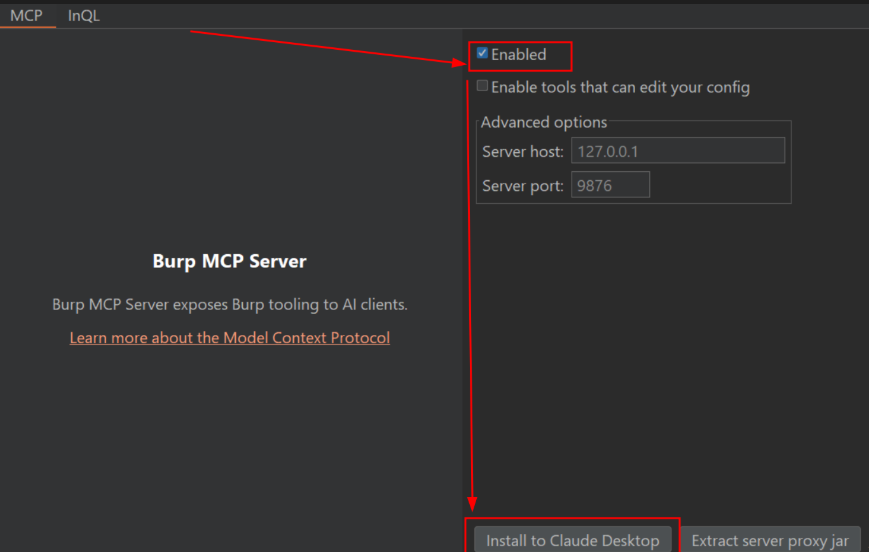
- Restart Claude Desktop – Essential to apply the configuration. After restarting, you should see an option in Claude like “Share context with Burp”.
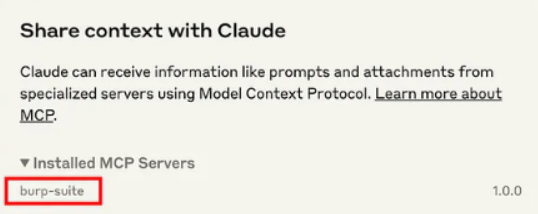
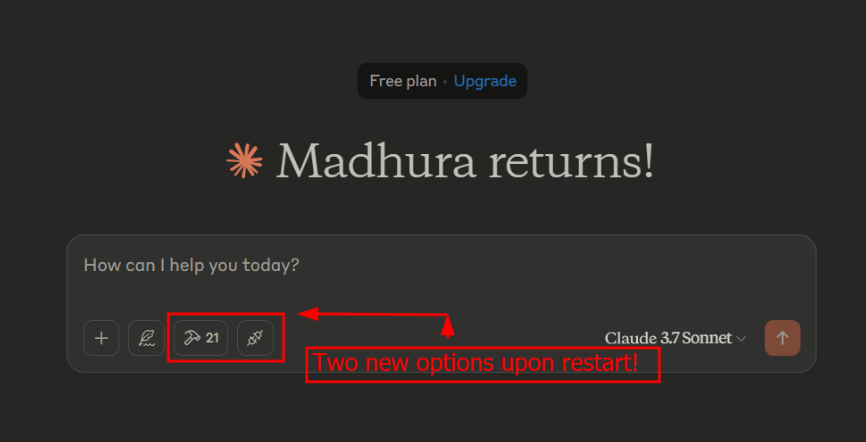
- Start Prompting – Launch your tests and fire up prompts in Claude Desktop.
Example Prompt
설치
This server does not publish a one-line install command.
Open the repository installation guide MCP 초보자라면? mcpskill.org 가이드부터 시작하세요 →