
llnl/paraview_mcp
Developer tools이 페이지는 AI로 자동 번역되었습니다. 기술적인 세부 사항은 원문을 확인하세요. 원문 보기
llnl/paraview mcp는 MCP 서버 후보로 수입 https://github.com/llnl/paraview_mcp.]
개요
llnl/paraview mcp는 MCP 서버 후보로 수입 https://github.com/llnl/paraview_mcp.]
개요(AI 번역)
ParaView-MCP는 Model Context Protocol을 통해 ParaView와 멀티모드 대형 언어 모델을 통합하는 자율주행제로서 복잡한 명령이나 GUI 작업 대신 자연 언어 및 시각 입력을 사용하여 과학 시각화를 만들고 조작할 수 있습니다. 이 시스템은 뷰포트와 이퀄리티의 세련된 시각화를 관찰할 수 있는 시각적 피드백 기능을 갖추고 있으며, 지능형 자동화를 통해 전문가의 워크플로우를 증강하면서 비-experts에 접근할 수 있도록 합니다.
면책
MCP 서버와 ParaView 사이의 연결의 현재 구현은 주 및 dev 지점 모두에서 pvserver와 ParaView 클라이언트 사이의 동기화에 의존합니다. 이 기능은 가장 최근의 ParaView 버전에서 deprecated되었기 때문에 ParaView 응용 프로그램은 pvserver 인스턴스에서 콘텐츠를 올바르게 표시할 수 없으며 전반적인 안정성 문제는 발생할 수 있습니다.
비디오 데모
아래 이미지를 클릭하여 비디오를 시청하십시오.
설치
LLM 설정
claude 데스크톱과 통합을 설정하려면 claude desktop config.json에 다음을 추가하십시오.
실행
##1. 시작 paraview 서버
# # # # 2.
이 페이지는 AI로 자동 번역되었습니다. 기술적인 세부 사항은 원문을 확인하세요.
README
Paraview_MCP
ParaView-MCP is an autonomous agent that integrates multimodal large language models with ParaView through the Model Context Protocol, enabling users to create and manipulate scientific visualizations using natural language and visual inputs instead of complex commands or GUI operations. The system features visual feedback capabilities that allow it to observe the viewport and iteratively refine visualizations, making advanced visualization accessible to non-experts while augmenting expert workflows with intelligent automation.
Disclaimer
The current implementation of the connection between the MCP server and ParaView, in both the main and dev branches, relies on synchronization between pvserver and the ParaView client. Because this feature has been deprecated in most recent ParaView versions, the ParaView application view may not display content from the pvserver instance correctly, and overall stability issues may occur.
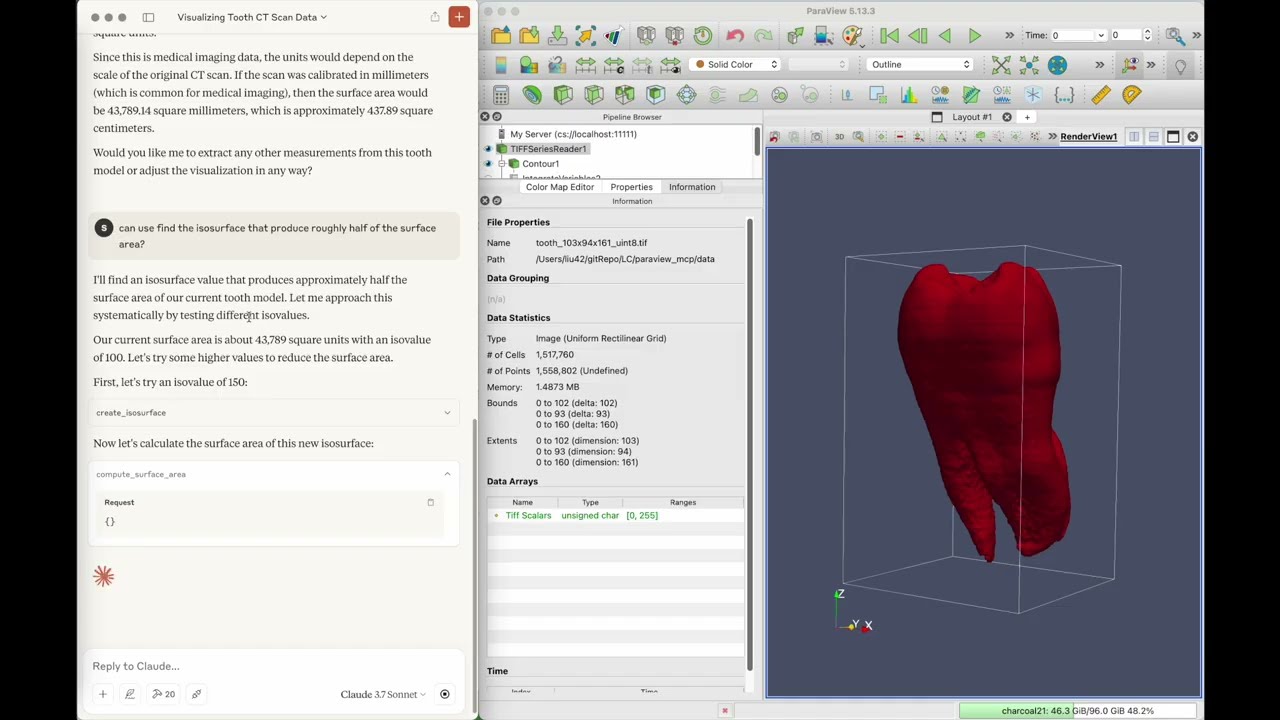
Video Demo
Click the image below to watch the video:
Installation
git clone https://github.com/LLNL/paraview_mcp.git
cd paraview_mcp

conda create -n paraview_mcp python=3.10
conda install conda-forge::paraview
conda install mcp[cli] httpx
Setup for LLM
To set up integration with claude desktop, add the following to claude_desktop_config.json
    "mcpServers": {
      "ParaView": {
        "command": "/path/to/python",
        "args": [
        "/path/to/paraview_mcp/paraview_mcp_server.py"
        ]
      }
    }
running
1. Start paraview server
python pvserver --multi-clients
2. Connect to paraview server from paraview GUI (file -> connect)
3. Start claude desktop app
Citing Paraview_MCP
S. Liu, H. Miao, and P.-T. Bremer, “Paraview-MCP: Autonomous Visualization Agents with Direct Tool Use,” in Proc. IEEE VIS 2025 Short Papers, 2025, pp. 00
@inproceedings{liu2025paraview,
  title={Paraview-MCP: Autonomous Visualization Agents with Direct Tool Use},
  author={Liu, S. and Miao, H. and Bremer, P.-T.},
  booktitle={Proc. IEEE VIS 2025 Short Papers},
  pages={00},
  year={2025},
  organization={IEEE}
}
Authors
Paraview_MCP was created by Shusen Liu ([email protected]) and Haichao Miao ([email protected])
License
Paraview_MCP is distributed under the terms of the BSD-3 license.
LLNL-CODE-2007260
설치
This server does not publish a one-line install command.
Open the repository installation guide MCP 초보자라면? mcpskill.org 가이드부터 시작하세요 →설정
"mcpServers": {
      "ParaView": {
        "command": "/path/to/python",
        "args": [
        "/path/to/paraview_mcp/paraview_mcp_server.py"
        ]
      }
    }