
justasmonkev/mcp-accessibility-scanner
Browser automation이 페이지는 AI로 자동 번역되었습니다. 기술적인 세부 사항은 원문을 확인하세요. 원문 보기
justasmonkev/mcp-accessibility-scanner는 MCP 서버 후보자는 https://github.com/justasmonkev/mcp-accessibility-scanner.]에서 수입했습니다
개요
justasmonkev/mcp-accessibility-scanner는 MCP 서버 후보자는 https://github.com/justasmonkev/mcp-accessibility-scanner.]에서 수입했습니다
개요(AI 번역)
코딩 에이전트 내부의 접근성 검사: axe 스캔, 키보드 초점 검사 및 반복 가능한 보고서.
- 의도적으로 로컬 데모 페이지를 결함, 자동화 된 도구로 확인. 이 표기는
scan_page]에 의해 생성되었습니다annotateScreenshot: true, 손으로 추가되지 않았습니다.*
이 MCP 서버는 코딩 에이전트가 페이지를 검사, axe 체크, 운동 키보드 초점 및 리뷰에 대한 검색을 저장합니다. 자동화된 검사는 WCAG 준수를 인증하지 않습니다. 수동 접근성 테스트는 여전히 필요합니다. audit_screen_reader]는 브라우저의 접근성 트리, 접근 가능한 이름 및 요소 형상을 검사합니다. 실제 화면 리더로 테스트하지 않습니다.
Quickstart: 당신의 기호화 대리인을 연결하십시오
첫번째 감사의 앞에 구글 크롬을 설치하십시오. 아래의 구성은 시스템 크롬; npm 패키지를 설치하지 않습니다 브라우저. 대안에 대한 브라우저 구성을 참조하십시오.
스캐너 설치:
flag는 npm 12에 설치하기 위해 네이티브 re2 의존성을 허용합니다. 미리 만들어진 바이너리가 사용할 수없는 경우, 그것의 설치자는 기본 빌드 툴 체인을 필요로한다; re2의 설치 노트를 참조하십시오.
이 stdio 서버를 코딩 에이전트의 MCP 구성에 추가, 다음 다시 시작 또는 클라이언트를 다시 연결:
이 페이지는 AI로 자동 번역되었습니다. 기술적인 세부 사항은 원문을 확인하세요.
README
원문 README의 일부입니다. 원문 보기.
MCP Accessibility Scanner 🔍
Accessibility checks inside your coding agent: axe scans, keyboard-focus checks and repeatable reports.
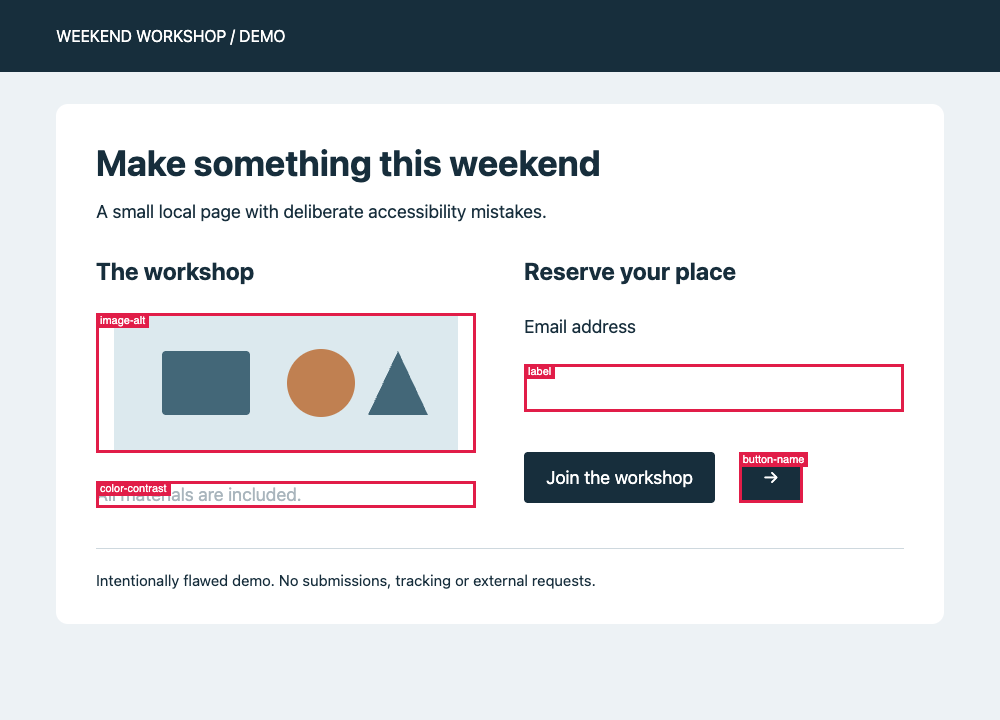
An intentionally flawed local demo page, checked with automated tools. These annotations were generated by scan_page with annotateScreenshot: true, not added by hand.
This MCP server lets your coding agent inspect a page, run axe checks, exercise keyboard focus and save findings for review. Automated checks don’t certify WCAG compliance; manual accessibility testing is still needed. audit_screen_reader inspects the browser’s accessibility tree, accessible names and element geometry. It does not test with an actual screen reader.
Quickstart: connect your coding agent
Install Google Chrome before the first audit. The configuration below uses system Chrome; installing the npm package does not install a browser. See browser configuration for alternatives.
Install the scanner:
npm install -g mcp-accessibility-scanner --allow-scripts=re2
The flag allows the native re2 dependency to install on npm 12. If a prebuilt binary is unavailable, its installer needs a native build toolchain; see re2’s installation notes.
Add this stdio server to your coding agent’s MCP configuration, then restart or reconnect the client:
{
  "mcpServers": {
    "accessibility-scanner": {
      "command": "mcp-accessibility-scanner",
      "args": ["--headless", "--isolated", "--output-dir", "./a11y-output"]
    }
  }
}
The client must be able to find the installed command on its PATH. --isolated uses a fresh browser profile, not your personal Chrome session. Output paths are relative to the server’s working directory; use an absolute --output-dir if your client starts it elsewhere. Client-specific setup and other installation methods are in the reference below.
Your first audit
Start your app locally, then ask your connected coding agent to run these tools in order, replacing the URL with your app’s address:
browser_navigate {"url":"http://localhost:3000"}
scan_page {"annotateScreenshot":true}
audit_keyboard {"maxTabs":30}
audit_screen_reader {}
audit_text_spacing {}
These are MCP tool calls, not shell subcommands. For terminal use, see interactive mode.
설치
npx --allow-scripts=re2 mcp-accessibility-scanner설정
{
  "mcpServers": {
    "accessibility-scanner": {
      "command": "mcp-accessibility-scanner",
      "args": ["--headless", "--isolated", "--output-dir", "./a11y-output"]
    }
  }
}