
hope1026/weppy-roblox-mcp
Developer tools이 페이지는 AI로 자동 번역되었습니다. 기술적인 세부 사항은 원문을 확인하세요. 원문 보기
Roblox Studio MCP 서버 및 Claude Code, Cursor, Codex 및 Gemini 용 플러그인. AI 전원 스크립트, 지형, 자산, 조명 및 양방향 프로젝트 동기화.
개요
roblox Studio AI 개발 제품입니다. AI 앱 연결 및 라이브 스튜디오 컨트롤이 포함되어 있습니다. Claude Code, Codex 및 Antigravity는 클라이언트 고유 설정 및 워크플로우 지침에 대한 옵션을 설치할 수 있습니다. Claude, Codex 및 Gemini와 같은 AI 코딩 에이전트는 강력하지만 Roblox Studio 내부에서 아무것도 볼 수 없습니다. DataModel, 스크립트, 지형 및 조명은 외부 도구에 보이지 않습니다. 다리없이 AI는 수동으로 붙여야 할 코드 스니펫을 생성 할 수 있습니다. AI 에이전트를 연결합니다. AI는 직접 인스턴스, 스크립트, 속성, 지형 등을 구성하고 수정합니다. Studio와 대쉬보드에서 바로 반영되어 변경된 내용을 정확히 볼 수 있습니다. WEPPY는 또한 몇몇 장소의 맞은편에 있는 Roblox 경험을 위해 건축됩니다. 로비, 게임, 쇼핑, 자습서, 기타 장소를위한 5 개의 스튜디오 창을 열고 Studio ID를 사용하여 에이전트에게 알려줍니다.
개요(AI 번역)
WEPPY Roblox AI Toolkit는 Roblox Studio AI 개발 제품입니다. WEPPY MCP Server for AI 앱 연결 및 WEPPY Roblox Studio Plugin for live Studio 컨트롤. Claude Code, Codex 및 Antigravity는 클라이언트 고유 설정 및 워크플로우 지침에 대한 옵션 WEPPY AI Agent Plugin을 설치할 수 있습니다.
Multi-Place Studio 작업 · Roblox · 양방향 동기화에 자산을 생성 · 자동화 된 재생 · UI Studio
ホーム > 회사소개 > 회사 소개
왜 WEPPY Roblox AI 툴킷?
Claude, Codex 및 Gemini와 같은 AI 코딩 에이전트는 강력하지만 Roblox Studio 내부에서 아무것도 볼 수 없습니다. DataModel, 스크립트, 지형 및 조명은 외부 도구에 보이지 않습니다. 다리없이 AI는 수동으로 붙여야 할 코드 스니펫을 생성 할 수 있습니다.
WEPPY MCP Server는 WEPPY Roblox Studio Plugin에 AI Agent를 연결합니다. AI는 인스턴스, 스크립트, 속성, 지형 등을 직접 만들고 수정합니다. 그리고 Studio 내부에서 변경된 변경 사항은 Studio와 대쉬보드에서 즉시 반영됩니다.
이 페이지는 AI로 자동 번역되었습니다. 기술적인 세부 사항은 원문을 확인하세요.
README
원문 README의 일부입니다. 원문 보기.
WEPPY Roblox AI Toolkit — AI Game Development for Roblox Studio
WEPPY Roblox AI Toolkit is a Roblox Studio AI development product. It includes the WEPPY MCP Server for AI app connections and the WEPPY Roblox Studio Plugin for live Studio control. Claude Code, Codex, and Antigravity can also install the optional WEPPY AI Agent Plugin for client-native setup and workflow guidance.
Multi-Place Studio work · Generated assets to Roblox · Bidirectional sync · Automated playtest · UI Studio
English | 한국어 | 日本語 | Español | Português | Bahasa Indonesia | Deutsch
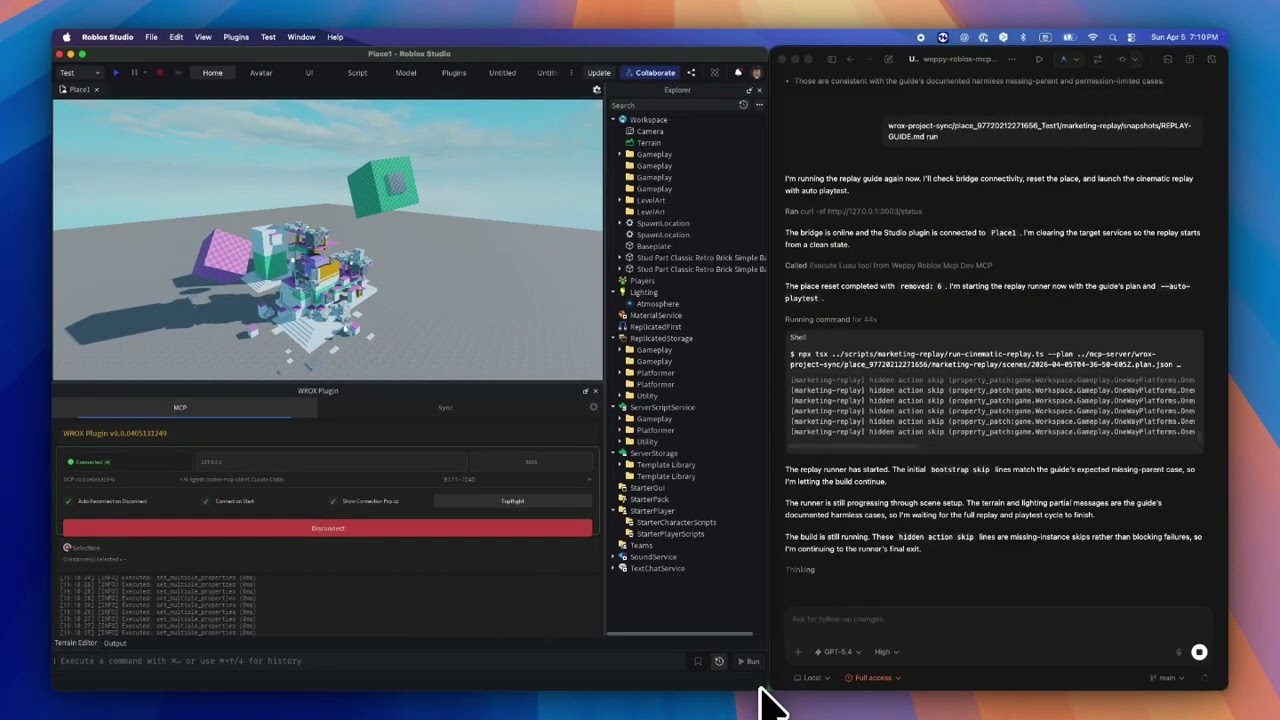
Why WEPPY Roblox AI Toolkit?
AI coding agents like Claude, Codex, and Gemini are powerful, but they cannot see or modify anything inside Roblox Studio. The DataModel, scripts, terrain, and lighting are invisible to external tools. Without a bridge, AI can only generate code snippets that you must paste manually.
The WEPPY MCP Server connects AI agents to the WEPPY Roblox Studio Plugin. AI directly creates and modifies instances, scripts, properties, terrain, and more inside Studio, and the changes are reflected immediately in Studio and the dashboard so you can see exactly what changed.
WEPPY is also built for Roblox experiences that are split across several Places. Open up to five Studio windows for Lobby, Game, Shop, Tutorial, or other Places, then tell the agent which Studio ID to use. One request can update several Places without re-explaining context or copying changes by hand.
For assets, an agent can create or prepare an image, save it to the Asset Library, upload it through Roblox Open Cloud, and apply the returned asset URI to a Place. The result is a shorter path from “make this icon/decal” to “it is visible in Studio.”
No copy-pasting code or asset IDs. AI does the work, you review the results.
Quick Install
Start from the web install page. It shows the recommended one-line script for your platform first.
Recommended One-Line Install
On the install page, copy the one-line script and run it in Terminal or PowerShell.
macOS / Linux
curl -fsSL https://raw.githubusercontent.com/hope1026/weppy-roblox-mcp/main/install.sh | bash
Windows (PowerShell)
irm https://raw.githubusercontent.com/hope1026/weppy-roblox-mcp/main/install.ps1 | iex
Then reopen your AI app and restart Roblox Studio.
Automatic WEPPY MCP Server registration supports Claude Code, Claude Desktop, Cursor, Codex CLI/App, Gemini CLI, and Antigravity / Antigravity IDE / Antigravity CLI.
설치
npx -y @weppy/roblox-mcp@latest