
gethopp/figma-mcp-bridge
Developer tools이 페이지는 AI로 자동 번역되었습니다. 기술적인 세부 사항은 원문을 확인하세요. 원문 보기
gethopp/figma-mcp-bridge는 [[T0]에서 가져온 MCP 서버 후보입니다.
개요
gethopp/figma-mcp-bridge는 [[T0]에서 가져온 MCP 서버 후보입니다.
개요(AI 번역)
- 데모
- 퀵 스타트
- 사용 가능한 도구
- 지역 개발
- 구조
- 작동 원리
[! 참고] Figma 데스크톱 앱(macOS/Windows)이 필요합니다. 브라우저 버전인 Figma는 개발 플러그인 가져오기를 지원하지 않습니다.
Figma-Context-MCP 같은 다른 훌륭한 Figma MCP 서버들도 있지만, 무료 사용자에게는 API 제한이 있다는 점이 문제입니다.
무료 계정의 요청 한도는 한 달에 6건, 네 한 달입니다.
Figma MCP Bridge는 이 문제에 대한 해결책입니다. 이 서버는 플러그인 + MCP 서버로, Figma API 속도 제한을 넘어지지 않고 실시간 Figma 문서 데이터를 AI 도구로 스트리밍하기 때문에 나머지 사용자✊에게는 Figma MCP입니다
여러 Figma 파일을 동시에 연결 지원합니다. 각 파일에서 플러그인을 열면 AI 에이전트가 fileKey로 원하는 파일을 쿼리할 수 있습니다. 단일 파일 설정은 이전과 똑같이 작동하며 변경 사항이 없습니다.
또한 안전한 에이전트 기반 편집을 위한 소수의 선택 가능한 작성 도구 세트도 포함되어 있습니다 — 아래 편집 노트를 참조하세요.
데모
Figma MCP Bridge로 커서에서 UI 빌드 데모를 시청하세요
퀵 스타트
1. MCP 서버를 좋아하는 AI 도구에 추가하세요
AI 도구의 MCP 설정에 다음 항목들을 추가하세요(예: 커서, 윈드서프, 클로드 데스크톱):
이 페이지는 AI로 자동 번역되었습니다. 기술적인 세부 사항은 원문을 확인하세요.
README
원문 README의 일부입니다. 원문 보기.
Figma MCP Bridge

[!NOTE]
Requires the Figma desktop app (macOS/Windows). The browser version of Figma does not support importing development plugins.
While other amazing Figma MCP servers like Figma-Context-MCP exist, one issues is the API limiting for free users.
The limit for free accounts is 6 requests per month, yes per month.
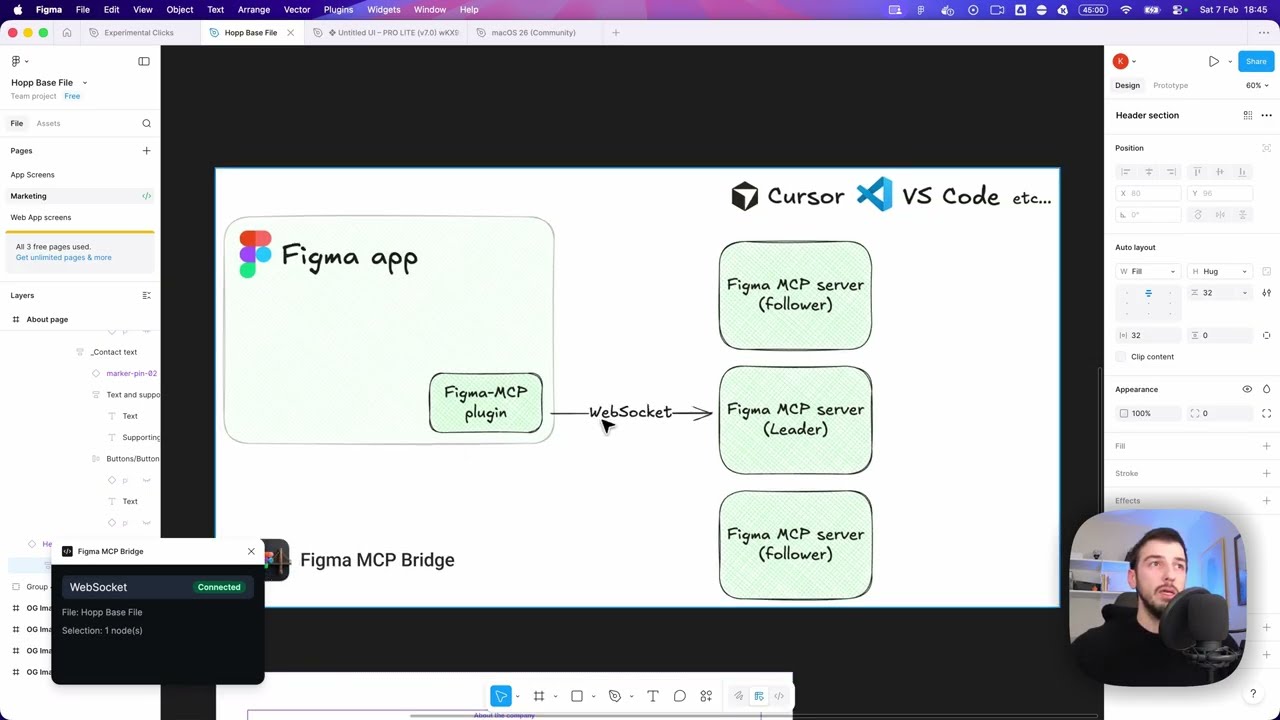
Figma MCP Bridge is a solution to this problem. It is a plugin + MCP server that streams live Figma document data to AI tools without hitting Figma API rate limits, so its Figma MCP for the rest of us ✊
It supports multiple Figma files connected simultaneously; open the plugin in each file and your AI agent can query any of them by fileKey. Single-file setups work exactly as before with no changes required.
It also includes a small, opt-in set of write tools for safe agent-driven edits — see Editing Notes below.
Demo
Watch a demo of building a UI in Cursor with Figma MCP Bridge
Quick Start
1. Add the MCP server to your favourite AI tool
Add the following to your AI tool’s MCP configuration (e.g. Cursor, Windsurf, Claude Desktop):
{
  "figma-bridge": {
    "command": "npx",
    "args": ["-y", "@gethopp/figma-mcp-bridge"]
  }
}
That’s it — no binaries to download or install.
2. Add the Figma plugin
Download the plugin from the latest release page, then in Figma go to Plugins > Development > Import plugin from manifest and select the manifest.json file from the plugin/ folder. The same plugin runs in Figma design files, Dev Mode (read-only), and FigJam boards.
3. Start using it 🎉
Open a Figma file, run the plugin, and start prompting your AI tool. The MCP server will automatically connect to the plugin.
To work across multiple files, just open the plugin in each Figma file. The bridge keeps all connections active and your AI agent can target any of them by fileKey.
If you want to know more about how it works, read the How it works section.
Available Tools
| Tool | Description |
설치
npx -y @gethopp/figma-mcp-bridge