
elliotttate/splicekit
Developer tools이 페이지는 AI로 자동 번역되었습니다. 기술적인 세부 사항은 원문을 확인하세요. 원문 보기
elliotttate/splicekit은 [[T0]에서 가져온 MCP 서버 후보입니다.
개요
elliotttate/splicekit은 [[T0]에서 가져온 MCP 서버 후보입니다.
개요(AI 번역)
Final Cut Pro, 잠금 해제. 명령 팔레트, MCP 서버, 그리고 거의 모든 기능을 할 수 있는 오픈 플러그인 프레임워크.
| 🎹 명령 팔레트 | 🤖 MCP 서버 | 🧩 플러그인 프레임워크 |
|---|---|---|
Cmd+Shift+P 누르고 원하는 것을 입력하세요. Apple Intelligence가 운영합니다. |
어떤 LLM이든 당신의 타임라인을 읽고 편집할 수 있으며, 진행하면서 새로운 도구를 만들 수 있습니다. | 모든 내장 기능은 단지 예시 플러그인일 뿐입니다. 당신(또는 AI)이 더 많은 것을 제공할 수 있습니다. |
편집자? 여기서 시작하세요. 공식 SpliceKit 사이트와 FAQ가 가장 친근한 접근법입니다. 질문, 도움 또는 기능 요청이 있으신가요? FCP 카페 디스코드에서 SpliceKit 채널에 참여하세요. 버그 보고: GitHub 문제를 열어보세요.
네가 어떻게 할지 정말 기대돼. 🥳
세 기둥
🎹 1. 커맨드 팔레트
한 번의 키 입력으로.
패치된 FCP 내에서 Cmd+Shift+P를 누르세요. 내장 편집 동작 100+를 퍼지로 검색하세요 — 블레이드, 트림, 색상, 속도, 마커, 효과, 전환, 내보내기 — 또는 평범한 영어로 입력하고 Apple Intelligence(기기 내 비공개)가 무슨 뜻인지 알아내게 하세요.
말해 봐…
- “5초마다 마커 추가”
- “이 클립을 절반 속도로 느리게 해라”
- “장면 전환마다 칼날”
- “모든 침묵을 제거해라”
이 페이지는 AI로 자동 번역되었습니다. 기술적인 세부 사항은 원문을 확인하세요.
README
원문 README의 일부입니다. 원문 보기.
SpliceKit




Final Cut Pro, unlocked. A Command Palette, MCP server, and an open plugin framework to do almost anything.
SpliceKit v4
This is the official and original repository for SpliceKit.
It is still maintained - however progress is slow, as we’re busy with other jobs (hence all the open pull requests).
However, SpliceKit v4 is a fork, that’s now available on FCP Cafe that is more actively maintained and updated.
| 🎹 Command Palette | 🤖 MCP Server | 🧩 Plugin Framework |
|---|---|---|
Hit Cmd+Shift+P and type what you want. Apple Intelligence runs it. |
Any LLM can read and edit your timeline — and build new tools as it goes. | Every built-in feature is just an example plugin. You (or an AI) can ship more. |
Editor? Start here. The official SpliceKit site and the FAQ are the friendliest way in. Questions, help, or feature requests? Join the SpliceKit channels on the FCP Cafe Discord. Bug reports: open a GitHub issue.
Can’t wait to see what you do with it. 🥳
The Three Pillars
🎹 1. The Command Palette
One keystroke to anything.
Hit Cmd+Shift+P inside the patched FCP. Fuzzy-search 100+ built-in editing actions — blade, trim, color, speed, markers, effects, transitions, export — or type plain English and let Apple Intelligence (on-device, private) figure out what you meant.
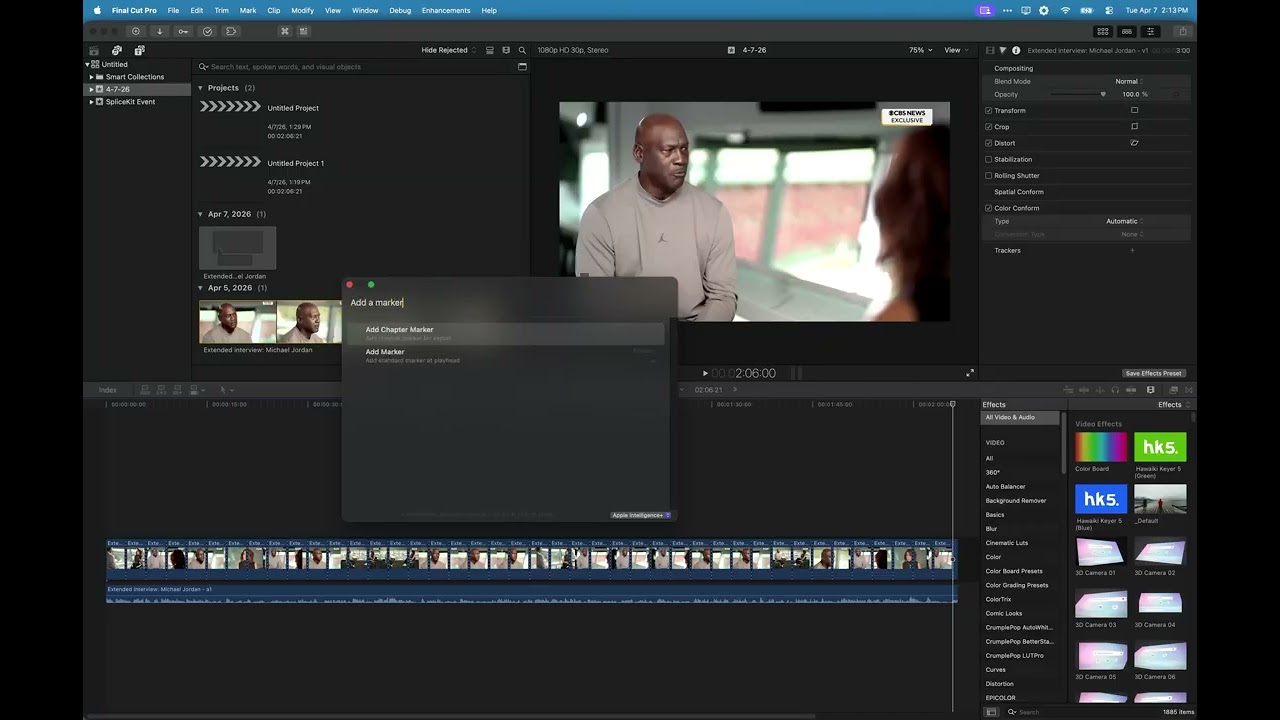
Try saying…
- “add markers every 5 seconds”
- “slow this clip to half speed”
- “blade at every scene change”
- “remove all the silences”
- “add a cross dissolve”
No more menu hunting. No more memorizing shortcuts. No cloud.
🤖 2. The MCP Server
Claude (or any other LLM) can drive your editor — and teach it new tricks.
SpliceKit ships with an MCP server that exposes ~200 tools covering every major FCP subsystem. Point Claude Code, Claude Desktop, or any MCP-compatible AI client at it and you can say things like:
- “cut this 40-minute interview down to its best moments”
- “remove the silences from this podcast, add captions, and export”
- “assemble a rough cut from these clips, synced to the beat of this song”
설치
This server does not publish a one-line install command.
Open the repository installation guide MCP 초보자라면? mcpskill.org 가이드부터 시작하세요 →설정
{
  "mcpServers": {
    "splicekit": {
      "command": "/Users/yourname/.venvs/splicekit-mcp/bin/python",
      "args": ["/absolute/path/to/SpliceKit/mcp/server.py"]
    }
  }
}